EasyManua.ls Logo

Fisher MC-620 - Page 2

Fisher MC-620
20 pages
Print Icon
To Next Page IconTo Next Page
To Previous Page IconTo Previous Page
Loading...
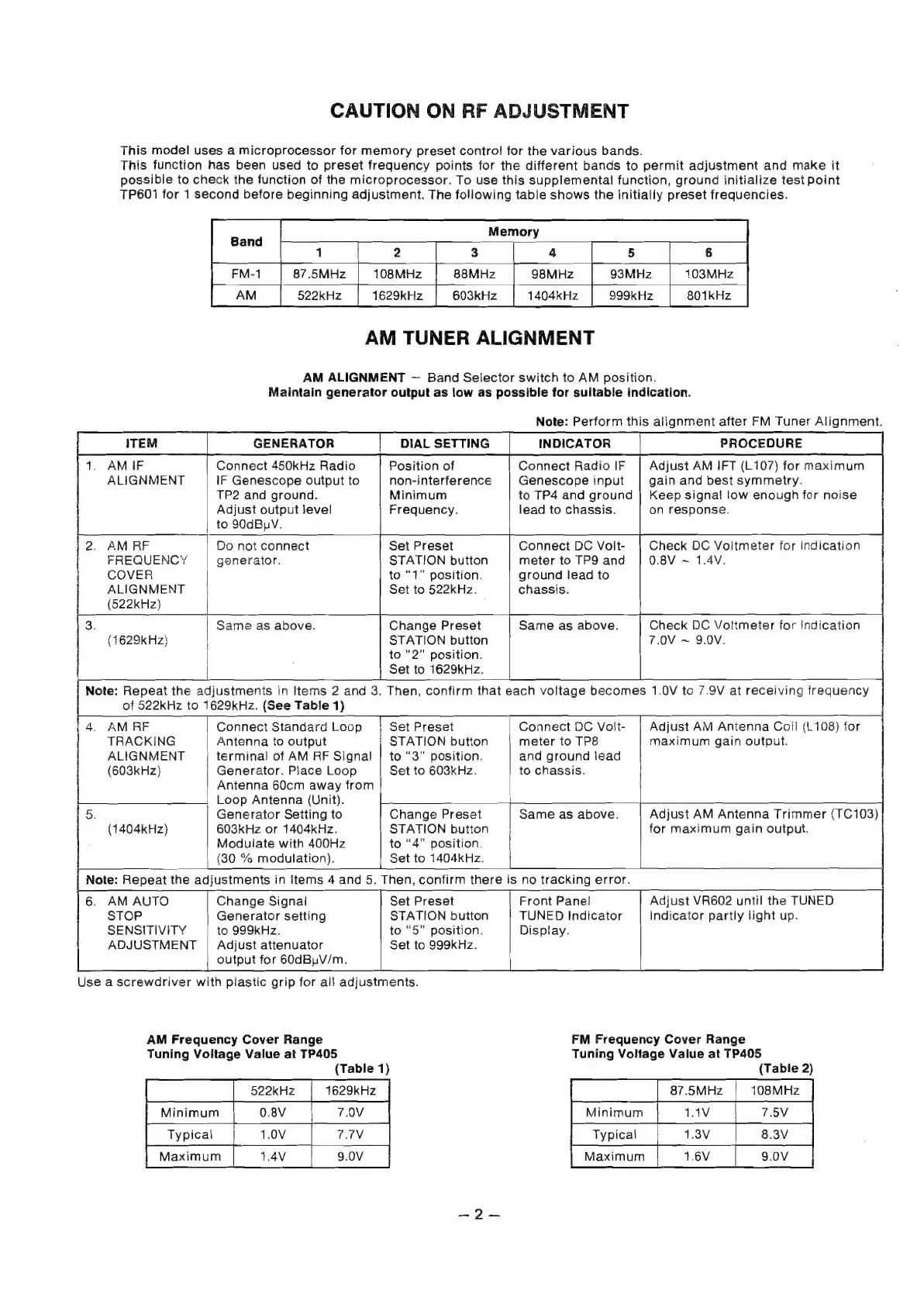
CAUTION
ON
RF
ADJUSTMENT
This
model
uses
a
microprocessor
for
memory
preset
contro!
for
the
various
bands.
This
function
has
been
used
to
preset
frequency
points
for
the
different
bands
to
permit
adjustment
and
make
it
possible
to
check
the
function
of
the
microprocessor.
To
use
this
supplemental
function,
ground
initialize
test
point
TP601
for
1
second
before
beginning
adjustment.
The
following
table
shows
the
initially
preset
frequencies.
2
5
|
6
108MHz
98MHz
1629kHz
1404kHz
87.5MHz
522kHz
AM
TUNER
ALIGNMENT
AM
ALIGNMENT
Band
Selector
switch
to
AM
position.
Maintain
generator
output
as
low
as
possible
for
suitable
indication.
Note:
Perform
this
alignment
after
FM
Tuner
Alignment.
ITEM
GENERATOR
DIAL
SETTING
INDICATOR
1.
AMIF
Connect
450kHz
Radio
Position
of
Connect
Radio
IF
Adjust
AM
IFT
(L107)
for
maximum
ALIGNMENT
IF
Genescope
output
to
non-interference
Genescope
input
gain
and
best
symmetry.
TP2
and
ground.
Minimum
to
TP4
and
ground
|
Keep
signal!
low
enough
for
noise
Adjust
output
level
Frequency.
lead
to
chassis.
on
response.
to
90dBuV.
2.
AM
RF Do
not
connect
Set
Preset
Connect
DC
Volt-
|
Check
DC
Voitmeter
for
Indication
FREQUENCY
generaior.
STATION
button
meter
to
TP9
and
0.8V
~
1.4V.
COVER
H
to
“1”
position.
ground
lead
to
ALIGNMENT
Set
to
522kHz.
chassis.
(522kHz)
Check
DC
Vo!tmeter
for
indication
7.0V
~
9.0V.
Same
as
above.
Change
Preset
Same
as
above.
STATION
button
to
“2”
position.
Set
to
1629kHz.
Then,
confirm
that
each
voltage
becomes
1.0V
tc
7.9V
at
receiving
frequency
(1629kHz}
Note:
Repeat
the
adjustments
in
Items
2
and
3.
of
522kHz
to
1629kHz.
(See
Table
1)
i
4.
AM
RF
Connecti
Standard
Loop
T
Set
Preset
Connect
DC
Volt-
Adjust
AM
Antenna
Coil
(L108)
for
TRACKING
Antenna
to
output
STATION
button
meter
to
TP8
maximum
gain
output.
ALIGNMENT
terminal
of
AM
RF
Signal
|
to
“3”
position.
and
ground
lead
(603kHz}
Generator.
Place
Loop
Set
to
603kHz.
to
chassis.
Antenna
60cm
away
from
Loop
Antenna
(Unit).
5.
Generator
Setting
to
(1404kHz)
603kHz
or
1404kHz.
Modulate
with
400Hz
to
“4”
position.
|
(30
%
modulation).
Ip
Set
to
1404kHz.
Note:
Repeat
the
adjustments
in
Items
4
and
5.
Then,
confirm
there
is
no
tracking
error.
Change
Preset
Same
as
above.
STATION
button
Adjust
AM
Antenna
Trimmer
(TC103)
for
maximum
gain
output.
6.
AM
AUTO
Change
Signal
Set
Preset
Front
Panel
Adjust
VR602
until
the
TUNED
STOP
Generator
setting
STATION
button
TUNED
Indicator
Indicator
partly
light
up.
SENSITIVITY
to
999kHz.
to
“5”
position.
Display.
ADJUSTMENT
|
Adjust
attenuator
Set
to
999kHz.
output
for
60dBuV/m.
Use
a
screwdriver
with
plastic
grip
for
all
adjustments.
AM
Frequency
Cover
Range
Tuning
Voitage
Value
at
TP405
(Table
1)
|
|
522kKHz
|
1629kKHz
Typical
1.0V
7.7NV
FM
Frequency
Cover
Range
Tuning
Voltage
Value
at
TP405
(Table
2)
ete
fs
87.5MHz
|
108MHz
[Riaximum
|
rev_[
soy

Related product manuals