EasyManua.ls Logo

Fisher MC-620 - Page 3

Fisher MC-620
20 pages
Print Icon
To Next Page IconTo Next Page
To Previous Page IconTo Previous Page
Loading...
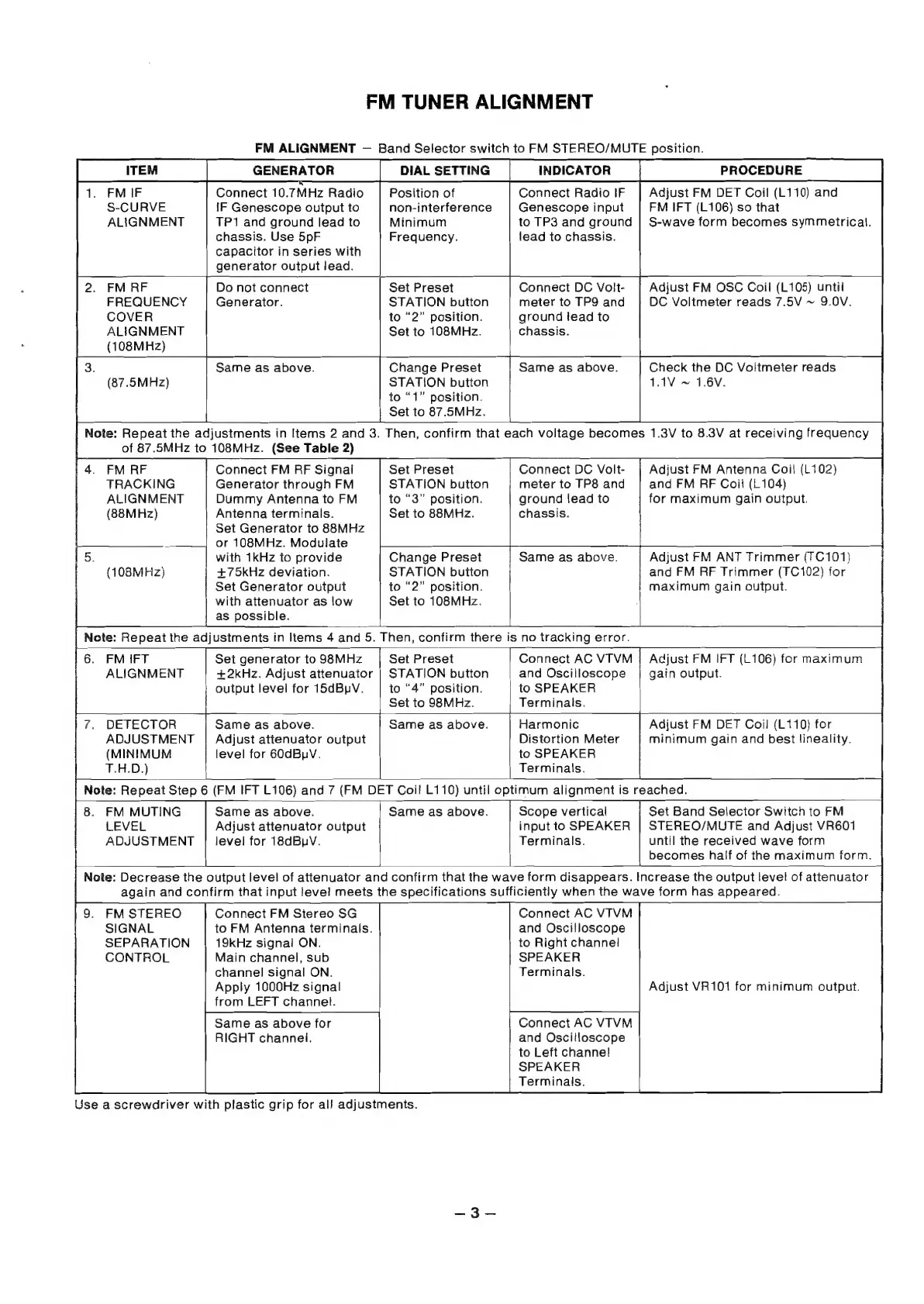
FM
TUNER
ALIGNMENT
FM
ALIGNMENT
Band
Selector
switch
to
FM
STEREO/MUTE
position.
ITEM
GENERATOR
DIAL
SETTING
INDICATOR
PROCEDURE
1.
FMIF
Connect
10.7MHz
Radio
Position
of
Connect
Radio
IF
|
Adjust
FM
DET
Coil
(L110)
and
S-CURVE
iF
Genescope
output
to
non-interference
Genescope
input
FM
IFT
(L106)
so
that
ALIGNMENT
TP1
and
ground
lead
to
Minimum
to
TP3
and
ground
|
S-wave
form
becomes
symmetrical.
chassis.
Use
5pF
Frequency.
lead
to
chassis.
capacitor
in
series
with
generator
output
lead.
2.
FM
RF
Do
not
connect
Set
Preset
Connect
DC
Volt-
Adjust
FM
OSC
Coil
(L105)
until
FREQUENCY
Generator.
STATION
button
meter
to
TP9
and
DC
Voltmeter
reads
7.5V
~
9.0V.
COVER
to
“2”
position.
ground
lead
to
ALIGNMENT
Set
to
108MHz.
chassis.
(108MHz)
3.
Same
as
above.
Change
Preset
1
Same
as
above.
Check
the
DC
Voltmeter
reads
(87.5MHz)
STATION
button
1.1V
~
1.6V.
to
“1”
position.
Set
to
87.5MHz.
3
Note:
Repeat
the
adjustments
in
Items
2
and
3.
Then,
confirm
that
each
voltage
becomes
1.3V
to
8.3V
at
receiving
frequency
of
87.5MHz
to
108MHz.
(See
Table
2)
i
4.
FM
RF
Connect
FM
PF
Signal
Set
Preset
Connect
DC
Volt-
Adjust
FM
Antenna
Coil
(L102)
TRACKING
Generator
through
FM
STATION
button
meter
to
TP8
and
and
FM
RF
Coil
(L104)
ALIGNMENT
Dummy
Antenna
to
FM
to
“3”
position.
ground
lead
to
for
maximum
gain
output.
(88MHz)
Antenna
terminals.
Set
to
88MHz.
chassis.
Set
Generator
to
88MHz
#
or
108MHz.
Modulate
5.
with
1kHz
to
provide
Change
Preset
Same
as
above.
Adjust
FM
ANT
Trimmer
(TC101)
(108MHz)
+75kHz
deviation.
STATION
button
and
FM
PF
Trimmer
(TC102)
for
Set
Generator
output
to
“2”
position.
maximum
gain
output.
with
attenuator
as
low
Set
to
108MHz.
as
possible.
|
Note:
Repeat
the
adjustments
in
Items
4
and
5.
Then,
confirm
there
is
no
tracking
error.
6.
FM
IFT
Set
generator
to
98MHz
Set
Preset
Connect
AC
VTVM
;
Adjust
FM
IFT
(L106)
for
maximum
ALIGNMENT
+2kHz.
Adjust
attenuator
|
STATION
button
and
Oscilloscope
|
gain
output.
|
output
level
for
15dBpV.
to
“4”
position.
to
SPEAKER
Set
to
98MHz.
Terminals.
+—
7
1
:
7.
DETECTOR
Same
as
above.
Same
as
above.
Harmonic
Adjust
FM
DET
Coil
(L110)
for
ADJUSTMENT
|
Adjust
attenuator
output
Distortion
Meter
minimum
gain
and
best
lineality.
(MINIMUM
level
for
60dBuV.
to
SPEAKER
T.H.D.)
|
Terminals.
Note:
Repeat
Step
6
(FM
IFT
L106)
and
7
(FM
DET
Coil
L110)
until
optimum
alignment
is
reached.
8.
FM
MUTING
LEVEL
ADJUSTMENT
Same
as
above.
Same
as
above.
Scope
vertical
Set
Band
Selector
Switch
to
FM
Adjust
attenuator
output
input
to
SPEAKER
|
STEREO/MUTE
and
Adjust
VR601
level
for
18dBuV.
Terminals.
until
the
received
wave
form
becomes
half
of
the
maximum
form.
Note:
Decrease
the
output
level
of
attenuator
and
confirm
that
the
wave
form
disappears.
Increase
the
output
level
of
attenuator
again
and
confirm
that
input
fevel
meets
the
specifications
sufficiently
when
the
wave
form
has
appeared.
9.
FM
STEREO
Connect
FM
Stereo
SG
Connect
AC
VTVM
SIGNAL
to
FM
Antenna
terminals.
and
Oscilloscope
SEPARATION
19kHz
signal
ON.
to
Right
channe!
CONTROL
Main
channel,
sub
SPEAKER
channel
signal
ON.
Terminals.
Apply
1000Hz
signal
from
LEFT
channel.
Connect
AC
VTVM
and
Oscilloscope
to
Left
channel!
SPEAKER
Terminals.
Adjust
VR101
for
minimum
output.
Same
as
above
for
RIGHT
channei.
Use
a
screwdriver
with
plastic
grip
for
al!
adjustments.

Related product manuals