16
Monitor Feature
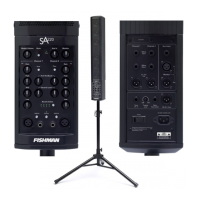
The monitor feature on the SA220 allows two performers, each with a SA220,
to “cross-feed” their EQ’d and mixed outputs to each other. This allows each
player to turn up the other player’s mix as heard through through their own
SA220.
Connect two SA220s as shown, then turn up the Monitor knob to mix in the
other performer’s SA220.
Mix D.I. (Post)
Mute
Foot Switch
Tweeter
Level
0dB-6dB
Tuner
(Ch. 1)
In
Out
Aux Input
Effects
Send
D.I. Out
(Pre)
Monitor
Channel 1 Channel 2
Effects
Return
Mix D.I. (Post)
Mute
Foot Switch
Tweeter
Level
0dB-6dB
Tuner
(Ch. 1)
In
Out
Aux Input
Effects
Send
D.I. Out
(Pre)
Monitor
Channel 1 Channel 2
Effects
Return
In
In
OutOut


 To Next Page