17
For more detailed instructions please visit www.fishman.com/tripleplay
guitar
mix
synth
0
1
2
3
4
5
6
7
8
9
1
0
TriplePlay Hardware Mode Operation
Working in Hardware Mode
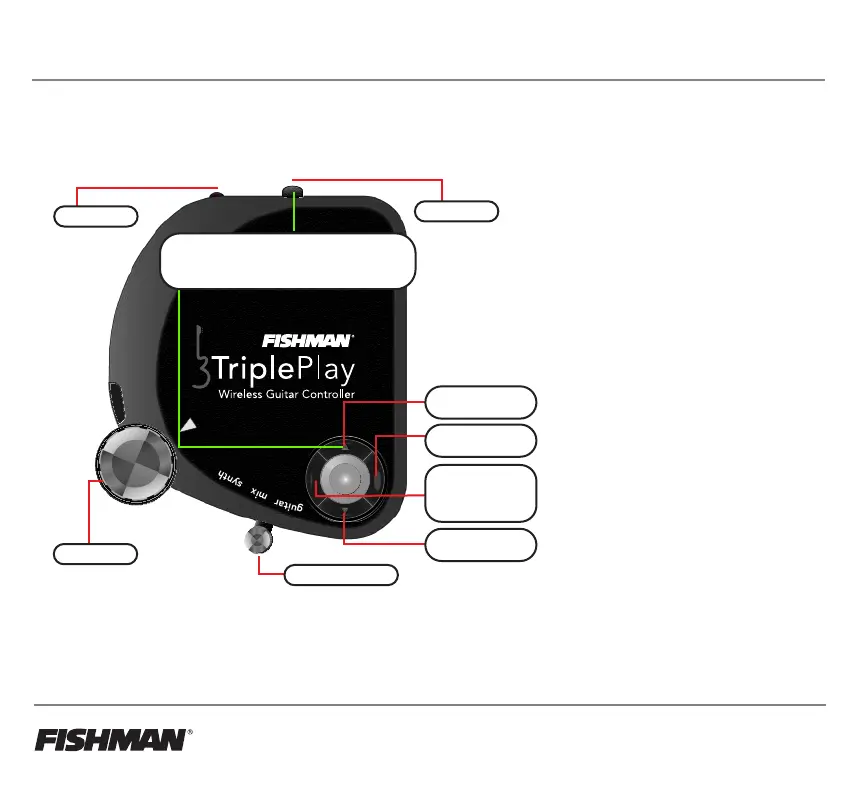
• Up/Down Buttons - send MIDI Program
changes. Bank and Program numbers are
custom programmable in the TriplePlay
software.
• Enter Button - Toggles between
Mono/Poly Mode.
Mono Mode sends each string on a
separate MIDI channel (MIDI Ch.1-6).
Poly Mode sends all strings on MIDI
channel 1.
• Back Button - Toggles between different
pitch bend modes.
Auto - bend or step between notes
automatically.
Smooth - always glides between notes;
can be difficult to stay in tune if intonation
is not accurate.
Stepped - glides between notes in
semitones without retriggering notes.
Trigger - no bending; retrigger’s notes in
semitones.
• Volume Knob - sends MIDI
Volume CC 007.
• Guitar/Synth Switch - only works with
software or FC-1 Pedal.
Up Button
+ Program Change
Enter Button
Mono/Poly Mode
Down Button
- Program Change
Back Button
Pitchbend - Auto,
Smooth, Stepped,
Trigger
On/Off Switch
Pairing Button
Volume Knob
Guitar/Synth Switch
Hardware Mode Controls
Hold ‘Up Button’ and switch controller
‘On’ to start in hardware mode



 To Next Page