Note that the gray shading indicates a month, not a cycle.
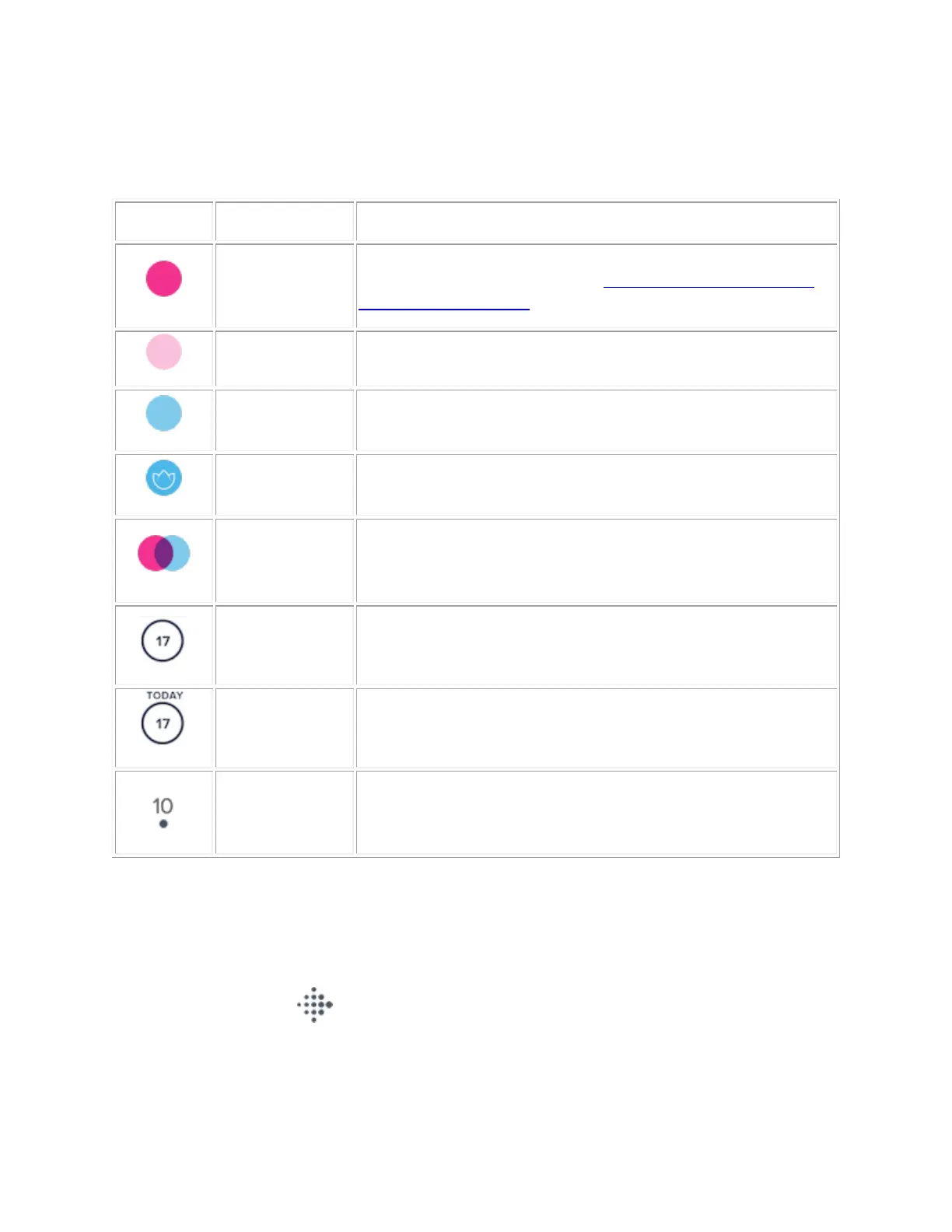
Refer to the table for more information about the calendar icons and colors:
Solid pink indicates a confirmed period. If you don’t have your
period, you can edit the dates. See How do I add, edit, or delete a
period in the Fitbit app?
Light pink indicates a predicted period.
Solid blue indicates an estimated fertile window.
A flower inside a fertile window indicates your estimated ovulation
day.
Confirmed period
& estimated
fertile window
Solid pink and blue overlapping to form purple means your
predicted period and estimated fertile window overlap.
A circle indicates the selected date.
The Today ring indicates the current date.
A dot underneath a date on the calendar indicates you logged
female health details for that day.
How do I change the day of the week my
calendar starts to Monday?
1. Tap the Today tab , and tap your profile picture.
2. Tap Advanced Settings. You might have to scroll down to find this option.
3. Tap Start Week On and choose which day you want your weeks to begin. Your female health
calendar updates automatically.



 To Next Page