Need help?
Do you have a question about the FitTrack Beebo and is the answer not in the manual?
Avoid using the scale with pacemakers or other internal medical devices.
Pregnant women and users of health devices should consult physicians before use.
Do not use the scale on slippery surfaces or when the body is wet.
Avoid using the scale immediately after strenuous physical activity for accurate results.
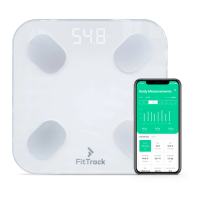
Details on the scale's screen, electrodes, feet, unit display, and batteries.
Guidance on using BIA technology for accurate and consistent body composition measurements.
List of conditions and activities to avoid for optimal scale performance and user safety.
Instructions for obtaining the most precise weight and body composition readings.
Instructions for powering the FitTrack Beebo scale on and its automatic shut-off feature.
Information on enabling Pregnancy Mode in the app and its impact on measurement functions.
Steps to locate and download the FitTrack Pro application from the App Store or Google Play.
A step-by-step guide to connecting your FitTrack Beebo scale to a mobile device via Bluetooth.
Instructions for performing body composition measurements and syncing results with the FitTrack Pro app.
How to select preferred measurement units (kg, lb, st) within the FitTrack Pro application.
Method for changing measurement units directly on the scale using a small button under the battery cover.
Navigating to the 'History' section to view and analyze past measurements and progress.
Steps for sharing your body composition reports and charts via social media platforms.
Guide on how to use the 'Infant Mode' to accurately measure the weight of a baby.
Explanation and solutions for 'Err1' messages, including body fat percentage limits and debris.
 General
| Connectivity | Bluetooth |
|---|---|
| User Profiles | Unlimited |
| Display | LCD |
| Compatibility | iOS and Android |
| Battery | AAA |
| Weight Units | kg, lb |
| Measurements | Weight, Body Fat, Muscle Mass, Bone Mass |
| Power | 4 AAA batteries |
| Weight Capacity | 396 lbs (180 kg) |

 To Next Page