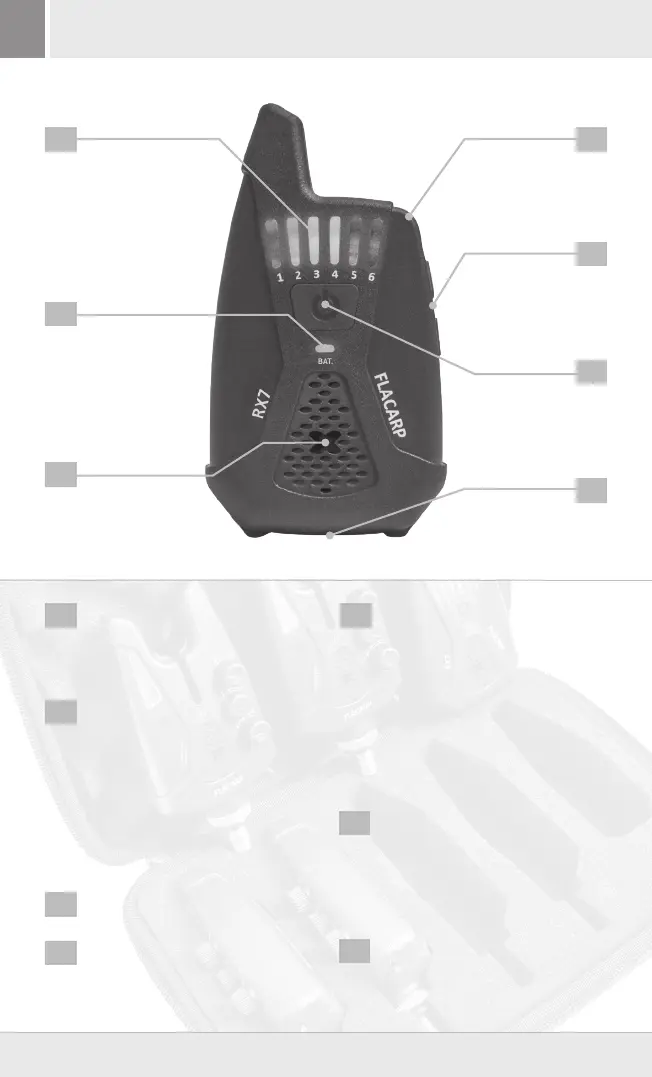
INDICATING CHANNEL RGB LED
LED indication of particular channels
(up to 12 devices can be stored). The
LED colour is identical with the one
set-up on the bite alarm.
MULTIFUNCTIONAL LED
It displays:
BATTERY STATUS
■ GREEN = battery charged.
■ RED = low battery.
ALARM
■ Flashes alternately in the case
of an alarm from external
sensors.
SOUND
For sound indication of a bite.
LOOP
For a neck string to be drawn through.
MULTIFUNCTIONAL PUSH
BUTTONS +/-
■ Volume adjustment (PLUS and
MINUS push buttons).
■ Switching-on of vibrations (hold
the PLUS push button for 1
second).
■ Switching-off of vibrations (hold
the MINUS push button for 1
second).
■ Enter the pairing mode (see
below).
ON/OFF button
■ To switch the receiver on or off,
hold for approx. 1 second.
■ Short multi-press can be
controlled remotely up to 4
FLACARP lights (see Description of
functions).
BATTERY REPLACEMENT
Slide the cover on the back receiver
side.
Batteries: 2 pcs LR03 (AAA). Use only quality alkaline or lithium batteries (2x 1.5V).
1
1 5
2
6
3
7
4
4
5
2
6
7
3
3
+420 731 115 151 | flacarp@tfe.cz | www.flacarp.com
RECEIVER - CONTROL ELEMENTS


 To Next Page
 Loading...