15
English
RECOMMENDATIONS
The electrical installaon of the part, the
installaon of the device and its use must
comply with the regulaons in force in your
country.
Do not use the device near ammable
objects and products, and, in general,
respect the minimum distance of 50 cm
between the device and other objects
(walls, curtains, mists, etc.).
The appliance must be placed so that the
electrical plug is accessible.
Do not pull on the power cord or the
appliance, even when you want to
disconnect the plug from the socket.
Never use the appliance leaning or lying on
its side.
This product is intended for domesc
use only. In the event of professional,
inappropriate use or use that does
not comply with the instrucons, the
manufacturer declines all responsibility and
the guarantee will be void.
Fully unwind the cable before each use.
Do not use an extension cord not adapted
to the power of the appliance.
Do not switch on the appliance in a dusty
place or where there is a risk of re.
DESCRIPTION
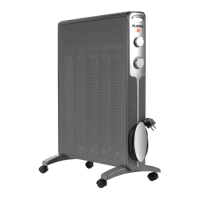
1. grate
2. Power & Mode rotary knob
3. Thermostat adjustment knob
4. Handle
5. Feet
OPERATION
The device can be operated using the
manual controls located on its side.
ATTENTION – The appliance must never be
put into operaon without the feet being
properly ed.
Feet assembly
Carefully remove the convector from the
box and bag.
The feet must be placed at the ends of the
lower part of the device.
Match the holes in the feet with the axles
located in the lower area.
Then screw them in (with the screws
provided).
Use
The appliance must be placed on a solid,
at and stable surface.
Make sure the Power & Mode rotary knob
is in the o posion (0) before plugging the
appliance into the wall outlet.
Plug the power plug into an electrical
outlet. Make sure the plug is securely in
the socket. If not properly seated, it can
overheat and damage the outlet. The cord
and plug assembly may become hot during
use. It is a normal situaon and does not
interfere with the proper funconing of the
device.
Set the thermostat adjustment knob to the
MAX posion.
Turn the Power & Mode rotary knob
to the desired temperature mode. Low
temperature (max. 1000W) is represented
by ( I ) and high temperature (max. 2000W)
by ( II ).


 To Next Page