19
LFO - PHASE (Phase shift)
The start point of the waveform can be moved forward or backward in 15 degree incre-
ments. This allows, for example, counterclockwise waveforms to be realized at the same
rate (180 degree shift).
The PHASE menu is the submenu of the WAVE menu.
Press and hold the WAVE button continuously. After approx. 1 second, the currently set
phase of this LFO will be shown in the display. Change the value using the dial while hol-
ding down the WAVE button.
Value range: - 180° ... + 180° (in steps of 15°)
0 no phase shift
180 shifted by half
A NOTICE:
The LFOs are set to the set phase during a reset. If LFO Sync is turned on, the LFO is
automatically reset to the clock according to the rate. Free running LFOs are only reset
when starting and changing the pattern.
The change in phase only takes effect after a reset. A change in the rate in sync occurs
at the next 16th and the LFO is resynchronized at the next bar.
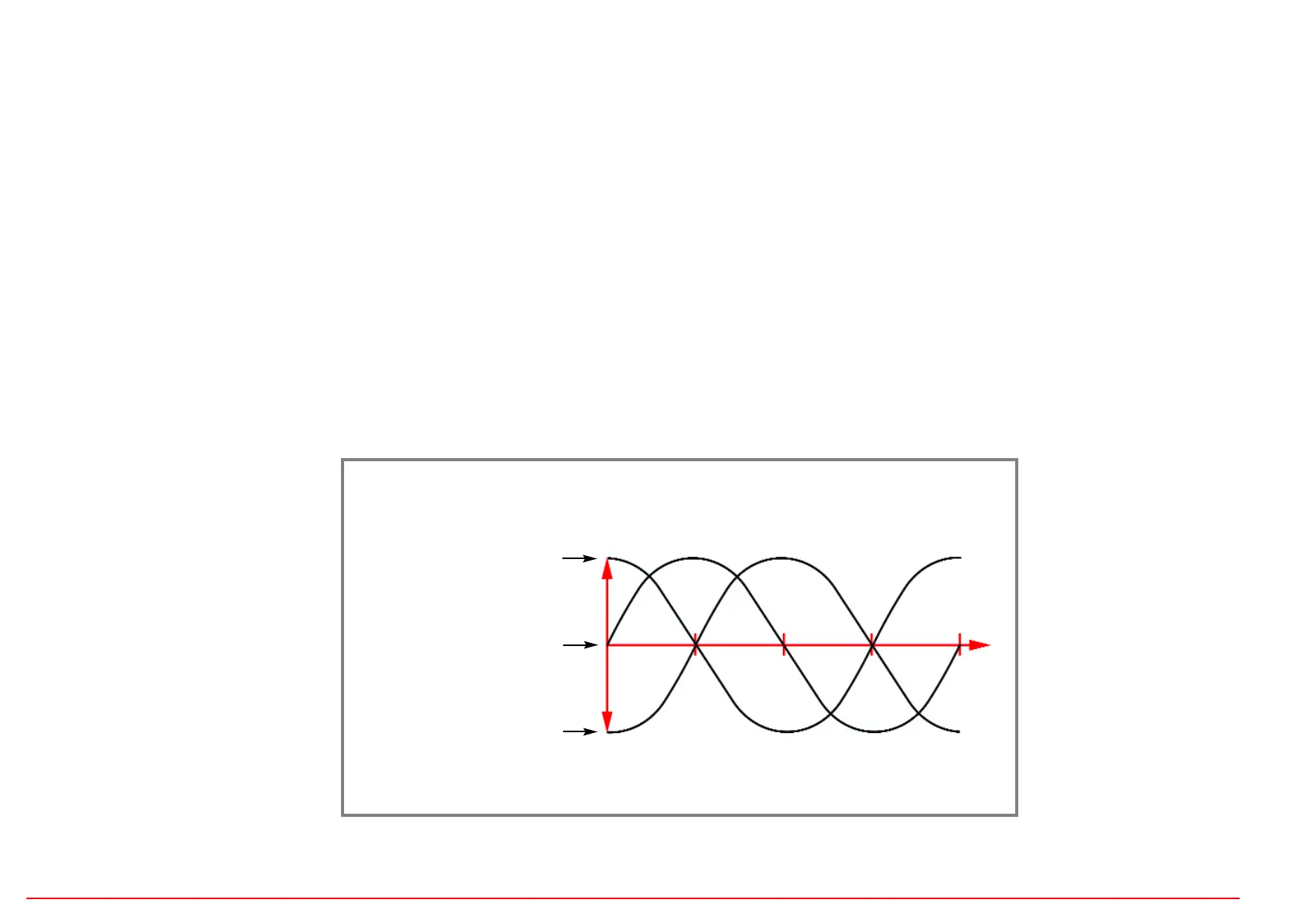
Example three SINE waves
Sine zero degrees
Sine shifted +90°
Sine shifted -90°
0° 90° 180°


 To Next Page
 Loading...