1. Reverb
●
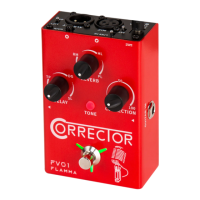
FV01 has three different classic reverb effects. The volume level of each reverb effect can be
adjusted by rotating the REVERB knob.
(Reverb type: RM for Room reverb, HL for Hall reverb, and PL for Plate reverb.)
The Hidden Mode can be accessed by press and hold the footswitch. Reverb of GUITAR can be
adjusted in the hidden menu.
2. Delay
3. Vocal TONE mode
4. Footswitch
Press to turn on Vocal TONE Mode Correction, Reverb, Delay effect. The footswitch LED will
stay green. Press again to turn off the Correction. The footswitch LED will turn red.
If you want to turn off the Vocal TONE Mode Correction, Delay, or Reverb effects, please press
the footswitch twice quickly when effects are on. The footswitch will turn off to indicate all the
effects are off.
The FV01 has three different delay effects. The volume level of the selected delay can be
adjusted by rotating the DELAY knob. The Hidden Mode can be accessed by press and hold the
footswitch. In the Hidden Mode, The delay time can be controlled using the tap tempo
function. Tap several times at your desired tempo to set the correct timing of the effect. the
Feedback of delay can be adjusted by the CORRECTION knob.
(Delay Type: TP for tape delay, DG for digital delay, and SL for slap delay.)
Press TONE button to switch between three different vocal modes. The color of the LED button
indicates the currently selected mode.
Mode: LED off indicates normal mode, Red LED for WARM mode, and Blue LED for BRIGHT
mode.
●
●
●
●
●
05
www.flammainnovation.com Shenzhen Flamma Innovation Co., Ltd
●


 To Next Page