DE
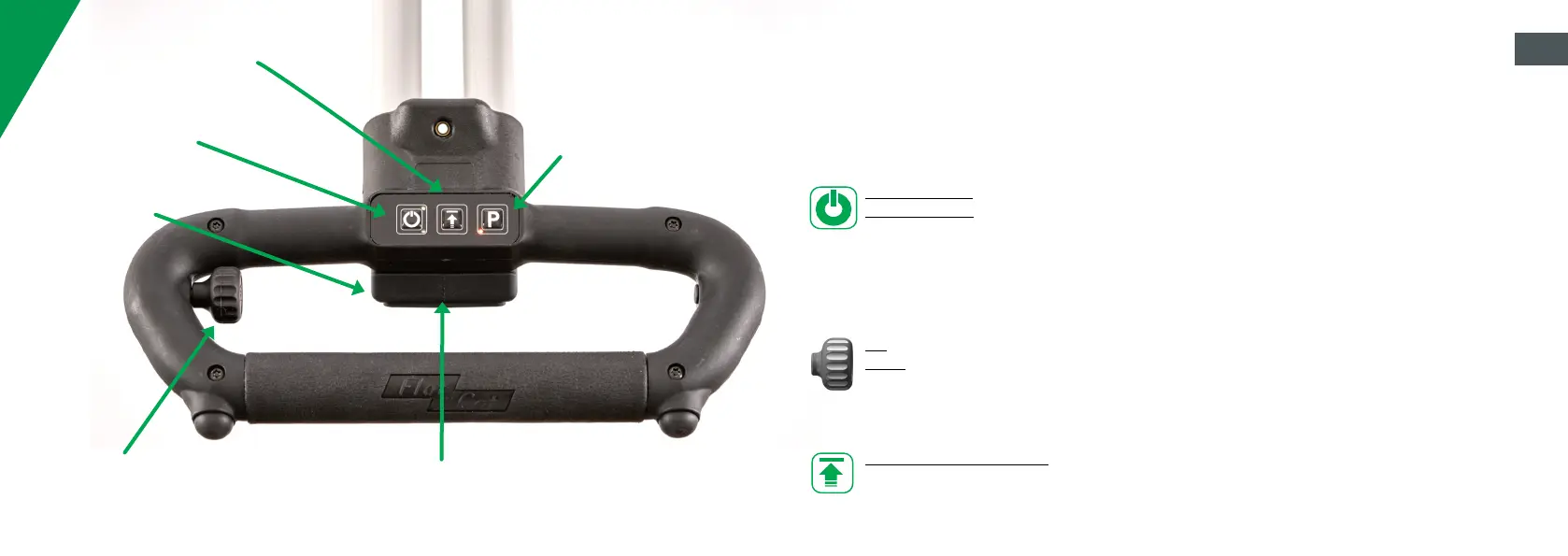
STANDBY-BUTTON
Turn on and Turn off
USB- PORT
Power supply for cell phone
or GPS devices
CONTROLLER
Stepless adjustment of the
speed
PLACE OF THE DISTANCE SENSOR
Working range between 15 and 50 cm
Beam angle of 2°
PARKING ASSISTENT (P)
The parking assistant is
activated automatically after
stopping (standby).
Release the parking assistant:
Tap the P key.
Activate the parking assistant
manually: Tap the P key again
AHEAD- BUTTON
Activation or deactivation of
the distance sensor or the
distance key
The Ahead model has a three-part control option.
1. distance sensor
2. controller
3. stop and go remote control
You can switch between these controls at anytime.
SWITCH TROLLEY ON AND OFF
Turn Trolley on: Press and hold the standby button for approx. 2 seconds (LED lights up).
Turn trolley off: Press and hold the standby key for approx. 3 seconds (LED goes out).
When stopped or switched off, the trolley is in automatic freewheel mode.
As soon as you turn the trolley on, it is in the so-called controller mode. Here, the trolley is operated
via the stepless speed controller.
OPERATION VIA CONTROLLER
Go: Tap Standby-Button (1x) and set potentiometer to desired speed
Stopp: Press the Standby-Button again (1x). When starting again, the speed already set is retained.
The speed can be changed at the potentiometer at any time. Simply turn and start.
Activation forward motion: Press the Ahead- Button briefly (1x). This activates the advance. The
trolley travels 18 m at a preset speed. The trolley then stops automatically and the parking assistant
is activated.
EN


 To Next Page
 Loading...