FW1173 User’s Manual
M4064-00 11 Seyeon Tech Co., Ltd
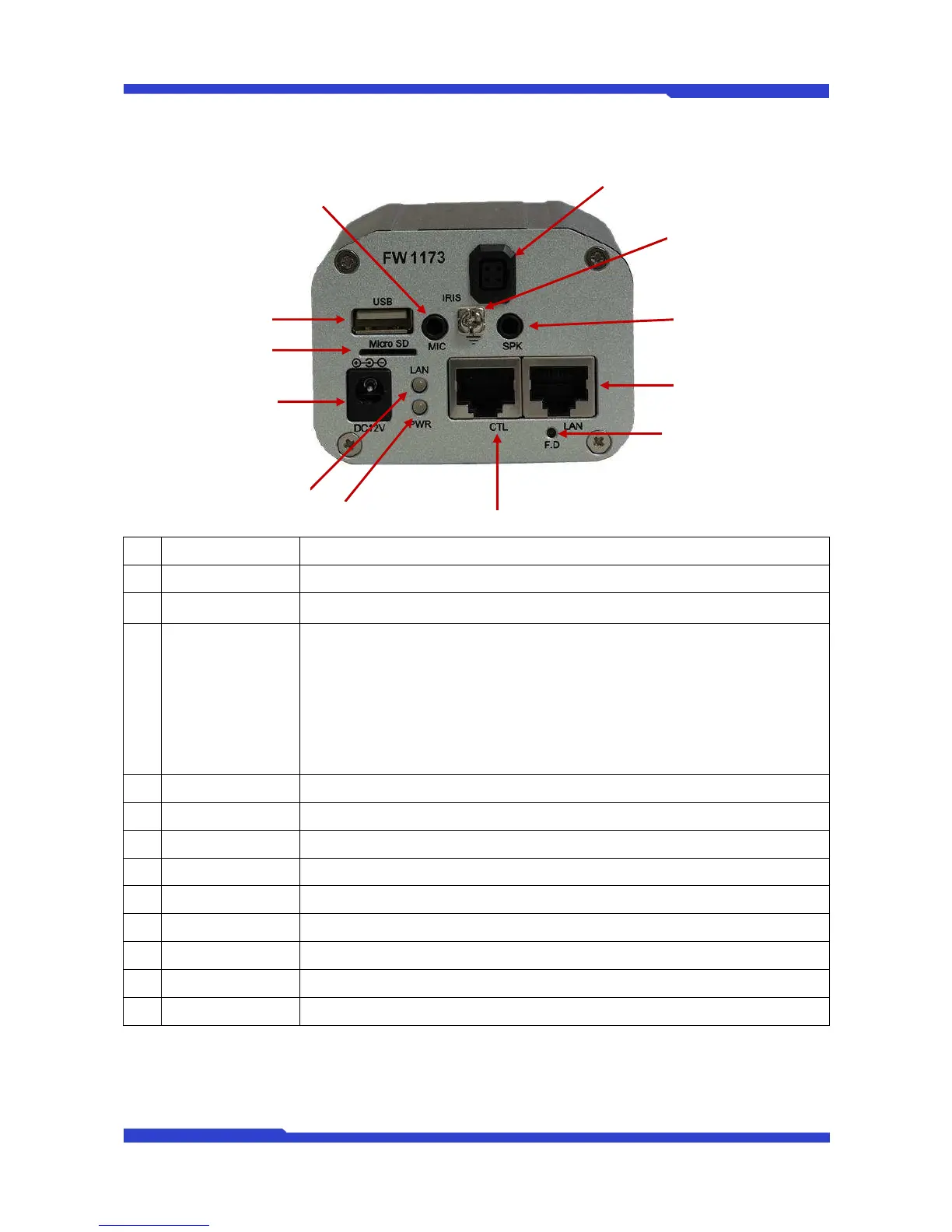
2.1. Rear View
Picture 3 : FW1173Rear View
Name Description
A
Power Jack 12V DC Power Input port
B
LAN (Tx/Rx) LED
(RED/GREEN)
RED – LAN TX/RX (Blinks when there is data activities)
GREEN – LAN LINK (Turn on when physical LAN connection is made)
C
POWER LED
(RED/GREEN)
RED – Power (Turns on when power is provided)
GREEN – Status (blinks when IP setup is done or during UPNP setup process*)
Green – Status (Display when IP setup is completed, and during uPnP Setup)
- Blink 1 sec: Ready to Communicate with Gateway with assigned IP address
- Blink 1/4 sec: The Internet is ready for use (DNS setup has been finished)
- Blink 1/16 sec: Port-mapping completed (ready to communicate from outside)
- Steady On: Test done for IPCCTVDNS server accessing FW-1173-MS.
Communication test with IPCCTVDNS server is attemped only when IP address is
assigned. If IPCCTVDNS setup is Disabled, LED is kept On in Red.
D
CTL Connector CTL Port (RS-485, RS-232, DI, DO)
E
Factory Default Button to restore the factory default. Need to keep pressing at least 5 seconds.
F
LAN Connector RJ-45 LAN Connector
G
SPEAKER Conn. Audio Output Port
H
Grounding Terminal Grounding Connection with other devices
I
IRIS Connector IRIS LENS Cable connector
J
MIC Jack Audio Input Port
K
USB Connector Connector for Wireless USB Dongle
L
microSD Slot microSD Card slot for video recording memory
Table 4 : FW1173 Rear View


 To Next Page