COOLER/HUMIDIFIER BUTTON:
If the Cooler/Humidier function is not on, the ECO AIR COOLER acts like any
normal fan, without the evaporative cooling.
When the Cooler/Humidier button is selected, the water pump is engaged.
After a couple of minutes, the evaporative cooling process will begin.
This function will only operate when there is at least the minimum required
amount of water in the water tank. If the Cooler/Humidier button is acti-
vated and there is not enough water in the tank, a beeping sound will emit
as a warning, and the Cooler/Humidier function will automatically shut
o - this is for the protection of the water pump.
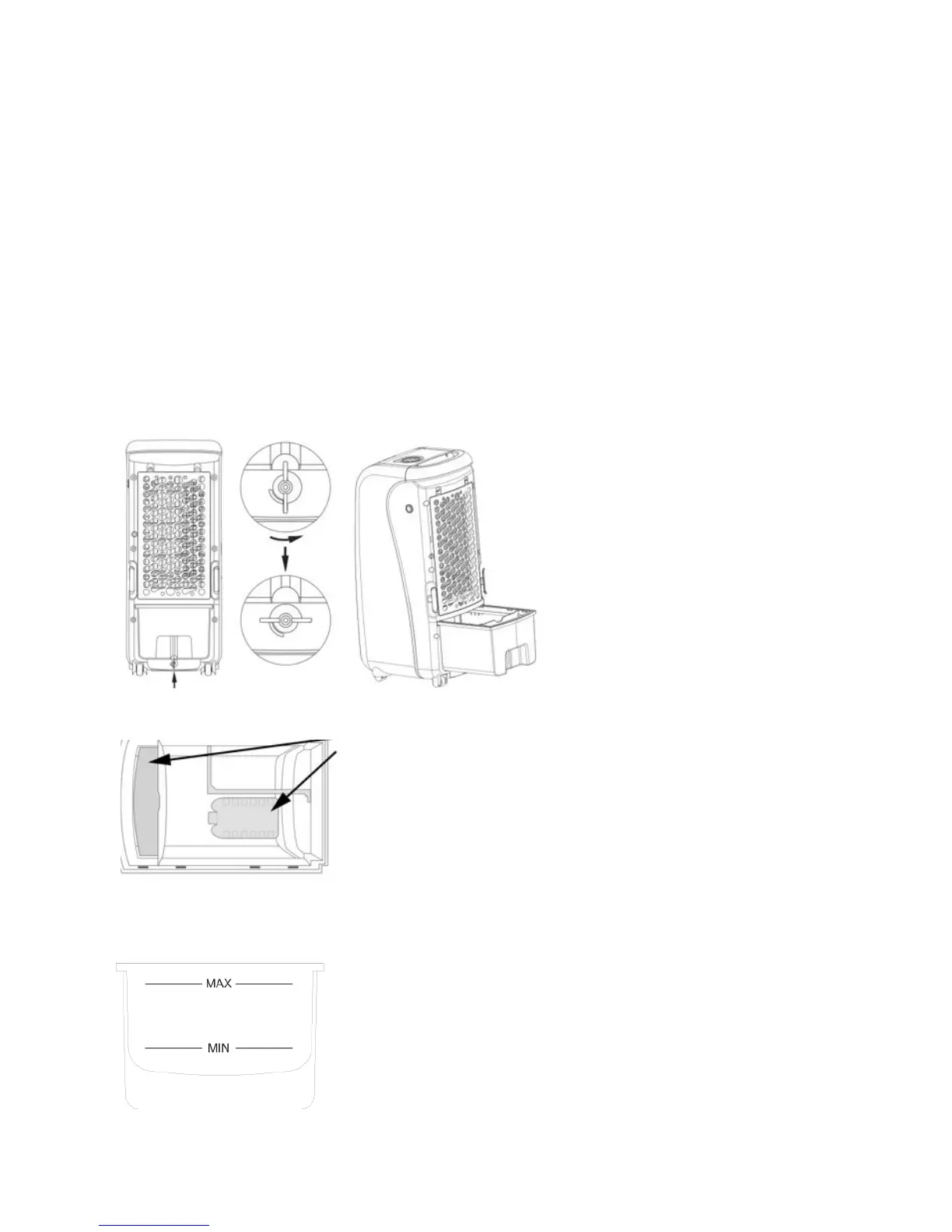
Turn the Water Tank Knob t
counter clockwise on the
back of the unit.
Pull the Water Tank out. t
Add cold and clean water t
to Water Tank.
Be mindful of the water level indicator when t
adding water and ice packs.
DO NOT OVERFILLt .
If water is overlled, remove excess water. t
DO NOT TIP UNIT TO DRAINt .
Water Tank Sound Dampener
Ice Pack(s)
The included two ice packs can be used to cool t
the water in the water tank.
This allows the water to stay cooler for longer t
so that the evaporative process can work at its
most optimal.
After adding water or ice packs, close and lock the Water Tank.
*


 To Next Page