10
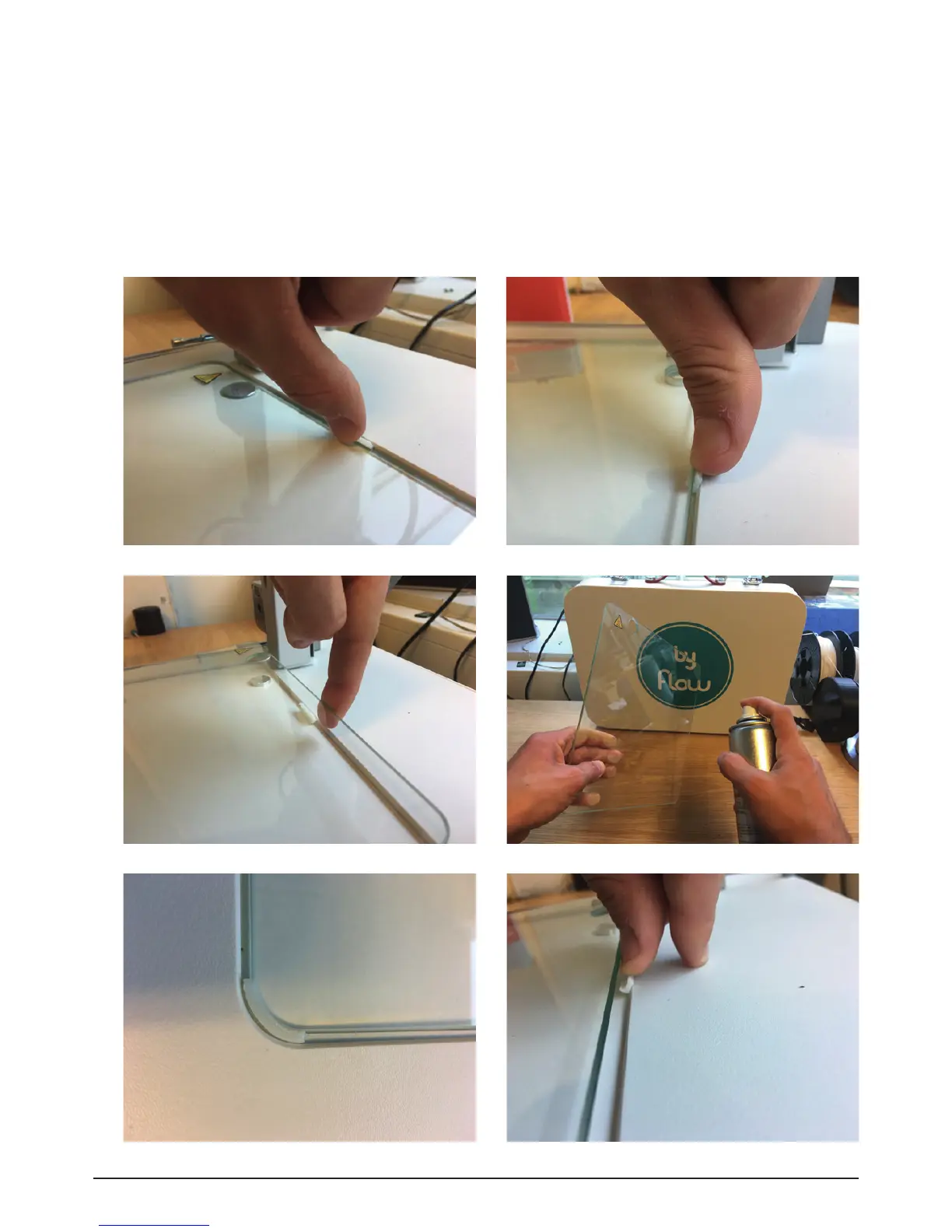
1. How do I remove the glassplate for cleaning or spraying?
The glassplate is fixed to the printer by 3 flexible bedholders – two in corners and one at the rear
side of the plate. In order to remove the glassplate, you have to push the rear bedholder horizontally
until the plate is lifted (Img. H1.1 - Img. H1.3). Then you can easily take it and clean or spray a little
bit prior to filament printing (Img. H1.4). Afterwards, press it under corner bedholders (Img. H1.5),
press the rear bedholder horizontally (Img. H1.6) and press the glassplate down to the printer. If the
plate is fixed, you can start printing again.
Image H1.1 - Hold your finger against the holder
Image H1.3 - Lift the glassplate
Image H1.5 - Plate in corner holders
Image H1.2 - Push the holder backwards
Image H1.4 - Spray the glassplate with 3DLAC
Image H1.6 - Push the backholder back onto the plate
FAQ - Hardware



 To Next Page