• Do not clean device while charging.
• Do not use water to clean the device.
• Do not use abrasive cleaning chemicals or solvents.
• Do use a slightly damp towel to clean the device.
• Do use the supplied cloth to dry afterward.
Cleaning
Maintenance
Charging
• High-density foam Flow Heads™ should be replaced every
three months or if they show obvious signs of wear and tear or
become dirty.
• Fully charge the device before rst use.
• Recharge device monthly to maintain battery life.
• Device can be recharged at any time and at any battery level.
• Only recharge using the supplied Flow A/C Wall Charger.
• Do not keep/leave/store the device in direct sunlight or at tem-
peratures above 40°C.
• The device and charger work best at normal room tempera-
ture. Do not charge in direct sunlight or cold temperatures. The
temperature range for charging is 0°C to 40°C.
• Never leave your device operating or charging unattended.
• It is recommended not to fully deplete the battery.
• Flow MINI is TSA approved as a carry-on item, it must only be
stored in carry-on baggage. If a carry-on bag is checked at the
gate, the device must be removed from the bag and kept with the
passenger in the aircraft cabin.
• Fully charge the device prior to long-term storage.
Travel/Storage
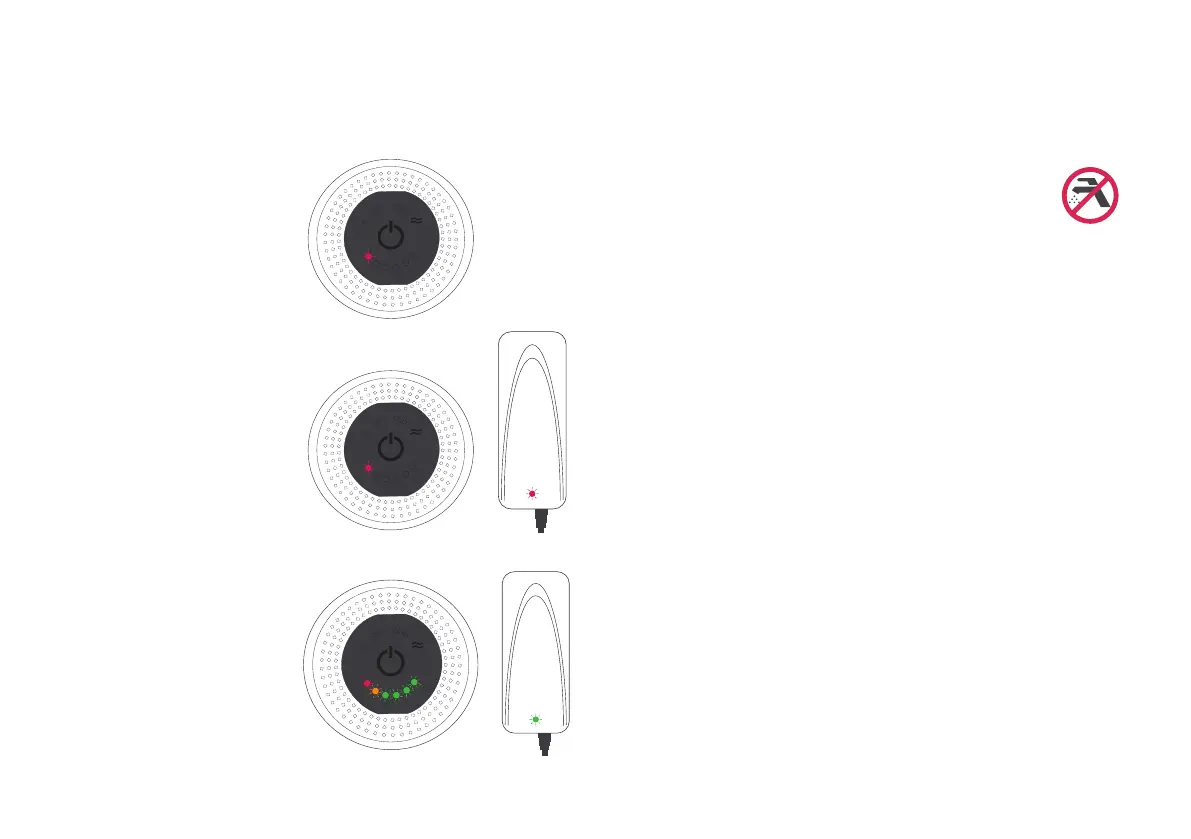
Charging Complete
When fully charged the A/C wall
charger will display a Green LED
and the device will show all 6
power indicator LEDs lled.
The device will not turn on while
charging.
Low or No Charge
When your device has very low or
zero charge left in its battery the
control panel will display a Red LED
and may operate sluggishly.
It is not recommended to run the
battery down to this point.
Charging your Device
Plug the A/C wall charger securely
into a wall socket.
The charger unit will display a Red
LED indicating that the charger is
connected and providing charge
- the charge level LEDs on the
control panel will cycle through -
Red, Amber & Green.


 To Next Page
 Loading...