Your device is designed to be as easy to
operate as possible.
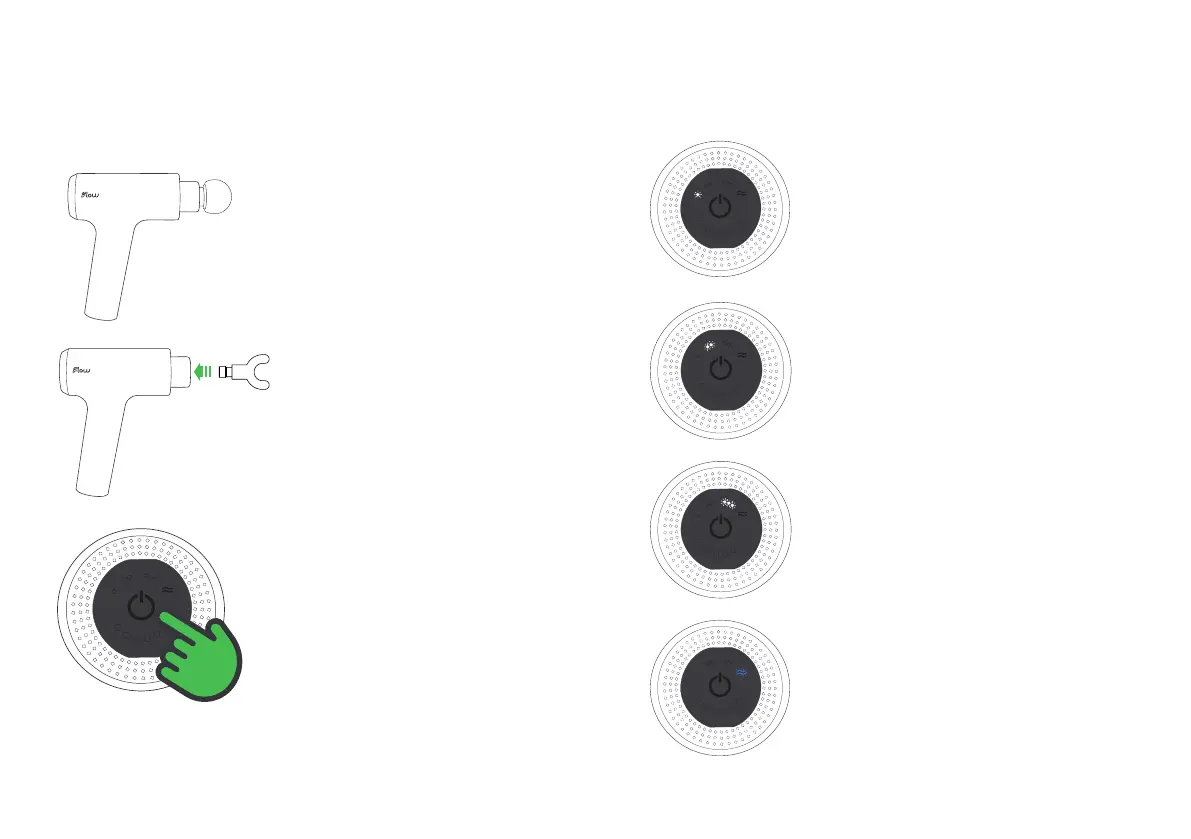
Press the large power button once, and the
device will start to operate in Relax mode,
our rst level.
Press again for level two, Refresh mode.
Press once more for maximum power at
level 3, Recharge mode.
Press a fourth time to start Flow mode.
To switch off press one last time and your
device will power down. There is no need
to do anything else, as Flow will sleep after
5 minutes of non-use. To wake, simply press
the power button.
Modes
Quick Start
Push &
Twist
Press
To turn the device on press the large power
buttton in the centre of the control panel.
Pressing again will activate the various
modes (see opposite). Massage desired
body part at the required speed and apply
pressure as needed. Cycle though the
modes or hold down the power button to
switch off when nished.
Remove the device carefully from the box.
Your Flow MINI will already have the Medium
Flow Head™ tted. To remove it simply grip
the base of the Flow Head™ and tug until you
hear a ‘pop’.
With the device off, fully insert the
Flow Head™ of your choice by pushing
it into the socket. Do not operate the
device without a Flow Head™.


 To Next Page