CONNECTING YOUR SOUNDBASE SYSTEM
PLEASE NOTE: Connect all wires to the Soundbase before placing into nal position. Check the audio
output settings in your TV’s settings and ensure audio output is enabled correctly.
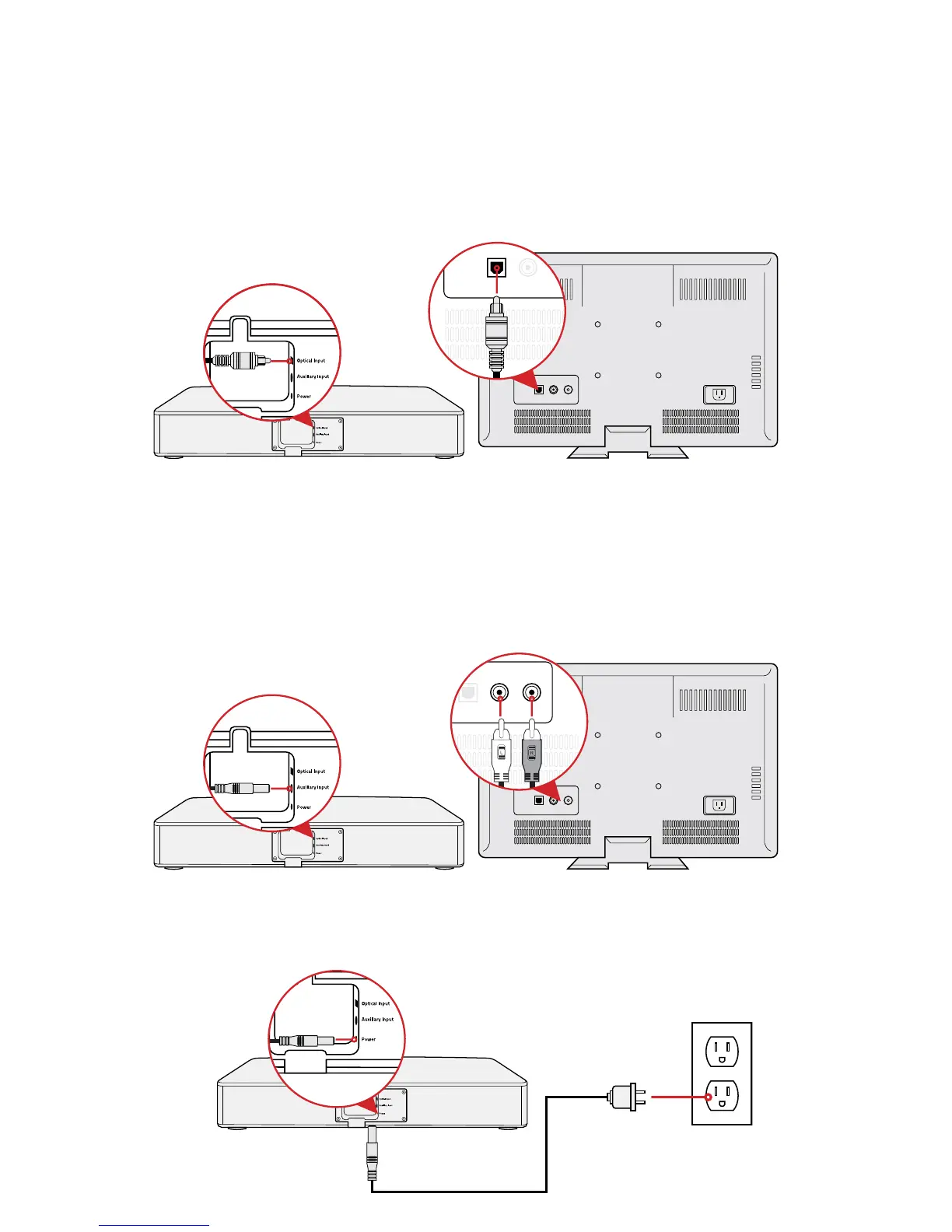
Option 1: Optical Cable (Preferred Method)
Plug one end of the Optical Cable into the Soundbase, and the other end into the TV’s optical output.
Option 2: Auxiliary Cable (Optional)
Plug one end of the Auxiliary Cable into the Soundbase. Plug the L and R connectors into the TV’s
auxiliary output.
NOTE: This setup is optional as it is not required to set up the product. Auxiliary cable is NOT included.
Connecting to Power
Plug one end of the Power Cable into the Power Input of the Soundbase. Plug the other end into a
power outlet.


 To Next Page