- 8 -
1 2 3
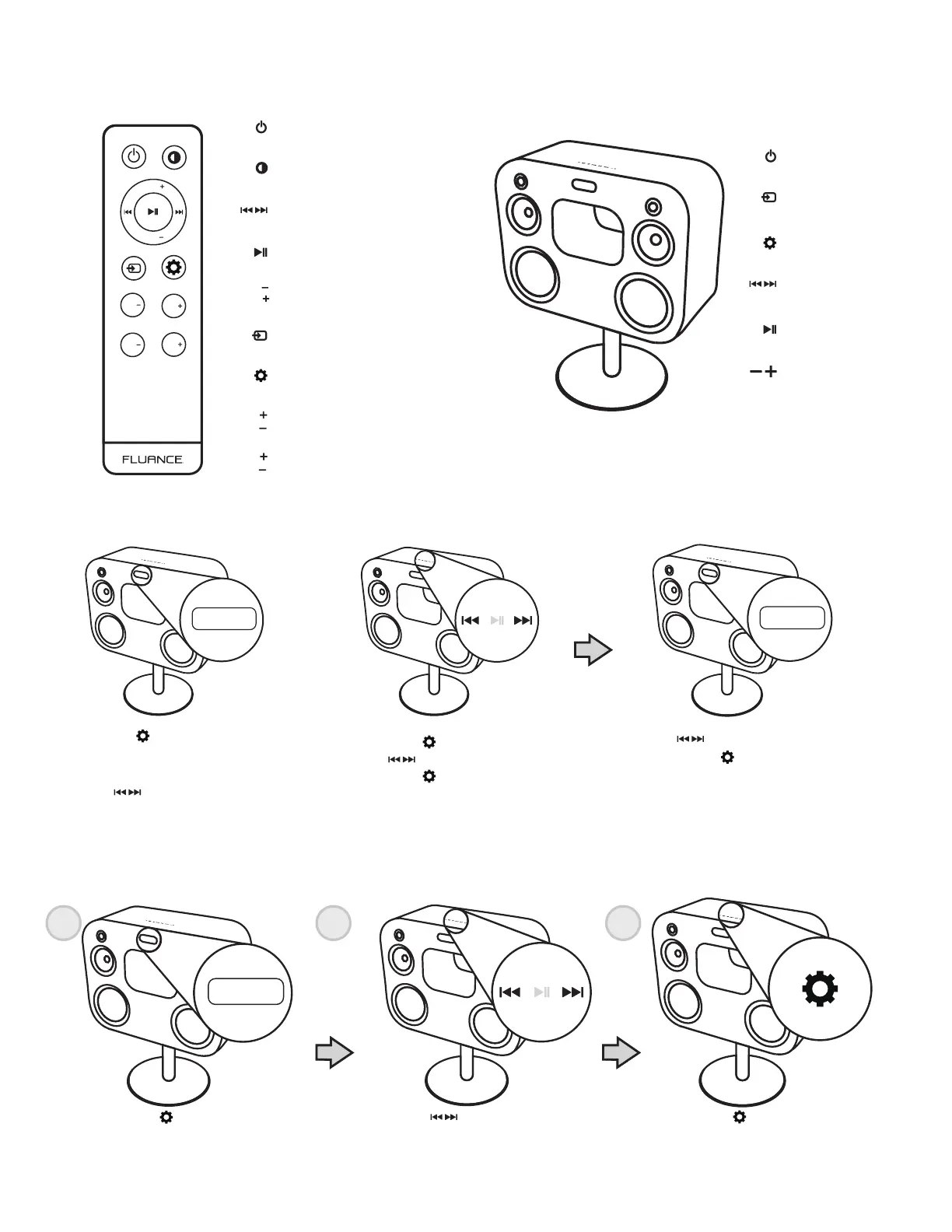
Power
Power
Settings
Play/Pause
Forward/Back*
Display
Source
Treble
Bass
Volume
Play/Pause
Forward/Back*
Settings
Source
Volume
CABINET BUTTONSREMOTE BUTTONS
SET TIME
VOL
VOL
BAS
TRE
TRE
TREBLE
BASS
BAS
VOL
VOL
BAS
TRE
TRE
TREBLE
BASS
BAS
VOL
VOL
TRE
TRE
BAS
BAS
SET SLEEP TIMER
VOL
VOL
BAS
TRE
TRE
TREBLE
BASS
BAS
sloo
VOL
VOL
BAS
TRE
TRE
TREBLE
BASS
BAS
Press the button until you see
“SL00” or a combination of SL and
two other digits (ex. SL15)
Press the
buttons to select the
amount of minutes to pass before
entering sleep mode
NOTE: The sleep timer can be set in 5min
Intervals (5, 10, 15, 20 etc.)
Press the
button to confirm
“OK” will now be displayed on
the LED screen
*NOTE: Previous Track/Next Track (when on Bluetooth); Previous radio station/Next
radio station (when on radio source)
VOL
VOL
BAS
TRE
TRE
TREBLE
BASS
BAS
Press the button until you see
“TIME” displayed on the LED screen
You will now see either AM or PM
Use the buttons to cycle between
both settings.
Press the
button to confirm
Press the buttons to select the hour
Press the button to confirm
Press the buttons to select the minutes
Press the button to confirm
“OK” will now be displayed on the LED screen
VOL
VOL
BAS
TRE
TRE
TREBLE
BASS
BAS
time
VOL
VOL
BAS
TRE
TRE
TREBLE
BASS
BAS
VOL
VOL
BAS
TRE
TRE
TREBLE
BASS
BAS
ok


 To Next Page