Fluance RT80/RT81/RT81P User Manual
12
Step Eight: Connecting the Power
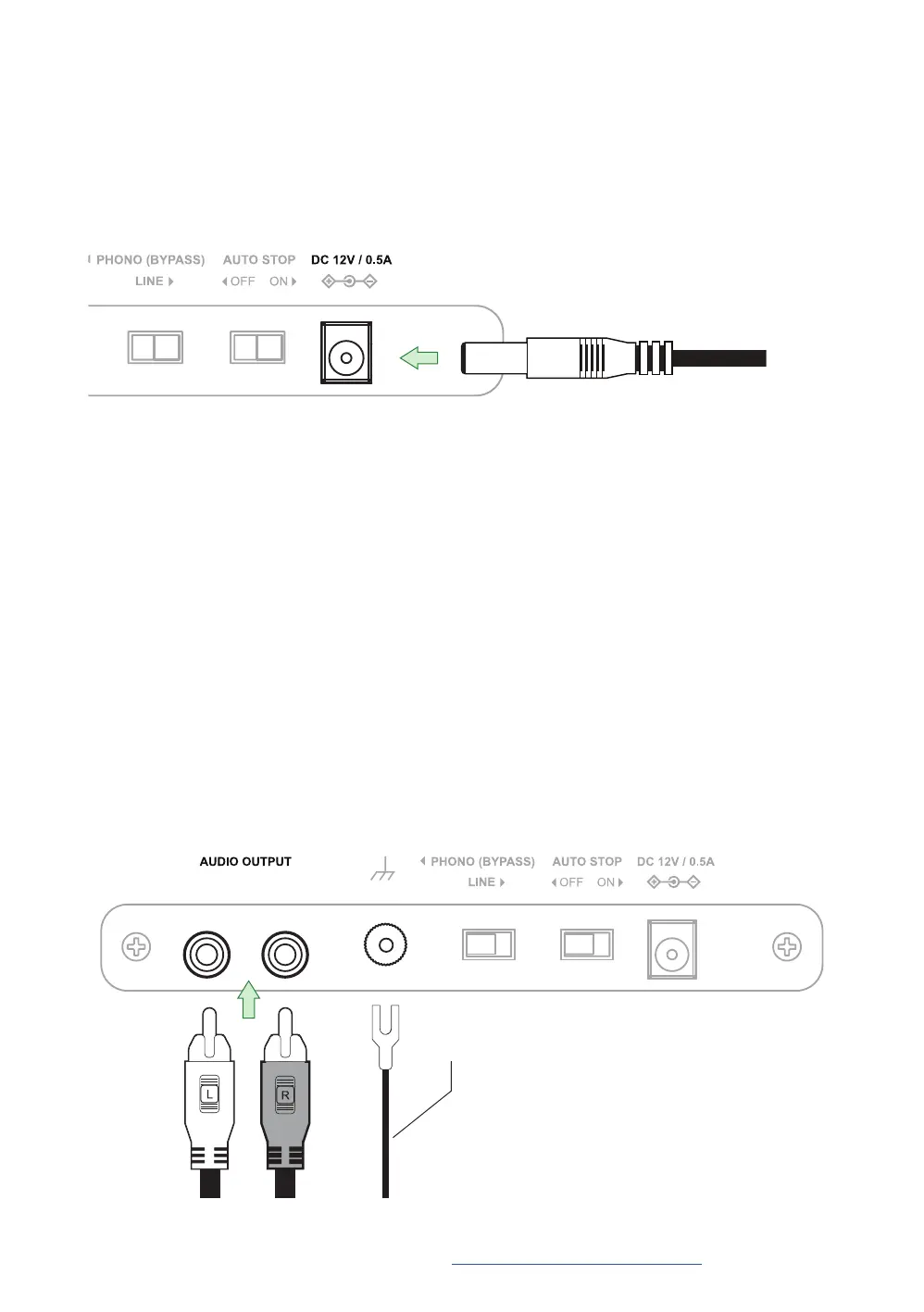
Ensure the power adapter is securely connected to a power outlet. Insert the power cable
into the power input on the back of the turntable.
Step Nine: Connecting the RCA Cable
The included RCA cable has a ground cable attached. When using the internal preamp
the ground cable is not required. Connect the RCA cables to the audio outputs on the
back of the turntable and then plug the other end into your stereo.
Optional:
When using an external preamp the ground cable should be connected to the ground terminal on the back
of the turntable and also connected to the external preamp. Connect the RCA cables to the audio outputs
on the back of the turntable and then plug the other end into your preamp.
Ground Cable (Optional)
Important:Onlyusetheofcialpoweradapterincludedwithyourturntable.
The turntable setup is now complete! Enjoy your Fluance turntable. Should you require
any further assistance please contact us at: www.uance.com/support



 To Next Page