7
Product Components
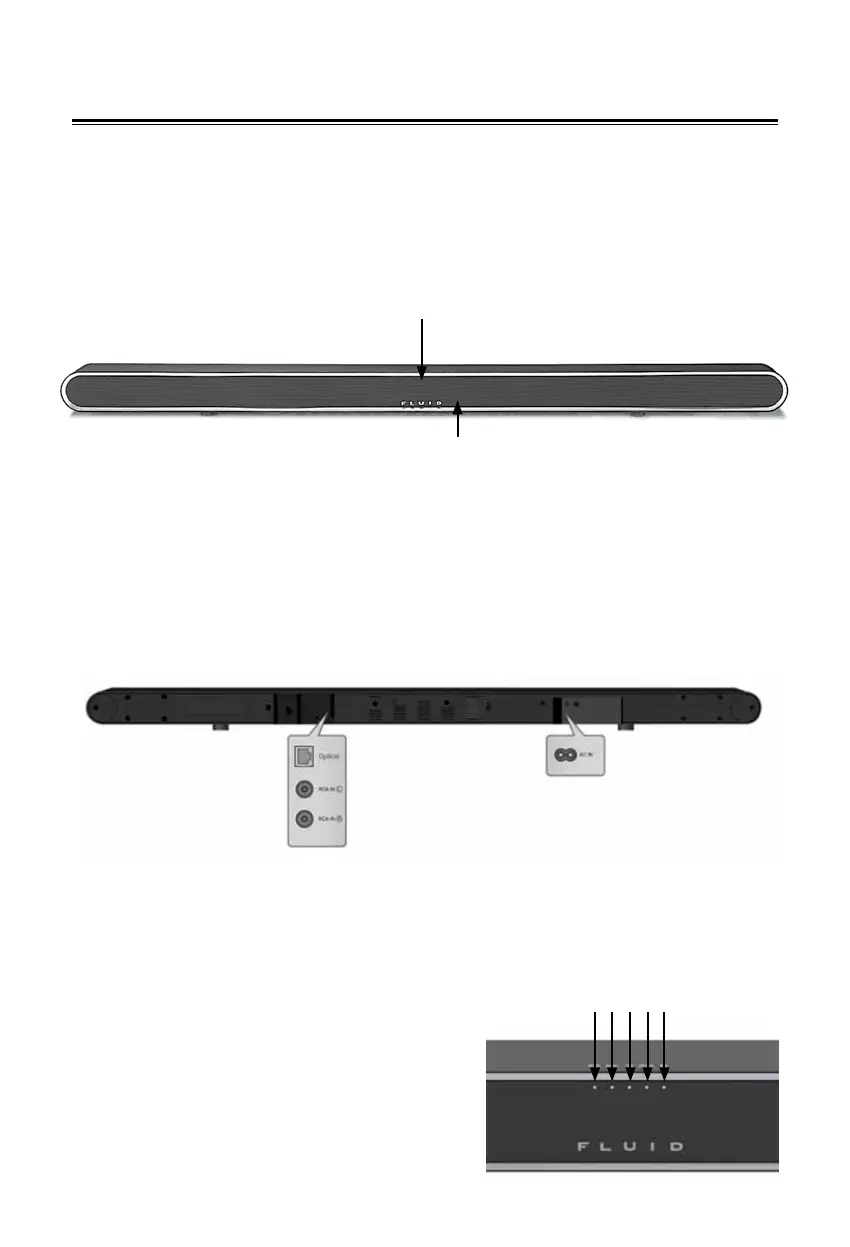
Front Panel
1. Display LED
Shows the current status of the main unit
2. Remote Sensor
Indicates where remote should be pointed
Rear Panel
1. SOURCE 1 (Optical)
Connect to the Optical (S/PDIF) output jack of a digital
optical audio device.
2. RCA IN
Connect to the RCA input jack of the TV
3. AC IN
Connect to the electrical outlet
4. MOVIE
Indicates preset listening mode optimized for Movie content
5. MUSIC
Indicates preset listening mode optimized for Music content
6. VSS Indicator LED
Indicates the Virtual Surround System mode
7. Optical Indicator LED
Indicates SPDIF (OPTICAL)
connection mode
8. RCA Indicator LED
Indicates RCA connection mode
1
2
4 5 6 7 8


 To Next Page