34
Troubleshooting
Check the chart below for a possible cause of the problem you are experiencing before requesting service
for this unit. Some simple checks or minor adjustments on your part may eliminate the problem and restore
proper operation. Keep away from static electricity.
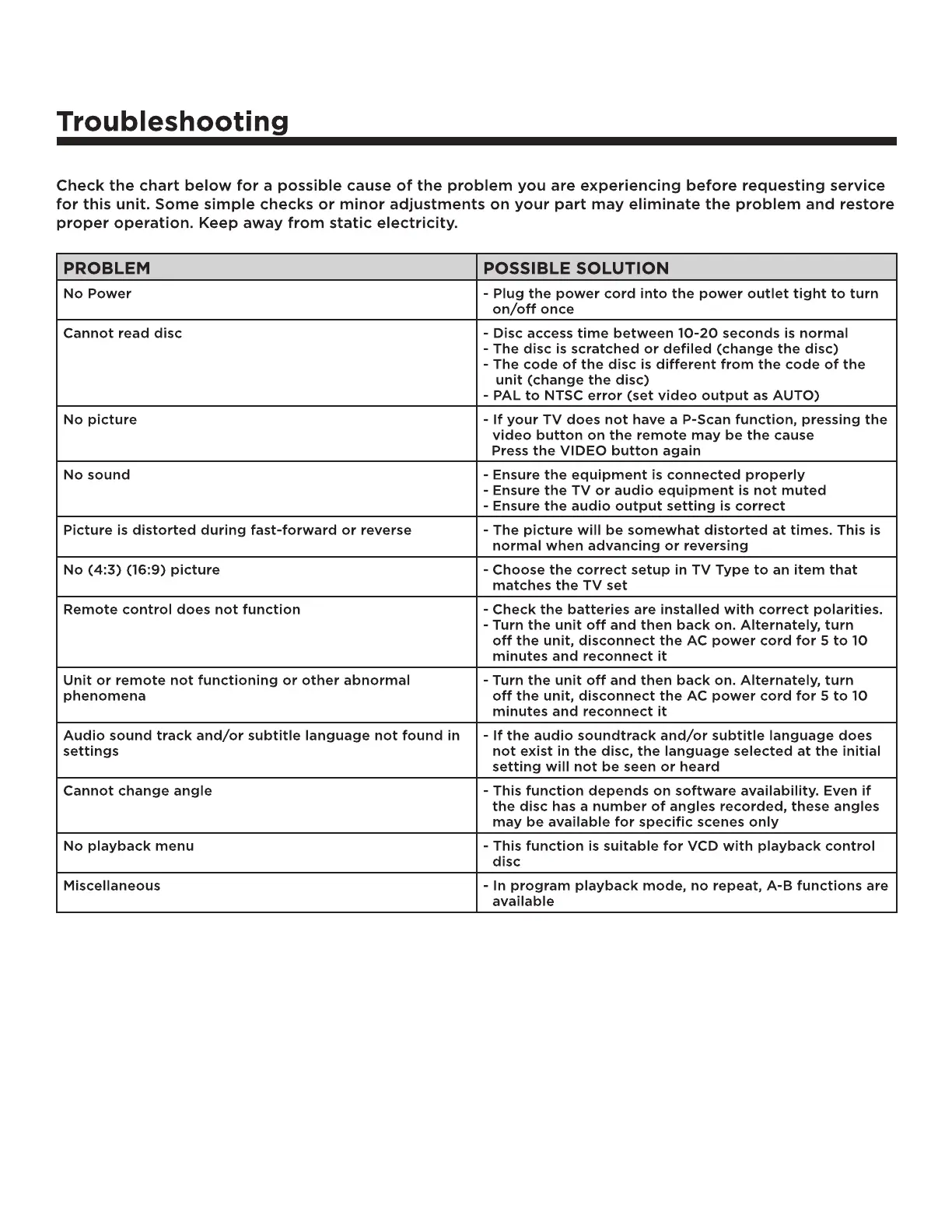
PROBLEM POSSIBLE SOLUTION
No Power - Plug the power cord into the power outlet tight to turn
on/off once
Cannot read disc - Disc access time between 10-20 seconds is normal
- The disc is scratched or defiled (change the disc)
- The code of the disc is different from the code of the
unit (change the disc)
- PAL to NTSC error (set video output as AUTO)
No picture - If your TV does not have a P-Scan function, pressing the
video button on the remote may be the cause
Press the VIDEO button again
No sound - Ensure the equipment is connected properly
- Ensure the TV or audio equipment is not muted
- Ensure the audio output setting is correct
Picture is distorted during fast-forward or reverse - The picture will be somewhat distorted at times. This is
normal when advancing or reversing
No (4:3) (16:9) picture - Choose the correct setup in TV Type to an item that
matches the TV set
Remote control does not function - Check the batteries are installed with correct polarities.
- Turn the unit off and then back on. Alternately, turn
off the unit, disconnect the AC power cord for 5 to 10
minutes and reconnect it
Unit or remote not functioning or other abnormal
phenomena
- Turn the unit off and then back on. Alternately, turn
off the unit, disconnect the AC power cord for 5 to 10
minutes and reconnect it
Audio sound track and/or subtitle language not found in
settings
- If the audio soundtrack and/or subtitle language does
not exist in the disc, the language selected at the initial
setting will not be seen or heard
Cannot change angle - This function depends on software availability. Even if
the disc has a number of angles recorded, these angles
may be available for specific scenes only
No playback menu - This function is suitable for VCD with playback control
disc
Miscellaneous - In program playback mode, no repeat, A-B functions are
available


 To Next Page
 Loading...