EasyManua.ls Logo

Fluke 6062A - Page 47

Fluke 6062A
86 pages
Print Icon
To Next Page IconTo Next Page
To Previous Page IconTo Previous Page
Loading...
2. Select
the IEEE-488
address
and mode
as follows:
a. Set
both the
LISTEN ONLY
and TALK
ONLY
switches (located
on
the rear
panel of the
Generator)
to
0
(down).
Set switches
al through
a5
to the desired
address 0 through
30.
For example, for
an address
of
1
,
set
switches a2,
a3, a4, and
a5
to
0
(down), and
set switch
al to
1
(up).
b. For talk-only
operation,
set
the TALK ONLY
switch
to
1
(up),
c. For
listen-only
operation,
set the
LISTEN
ONLY switch
to i
(up) and
set the
TALK
ONLY
switch to
0
(down).
3. Verify
the address
and
mode:
a.
Press the
[SPCL] and
the
[1] [0]
keys. Verify
that the selected
address
appears
in
decimal
in the
FREQUENCY
display field.
b. If the talk-only
mode
or listen-only
mode
has been
selected, “to”
or “lo” appears
to the left
of the
address in
the FREQUENCY
display field.
NOTE
The
address switches
are continuously
monitored except when
in remote.
The TALK
ONLYand
LISTEN
ONLYsvcUches
are only read
when the
Generator
is powered
on.
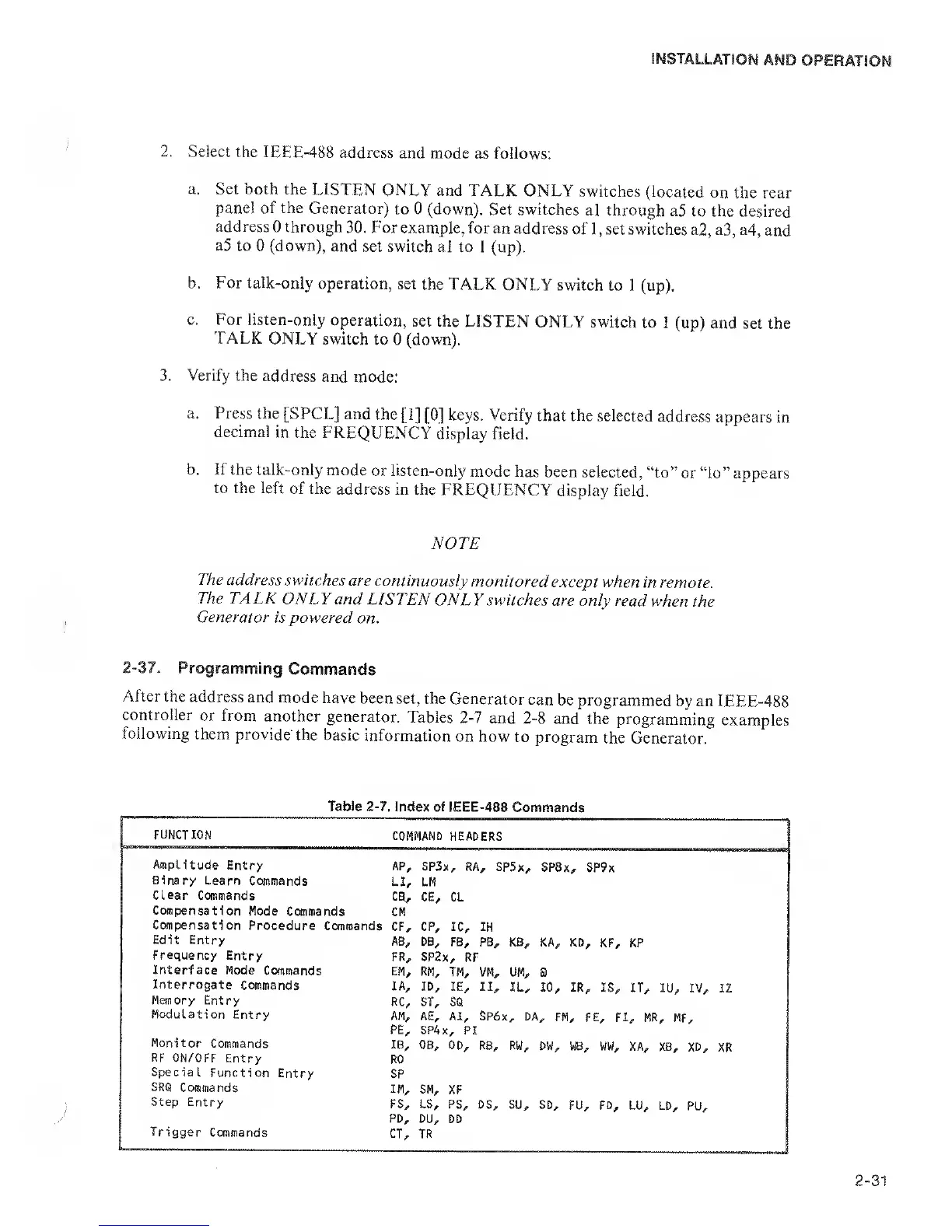
2-37.
Programming
Commands
After
the address
and
mode have
been
set, the Generator
can
be
programmed
by an IEEE-488
controller
or from
another
generator.
Tables
2-7
and
2-8
and
the
programming
examples
following
them
provide'
the basic
information
on how
to program
the Generator.
Table
2-7.
Index
of IEEE-488
Commands
FUNCT ION
COMMAND
HEADERS
Amplitude Entry
AP,
SP3x, RA
^
SP5x,
SP8>
,
SP9x
Binary
Learn Commands
LL
LM
Clear
Commands
ca. CE, CL
Compensation
Mode
Commands
CM
Canpensation
Procedure
Commands
CF, CP, ic. IH
Edit
Entry
AB,
DB, FB, PB,
KB, KA, KD,
KF, KP
Frequency
Entry
SP2>
.
RF
Interface
Mode Commands
EM,
RM,
TM, VM, UM,
a
Interrogate
Commands
lA,
ID, IE, II,
IL,
10,
IR,
IS, IT, lU,
IV, IZ
Hanory Entry
RC, ST,
SQ
Modulation
Entry
AM, AE, Ai,
SP6x
,
DA
,
FM
,
FE, FJ
,
MR
,
MF
PE, SP4x
,
PI
Monitor
Commands
IB,
OB, OD,
RB, RW,
DW, WW,
XA,
X8,
XD,
XR
RF
ON/OFF
Entry
RO
Special
Function Entry
SP
SRQ
Commands
IM,
SM,
XF
Step Entry
FS, LS,
PS, DS, SU,
SD,
FU,
FD,
LU, LD,
PU,
PD, DU,
DD
Trigger
Commands
CT,
TR

Related product manuals