EasyManua.ls Logo

Fluke 6062A - Page 49

Fluke 6062A
86 pages
Print Icon
To Next Page IconTo Next Page
To Previous Page IconTo Previous Page
Loading...
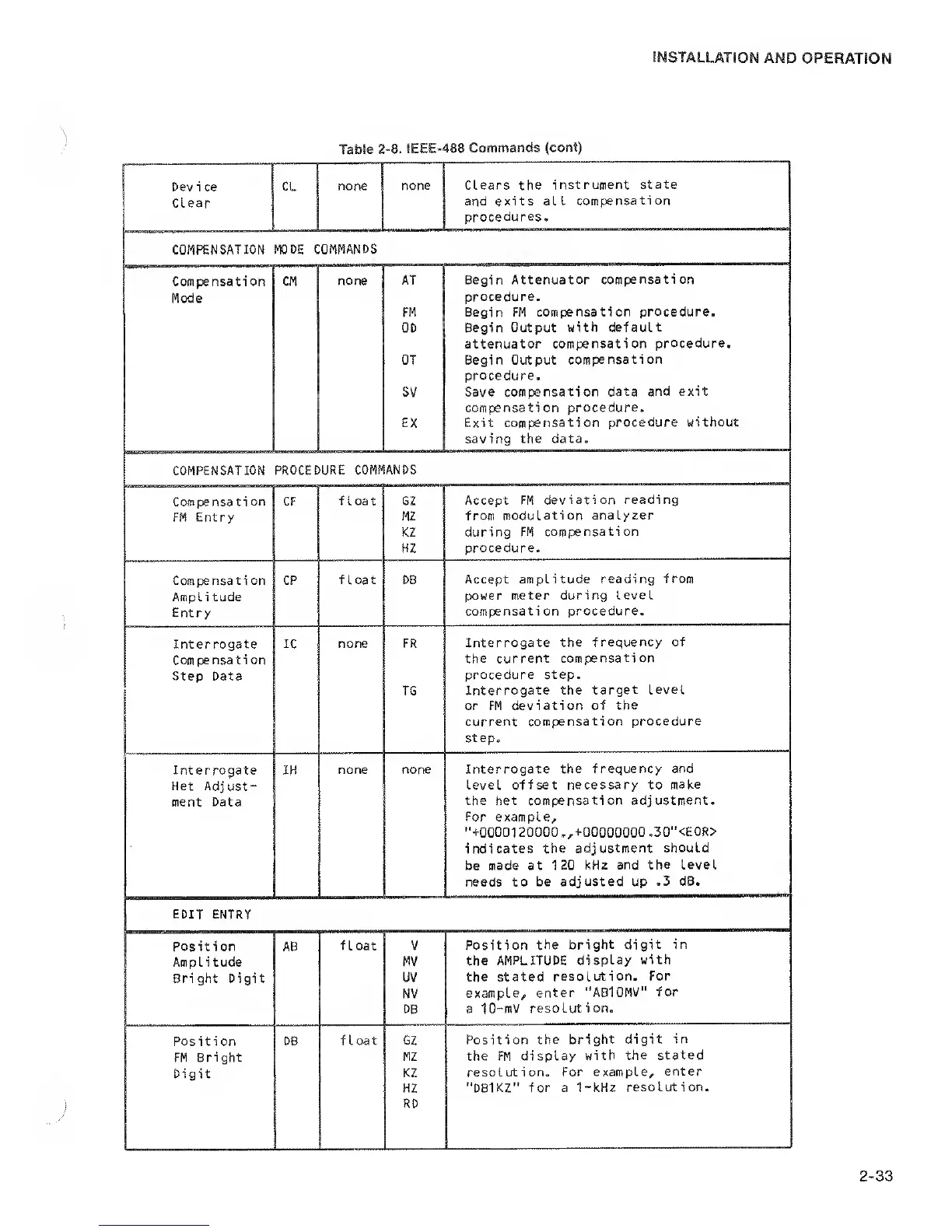
Dev i ce
CL
none
none Clears
the instrument
state
Clear
and exits all
compensation
procedures.
COMPENSATION
MODE COMMANDS
Compensation CM
none
AT
Begin Attenuator
compensation
Mode
FM
procedure.
Begin FM compensation procedure.
OD Begin
Output with default
attenuator compensation
procedure.
OT Begin Output
compensation
procedure.
sv
Save compensation
data and exit
compensation
procedure.
EX Exit compensation
procedure without
saving
the data.
COMPENSATION
PROCEDURE COMMANDS
Compensa ti
on CF
float G2
Accept FM
deviation reading
FM Entry
MZ from
modulation analyzer
KZ during FM
compensation
HZ
procedure.
Compensati on CP
float DB
Accept amplitude
reading from
Ampl i tude
power meter
during level
Entry
compensati on
procedure.
Interrogate
IC none FR
Interrogate the
frequency of
Compensation
the current
compensation
Step Data
TG
procedure step.
Interrogate the
target level
or FM deviation
of
the
current compensation
procedure
step.
Interrogate IH
none
none Interrogate
the frequency and
Het Adjust-
level offset necessary to
make
ment Data
the het compensation
adjustment.
For example,
"+00001
20000 .,+00000000
.30"<E0R>
indicates the adjustment
should
be
made at 120
kHz and
the
Level
needs to
be adjusted up
.3 dB.
EDIT ENTRY
Position AB
float V
Position
the
bright digit in
Amplitude
MV
the AMPLITUDE
display
with
Bright Digit
uv
the stated
resolution.
For
NV
example,
enter "ABlOMV"
for
DB a 10-mV
resolution.
Position
DB float
GZ
Position the
bright digit in
FM
Bright
MZ
the FM display
with
the stated
Digit
KZ
resolution.
For example,
enter
HZ "DB1KZ"
for a 1-kHz
resolution.
RD

Related product manuals