1586A
Calibration Manual
8
Front Panel Test
To test the keypad and LEDs on the front panel:
1. Turn on the Product.
2. Push Instrument Setup.
3. Push and hold 5 for 3 seconds to enter keypad diagnostic.
4. Push every key, the key name should be shown correctly on the screen.
5. Push S, L, P, R and Oagain, to check the LED.
6. Push E to exit the keypad diagnostic program.
DC Volts Verification
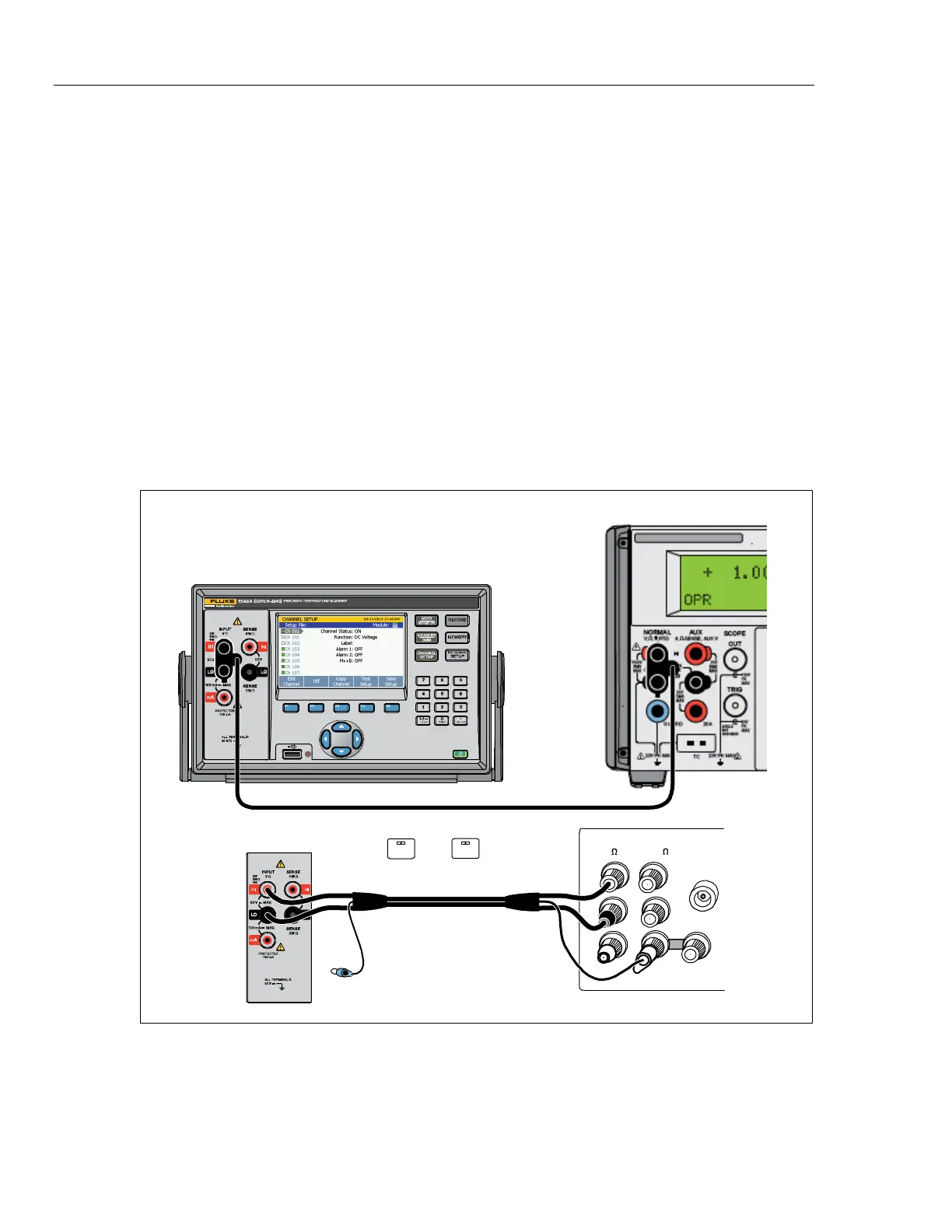
Connect the Product to the test equipment as shown in Figure 2 and apply the
voltages listed in Table 3.
Note
For the 0 V tests, use the 4-wire short to short the Hi/Lo and Sense
inputs.
X
1586A SUPER-DAQ
5522A Calibrator
UUT
HI
HI
LO
LO
HI
OUTPUT
VA
SENSE
V
AUX
CURRENT
GUARD GROUND
WIDEBAND
5720A Calibrator
NC
A.
EX SNS
: OFF
EX GRD
: OFF
hcn102.wmf
Figure 2. DC Voltage Test Connections



 To Next Page