EN-18EN-17
MAINTENANCE
WARNING: ALWAYS DISCONNECT ALL APPLIANCES IN THE AQUARIUM FROM THE
ELECTRICAL SUPPLY BEFORE PLACING HANDS IN THE WATER, BEFORE PUTTING
ON OR TAKING OFF PARTS, AND WHENEVER THE FILTER EQUIPMENT IS BEING
INSTALLED, MAINTAINED OR HANDLED.
Media Care
Filter Media must be periodically replaced or cleaned in accordance with instructions on individual packages. Actual life
span of any type of media will vary based on usage and the specific characteristics of each aquarium. To remove and
replace media, follow the instructions below.
IMPORTANT: Never replace all media at the same time. Stagger filter media changes so that some older media remains
in use. This ensures re-seeding of beneficial bacteria, so that colonies discarded with old media will be replaced by vigorous
new ones. To enhance bacterial action, use Nutrafin Cycle Biological Aquarium Supplement each time you change the media.
All rubber parts, cover gasket, primer stem, AquaStop Valve and seal rings should be periodically lubricated.
1. Drain the filter
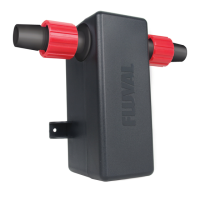
1. Close the AquaStop valve by lifting the lever all the way up. This seals off the input and output hosing connections
to maintain the vacuum that is necessary in order to restart the filter without priming.
2. Unplug the power cord.
3. Lift the locking lever to release the AquaStop valve.
It is not necessary to remove the hosing from the AquaStop valve unless the hosing, the AquaStop valve or both
require cleaning.
(Periodic cleaning is recommended to ensure optimal water flow. A good time to do this is during
a major water change. To clean, rinse under running tap water; if necessary use an appropriate Fluval Cleaning brush.)
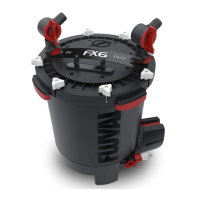
4. Hold the unit by the canister, not the cover, and move it to an appropriate flat surface near a sink or other drain.
(Be sure to keep it upright to avoid spills.)
5. Release the lift-lock clamps; then push down on clamps to lift the cover/pump housing off the canister and set it aside.
6. Holding the media cover in place, tilt the canister over the sink or drain, and pour out as much water as possible.
7. Media and foam screen will be saturated with water. If your sink is not large enough to hold them, have appropriate
bucket nearby. Lift the foam screen, media cover, and media baskets out of the canister and place them in your sink
or bucket.
8. Rinse the interior of the canister with clear water. NEVER use soap or detergents when cleaning canister or rinsing
foam screen or media baskets. Traces of cleaning products may remain on surfaces and damage sensitive fish tissues.
9. Rinse the interior of the priming cylinder with clear water. Be sure the cylinder has no debris trapped in the green
flapper valve and it is sitting flush in a closed position.
MAINTENANCE
2. Clean or replace media
1. Replace chemical media, as needed. Chemical media cannot be cleaned.
2. Rinse biological media with aquarium water, never tap water, or replace as required.
Never replace all biological media at one time, as valuable colonies of beneficial bacteria would be lost.
3. Rinse screen foams and bio-foams using aquarium or de-chlorinated tap water or replace foams as needed.
For the most thorough cleaning possible, slide the foam out of the screen frame and rinse each piece separately;
rinse and wipe the screen; then reassemble. Be sure that the foam is protruding from the top of the screen.
Rinse any other mechanical media also.
NEVER use soap or detergents on foam or screen, as traces of cleaning products could harm fish.
3. Reassemble unit
DO NOT FILL CANISTER WITH WATER WHEN RE-ASSEMBLING UNIT
1. Place rinsed and filled media baskets back in canister and put cover back on top basket.
2. Replace foam screen in canister.
(Insert with flat end down.)
3. Inspect and lubricate gasket as needed.
4. Replace the cover, making certain the MSF logo and power cord are properly aligned.
5. Use the lock-lift clamps to close the cover securely.
6. Place the unit back in position; re-insert the AquaStop valve, and push down the locking lever to lock it in place.
7. Push down on the valve lever to open the AquaStop valve. Water should start flowing immediately.
IMPORTANT: If the hosing has been disconnected from the AquaStop valve, or if the system has lost its
vacuum for some other reason, the canister will not fill automatically. Use the instant-prime handle to fill the canister.
8. Allow the canister to fill completely, then plug the power cord back into the electrical outlet.
IMPORTANT: If the canister is not full before the filter is plugged in, it may not work properly.
The filter unit should never be allowed to run dry. Running the unit dry may result in damage to the motor.



 To Next Page