使用您的PHANTOM 3 Advanced
3. 检查电量
请分别短按一次遥控器和智能飞行电池的电源开关以检查电量。首次使用智能飞行电池,请务必充满电。
短按一次、再长按2秒遥控器电源开关可开启遥控器(重复本操作可关闭遥控器)。
短按一次、再长按2秒智能飞行电池开关可开启智能飞行电池(重复本操作可关闭智能飞行电池)。
●
推荐在平板设备上使用DJI GO App以获得最佳的体验。DJI GO App要求使用iOS 8.0及以上系统和Android 4.1.2及以上系统。
1. 下载 DJI GO App
安装 DJI GO App,请在软件商店或扫描下方二维码下载。
或用移动设备访问以下网址:http://m.dji.net/djigo
2. 观看入门教学视频
扫描二维码观看扫描二维码下载安装
低 高
电量
使用Phantom 3 Advanced 之前,请 在 DJI GO App 或者 DJI 官方网站产品页面完整观看教学视频与下载阅读
《Phantom 3 Advanced 用户手册》,并仔细阅读以下包装内文档:《Phantom 3 Advanced 快速入门指南》、
《Phantom 3 免责声明和安全操作指引》、《Phantom 3 智能飞行电池安全使用指引》和《物品清单》。
4.充电
●
请使用 DJI 官方提供的充电器充电。充电前需将智能飞行电池取出。
●
连接充电器到交流电源(100~240 V,50/60 Hz;如需要请使用电源转换插头)。
●
智能飞行电池、遥控器开启或关闭的状态下均可充电。建议在关闭状态下充电。
●
在关闭状态下充电时,智能飞行电池与遥控器指示灯全部熄灭表示电已充满。
B
A
B
A
取出智能飞行电池
低 高
电量
请在 DJI GO App 或访问DJI官方网站观看。
http://www.dji.com/cn/product/phantom-3/video
www.dji.com
ADVANCED
PHANTOM 3
ppendix
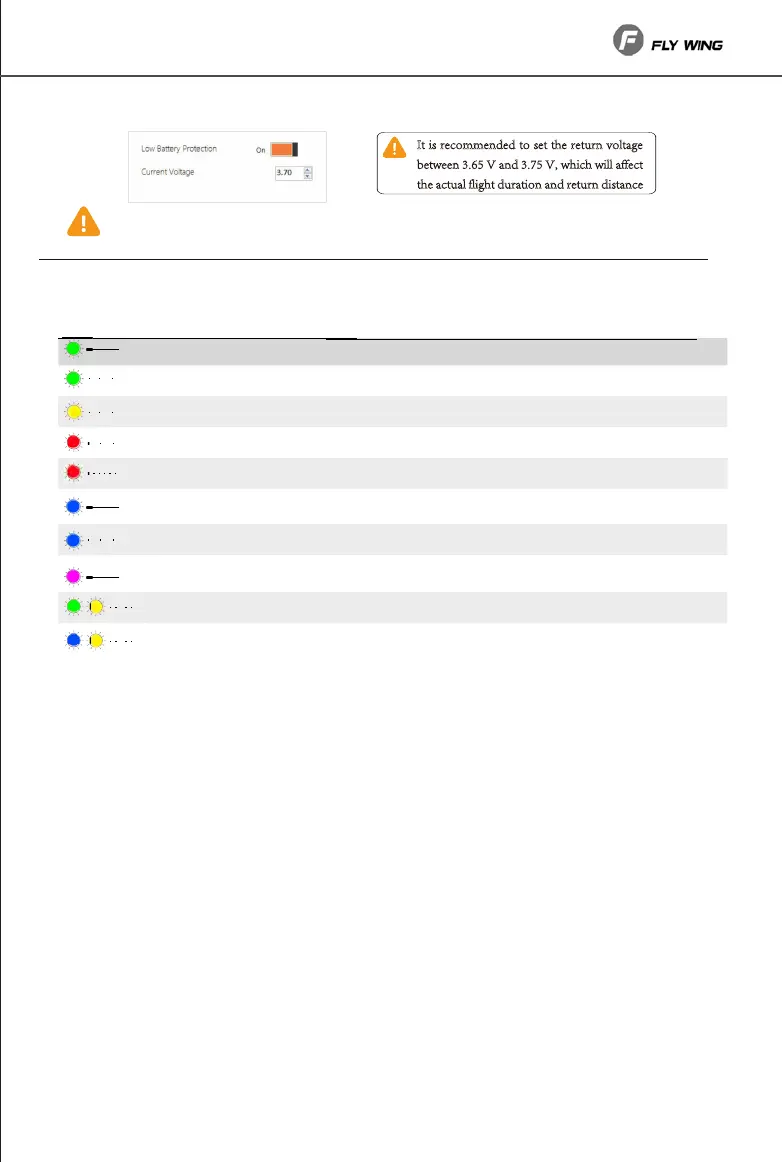
Helicopter tatus Indicator escription
When the transmitter signal is normal, the transmitter can be used to control the landing
position during the return landing.
reen solid
status is good, can take off
Yellow flash
ed flash slowly
helicopter is getting positioning
ompass calibration reuired
lue solid
status is good, can take off
reen,yellow flash
ow battery power in mode
lue, yellow flash
ow battery power in mode
urple solid
eturn mode or automatic flight mode
ed flash uickly
eceiver has no signal
reen flash
status has been locked, start switch can start motor
lue flash
status has been locked, start switch can start motor
• sers can increase or decrease the return voltage according to the flight demand, or turn off the
low power return function.
t i recoee to et the retr olte
etee hich ill ect
the ctl liht rtio retr itce


 To Next Page
 Loading...