EasyManua.ls Logo

FLY F350s - Home Screen Navigation; Home Screen Overview; Switching Between Screens

FLY F350s
48 pages
Print Icon
To Next Page IconTo Next Page
To Previous Page IconTo Previous Page
Loading...
19
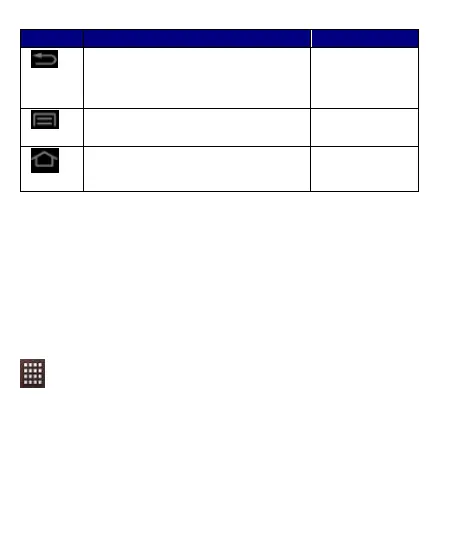
Button
Press
Press and hold
Back: Opens the previous screen you were
working on.
If the onscreen keyboard is open, closes the
keyboard
Menu: Opens a menu with items that affect
the current screen or Application.
Opens the
shortcuts
Home: Open the Home screen, If you are
viewing the left or right Extended Home
screen, opens the central Home screen.
Opens the most
recently used
applications.
The Home Screen
W
W
h
h
e
e
n
n
y
y
o
o
u
u
s
s
t
t
a
a
r
r
t
t
u
u
p
p
,
,
t
t
h
h
e
e
h
h
o
o
m
m
e
e
s
s
c
c
r
r
e
e
e
e
n
n
o
o
p
p
e
e
n
n
s
s
.
.
T
T
h
h
e
e
m
m
a
a
i
i
n
n
s
s
c
c
r
r
e
e
e
e
n
n
i
i
s
s
y
y
o
o
u
u
r
r
s
s
t
t
a
a
r
r
t
t
i
i
n
n
g
g
p
p
o
o
i
i
n
n
t
t
t
t
o
o
a
a
c
c
c
c
e
e
s
s
s
s
a
a
l
l
l
l
t
t
h
h
e
e
f
f
e
e
a
a
t
t
u
u
r
r
e
e
s
s
o
o
n
n
y
y
o
o
u
u
r
r
p
p
h
h
o
o
n
n
e
e
.
.
S
S
w
w
i
i
p
p
e
e
l
l
e
e
f
f
t
t
o
o
r
r
r
r
i
i
g
g
h
h
t
t
o
o
n
n
t
t
h
h
e
e
h
h
o
o
m
m
e
e
s
s
c
c
r
r
e
e
e
e
n
n
t
t
o
o
d
d
i
i
s
s
p
p
l
l
a
a
y
y
t
t
h
h
e
e
n
n
e
e
x
x
t
t
h
h
o
o
m
m
e
e
s
s
c
c
r
r
e
e
e
e
n
n
.
.
T
T
o
o
u
u
c
c
h
h
t
t
h
h
e
e
l
l
a
a
u
u
n
n
c
c
h
h
e
e
r
r
i
i
c
c
o
o
n
n
a
a
t
t
t
t
h
h
e
e
b
b
o
o
t
t
t
t
o
o
m
m
o
o
f
f
t
t
h
h
e
e
s
s
c
c
r
r
e
e
e
e
n
n
t
t
o
o
v
v
i
i
e
e
w
w
a
a
l
l
l
l
i
i
n
n
s
s
t
t
a
a
l
l
l
l
e
e
d
d
a
a
p
p
p
p
l
l
i
i
c
c
a
a
t
t
i
i
o
o
n
n
s
s
.
.
Switch Between Home Screens
Y
Y
o
o
u
u
c
c
a
a
n
n
s
s
h
h
i
i
f
f
t
t
b
b
e
e
t
t
w
w
e
e
e
e
n
n
t
t
h
h
e
e
h
h
o
o
m
m
e
e
s
s
c
c
r
r
e
e
e
e
n
n
s
s
a
a
s
s
s
s
h
h
o
o
w
w
n
n
b
b
e
e
l
l
o
o
w
w
;
;

Table of Contents

Related product manuals