EasyManua.ls Logo

FLY F350s - USING THE ONSCREEN KEYBOARD

FLY F350s
48 pages
Print Icon
To Next Page IconTo Next Page
To Previous Page IconTo Previous Page
Loading...
28
h
h
o
o
l
l
d
d
i
i
n
n
g
g
i
i
t
t
a
a
n
n
d
d
t
t
h
h
e
e
n
n
t
t
o
o
u
u
c
c
h
h
U
U
n
n
l
l
o
o
c
c
k
k
m
m
e
e
s
s
s
s
a
a
g
g
e
e
.
.
U
U
S
S
I
I
N
N
G
G
T
T
H
H
E
E
O
O
N
N
S
S
C
C
R
R
E
E
E
E
N
N
K
K
E
E
Y
Y
B
B
O
O
A
A
R
R
D
D
S
S
o
o
m
m
e
e
a
a
p
p
p
p
l
l
i
i
c
c
a
a
t
t
i
i
o
o
n
n
s
s
d
d
i
i
s
s
p
p
l
l
a
a
y
y
t
t
h
h
e
e
k
k
e
e
y
y
b
b
o
o
a
a
r
r
d
d
b
b
y
y
d
d
e
e
f
f
a
a
u
u
l
l
t
t
.
.
I
I
n
n
o
o
t
t
h
h
e
e
r
r
s
s
,
,
y
y
o
o
u
u
t
t
o
o
u
u
c
c
h
h
a
a
t
t
e
e
x
x
t
t
f
f
i
i
e
e
l
l
d
d
w
w
h
h
e
e
r
r
e
e
y
y
o
o
u
u
w
w
a
a
n
n
t
t
t
t
o
o
e
e
n
n
t
t
e
e
r
r
t
t
e
e
x
x
t
t
,
,
t
t
o
o
o
o
p
p
e
e
n
n
t
t
h
h
e
e
k
k
e
e
y
y
b
b
o
o
a
a
r
r
d
d
.
.
U
U
s
s
e
e
t
t
h
h
e
e
i
i
c
c
o
o
n
n
t
t
o
o
e
e
r
r
a
a
s
s
e
e
c
c
h
h
a
a
r
r
a
a
c
c
t
t
e
e
r
r
s
s
.
.
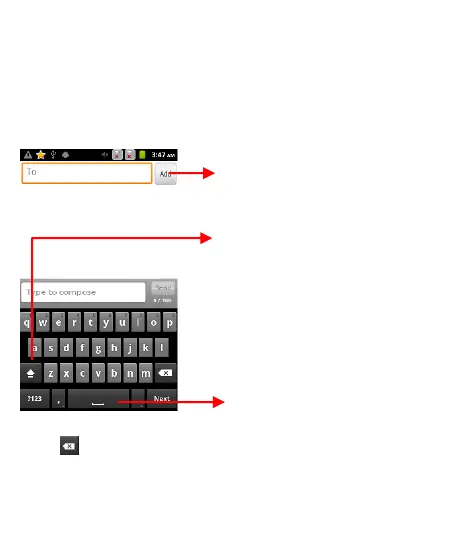
Press space or a punctuation
mark to enter the
highlighted suggestion.
Touch once to capitalize the
next letter you type. Touch
and hold for caps.
Tap this icon to select
desired contact from
phonebook

Table of Contents

Related product manuals