Flyability ELIOS 3 Smart Battery Safety Guidelines
-
7. Flyability ELIOS 3 Battery Charger
7.1. Charging Procedure
Flyability’s charger comes with a built-in power supply. You can connect the AC power cord to a 100-240V
AC socket directly.
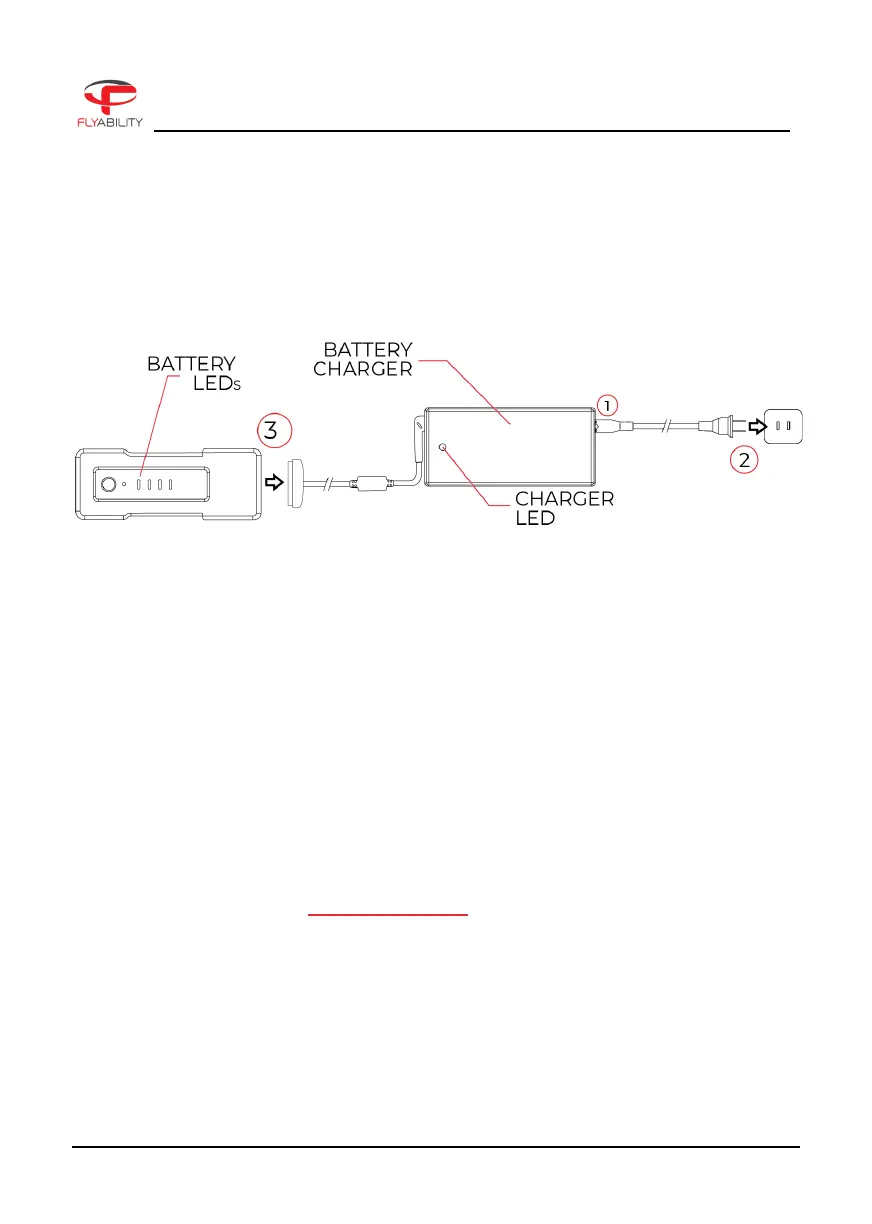
Please refer to the following steps to charge the battery:
1. Insert the AC power cord into the charger.
2. Connect the AC power cord into a 100-240V AC socket. The LED will turn green.
3. Connect the battery pack to the charger.
The battery LEDs will show the progression of the charge.
The charger LED will turn red, indicating that the charge is on going.
4. The battery will be fully charged when the LED turns green again.
If the LED remains green upon connection it might mean that either:
1. The battery is already fully charged, check the state of charge of the battery with a short press
on the button.
2. The battery is outside its temperature range.
a. If warm, let it cool down before re-trying to charge it.
b. If cold, warm the battery before re-trying to charge it.
3. The battery is permanently damaged due to over-discharging. Please contact Flyability
Professional Services at support@flyability.com
7.2. Safety Notes
- Never connect the charger if the power cable has been pinched or shorted.
- Never attempt to dismantle the charger or use a damaged charger.
- Never use the charger with another battery than the LiPo battery provided by Flyability.
Revision 1.0 Page 10 of 12



 To Next Page