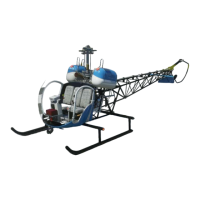
The FlyInside B-47G-2A1 is a meticulously recreated helicopter for Microsoft Flight Simulator, designed to offer a highly realistic flight experience with accurate systems and beautiful artwork. This user manual provides essential information for installation, setup, flight, and troubleshooting.
Function Description:
The FlyInside B-47G-2A1 is a virtual helicopter designed for use within Microsoft Flight Simulator. Its primary function is to simulate the flight characteristics and operational procedures of the real-world B-47G-2A1 helicopter, providing an immersive and challenging experience for flight simulator enthusiasts. The simulation includes realistic flight dynamics, accurate system modeling, and detailed artwork, aiming for an authentic recreation of the aircraft.
Important Technical Specifications (as inferred from the manual):
- Aircraft Type: Piston helicopter (B-47G-2A1).
- Flight Dynamics: Highly realistic, designed to mimic the real aircraft's behavior.
- Systems: Accurate system modeling.
- Engine: Piston engine with a simulated engine governor (can be enabled/disabled).
- Rotor RPM: Designed to maintain 100% rotor RPM when the engine governor is enabled. Manual control of RPM is required when the governor is off.
- Power: Limited overall power, requiring careful collective management.
- Tail Authority: Limited, impacting yaw control, especially in a hover.
- Compatibility: Microsoft Flight Simulator.
- Control Bindings: Compatible with standard Microsoft Flight Simulator control bindings for cyclic roll (left/right), cyclic pitch (fore/aft), yaw (rudder pedals), and collective (throttle paddle).
- Control Sensitivity: Recommended MSFS "Sensitivity" set to 0%, "Dead Zone" 0%, "Neutral" 0%, "Extremity Dead Zone" 0%, and "Reactivity" 100% for all axes for realistic control response.
- Heli Manager: A dedicated application (FlyInside Heli Manager) is used to configure flight model options and activate the product.
- Flight Model Options:
- Easy: Self-stabilizing, has little torque effect, and offers a gentle introduction to helicopter flight.
- Medium: Falls between Easy and Realistic.
- Realistic: Requires minute control inputs and a gentle touch, designed to fly like the real thing.
- Engine Governor: Toggle to switch the included engine governor on and off.
- Engine Failures: Toggle to enable/disable engine failures.
- Cyclic Sensitivity: Adjustable slider (0-100) to control how reactive cyclic controls are. Higher values mean more reactive controls.
- Helicopter Stability: Adjustable slider (0-100) that causes the helicopter to return to an upright hover on its own. In Realistic mode, the helicopter is not self-stable.
- Tail Stability: Adjustable slider (0-100) that determines how much the helicopter compensates for torque effects. Higher values make the tail more stable and less prone to spinning opposite the direction of rotation.
- Cockpit Instruments:
- Radio/Transponder: Active Freq, Standby Freq, Freq Adjust, Transponder Mode, Transponder Code, Com On/Off.
- Engine/Flight Controls: Carb Heat, Mixture, Magnetos (OFF, R, L, BOTH), Engine Starter, Engine Governor (ON/OFF).
- Gauges: OAT (Outside Air Temperature), Carb Air Temp, RPM (Rotor and Engine), Airspeed (MPH), Manifold Pressure (IN HG ABS), Altitude, Oil Pressure, Trans Oil Temp, Cylinder Temp, VSI (Vertical Speed Indicator).
- Electrical/Fuel: Battery (ON/OFF), Alternator (ON/OFF), Low Voltage Indicator, Fuel Prime, Fuel Gauge.
- Lighting: Instrument Power (ON/OFF), Nav Lights (ON/OFF), Tail Beacon (ON/OFF), Strobe Lights (ON/OFF), Landing Lights (ON/OFF).
- Other: Stop Watch.
Usage Features:
- Installation:
- Download the installer from the purchase receipt page (for website version).
- Run the installer and accept prompts.
- Click through the setup wizard.
- Verify the installer correctly locates the MSFS Community packages folder.
- Allow the installer to launch FlyInside Heli Manager upon completion.
- Activation (Website Version Only):
- Open Microsoft Flight Simulator and select the FlyInside B-47G.
- Load a flight.
- The B-47 will have an in-cockpit message prompting to run FlyInside Heli Manager or enter an activation key.
- If not running, launch FlyInside Heli Manager from the desktop or Start Menu.
- Enter the product key (Ctrl+V to paste) and click "Activate."
- The rotors should start spinning, indicating readiness for flight.
- Quick Tips for Initial Setup:
- Load a flight in MSFS.
- Press "Escape" to open the menu.
- Click the "Assistance Options" button.
- Ensure that all "PILOTING" options are set to "OFF" (Take-Off Auto-Rudder, Assisted Yoke, Assisted Checklist, Assisted Landing, Assisted Takeoff, AI Radio Communications (ATC), AI Anti-Stall Protection, AI Auto-Trim, Assisted Controller Sensitivity).
- Heli Manager Usage:
- The Heli Manager is used to configure flight model options (Easy, Medium, Realistic), enable/disable the engine governor, enable/disable engine failures, and adjust Cyclic Sensitivity, Helicopter Stability, and Tail Stability.
- For marketplace versions, the Heli Manager is integrated into the cockpit; for website versions, it runs as a separate application.
- To dismiss the in-cockpit Heli Manager, click the "X" on the upper right corner.
- To open it again, flip the Heli Manager switch on the bottom center of the helicopter panel.
- Flight Controls Setup:
- Bind joystick axis for cyclic roll (left/right) to MSFS "Ailerons Axis."
- Bind cyclic pitch (fore/aft) to MSFS "Elevator Axis."
- Bind pedals or yaw control to MSFS "Rudder Axis."
- Bind collective control (or throttle paddle) to MSFS "Throttle Axis."
- Ensure all control surfaces are set to "Joystick L-Axis X," "Joystick L-Axis Y," "Joystick R-Axis Z," and "Joystick Slider X" respectively, with "Reverse Axis" unchecked unless necessary for specific setups.
- For realistic control, set MSFS "Sensitivity" to 0%, "Dead Zone" to 0%, "Neutral" to 0%, "Extremity Dead Zone" to 0%, and "Reactivity" to 100% for all axes.
- Manual Throttle Control: The B-47G does not have an engine governor by default (unless enabled in Heli Manager). The pilot must manually control the engine's power level using a twist grip on their collective. More pitch on the collective requires more power.
- PC Helicopter Controls (HOTAS/Joystick): If using a HOTAS or joystick without a full USB helicopter collective, it's recommended to bind the twist throttle to the "Propeller Axis" in MSFS. This allows sharing one control between airplane throttle and helicopter collective.
- Startup Procedure:
- Turn on the BATT switch.
- Ensure the ALT switch is off.
- Set Magnetos to BOTH.
- Raise the mixture to the full-rich (upwards) position.
- Make sure the throttle is mostly closed (if using the engine governor, this will be handled for you).
- Press the Starter button on the collective.
- Once the engine starts, observe the engine RPM jump to a 1500 rpm idle, with rotor RPM at zero and slowly climbing.
- Gently add throttle to increase rotor RPM and join the needles.
- Using around 15 inches of manifold pressure, increase rotor RPM to 100%.
- Lower the throttle to ensure the needles split and the sprag clutch is functioning.
- Raise the throttle to join the needles again.
- Go fly!
- Helicopter Flight Characteristics:
- Power Management: The B-47G has limited power. Pilots must be gentle on the collective and manage power carefully, especially in a hover. Over-pulling collective can lead to engine failure.
- Manifold Pressure: Keep an eye on the Manifold Pressure gauge. There's a redline, indicating maximum engine power. Exceeding this can cause engine and in-flight engine failure.
- CHT (Cylinder Head Temperature): Stay within the yellow arc for too long to avoid overheating the engine.
- Yaw Control: The B-47 is designed with limited tail authority, making quick yaw left and right in a hover challenging. It requires gentle collective management and pivoting rather than direct yaw.
- Stability: The helicopter isn't inherently stable. If you tip the nose forward, it won't come back on its own. You need to pull back on the stick to pull the nose back up. Constant correction is needed.
Maintenance Features (as inferred from the manual):
- Engine Governor: The ability to enable/disable the engine governor allows for simulating different operational conditions or simplifying engine management.
- Engine Failures: The option to enable/disable engine failures allows users to practice emergency procedures or enjoy a less stressful flight experience.
- Troubleshooting Common Issues:
- Engine quitting in flight: This can be due to pulling too much power, keeping manifold pressure above red-line, or running out of fuel. Monitoring manifold pressure and fuel gauge is crucial.
- Descending and suddenly falling out of the sky (Vortex Ring State - VRS): This occurs when sinking into the downwash of your own turbulence. To avoid VRS, maintain forward airspeed in descents and avoid high altitude descents by going either forwards or sideways and lowering the collective.
- Inability to turn left: This is due to the B-47's limited overall power and tail authority. Pulling too much collective power will make it difficult to turn left. Lowering collective slightly and turning slowly will help.
The FlyInside Heli Manager, while not a "maintenance" feature in the traditional sense, serves as a configuration and diagnostic tool for the simulation, allowing users to adjust flight model parameters to suit their skill level and preferences, which can be seen as a form of "tuning" or "optimizing" the aircraft's behavior within the simulator. The manual also provides contact information for support, indicating a channel for addressing technical issues.

 Need help?

 To Next Page
 General