Before starting your Hedgetrimmer.
1. Remove blade cover (E).
To start your Hedgetrimmer
1. There are two switch levers fitted to your Hedgetrim-
mer.
2. Both switch levers need to be held in the operating
position (See Fig F) for the product to start.
To stop your Hedgetrimmer
• Move Hedgetrimmer away from cutting area before
stopping.
1. To stop, release one
of the switch levers.(Fig G)
Starting and Stopping
E
F
G
D
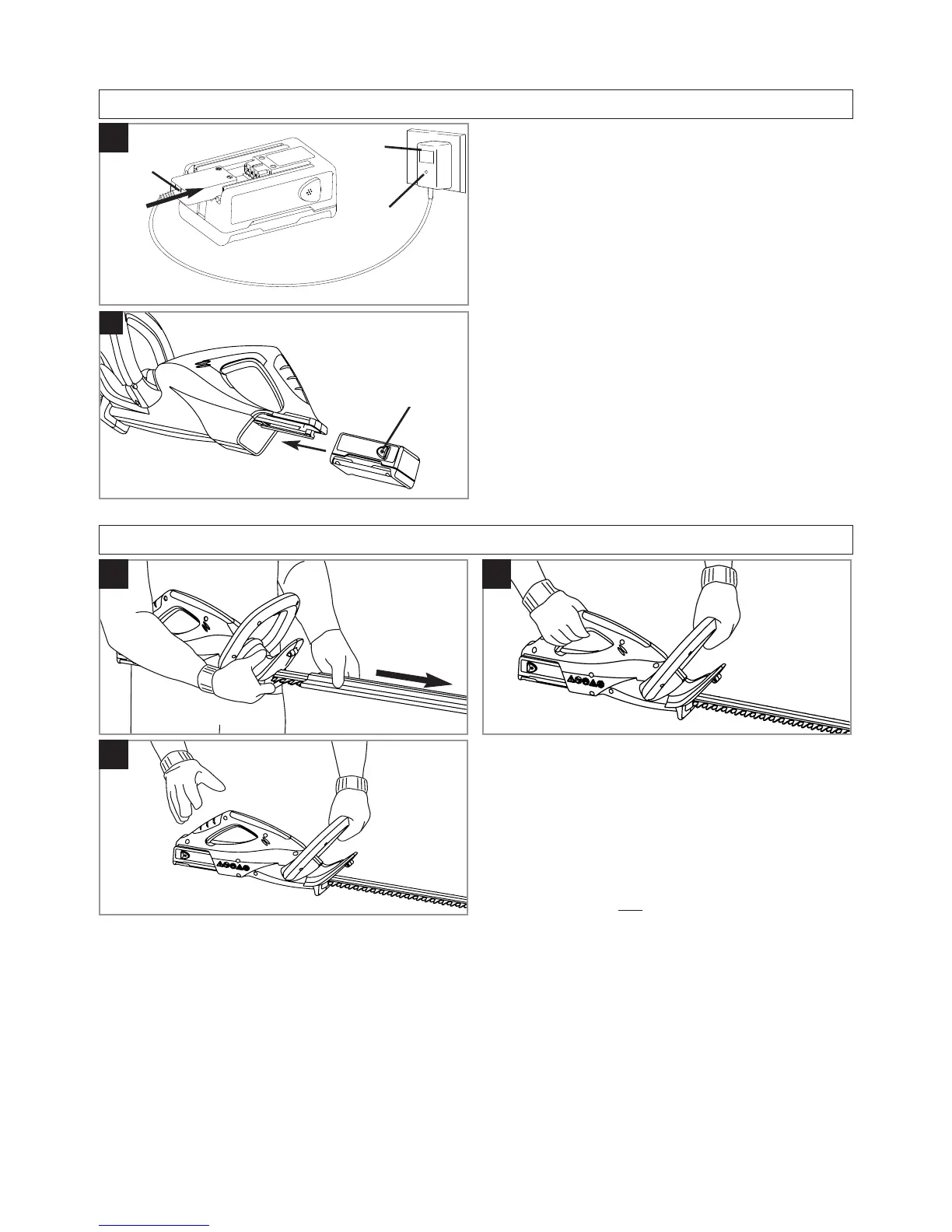
Charging the Battery Pack
Initial Charging Procedure
1. Use the charger indoors only.
2. Ensure the charger is not exposed to moisture. Keep
the charger and the Battery Pack dry at all times. Keep
the charger well ventilated during charging.
3. Attach the charger connector (C1) to the Battery Pack.
4. Plug the charger (C2) into a suitable household electrical
wall socket and switch on.
5. The red indicator lamp (C3) glows continuously during
charging.
6. Full charge will be achieved in 3 hours after which the indi-
cator lamp on the charger (C3) will turn to green. During
charging the charger becomes warm. This is normal and
means the charger is operating correctly.
Re-Charging the Battery Pack
1. Re-charge the Battery Pack as soon as the cutting power
of your trimmer begins to die and slow down.
2. Avoid running the Battery Pack into "deep" discharge, i.e.
avoid flattening the Battery Pack completely.
3. Follow the procedure outlined in the Initial Charging
Procedure.
4. Charging the Battery Pack according to these instructions
should ensure maximum battery life.
Battery Pack Assembly (D)
1. Attach the Battery Pack as illustrated in Fi
gure D, ensuring
that it clicks into position and is located firmly.
2. To remove, press the two buttons (D1) on either side of the
Battery Pack and slide off.
C
1
2
3
1







 To Next Page