28
COM2/COM3/COM4 Power Setting
COM2, COM3 and COM4 can be set to provide power to your serial device.
The voltage can be set to +5V or
+
12V by setting jumper JP9 on the motherboard.
When enabled, the power is available on pin 10 of the RJ45 serial connector.
If you use the serial RJ45 to DB9 adapter cable, the power is on pin 9 of the DB9
connector. By default, the power option is disabled in the BIOS.
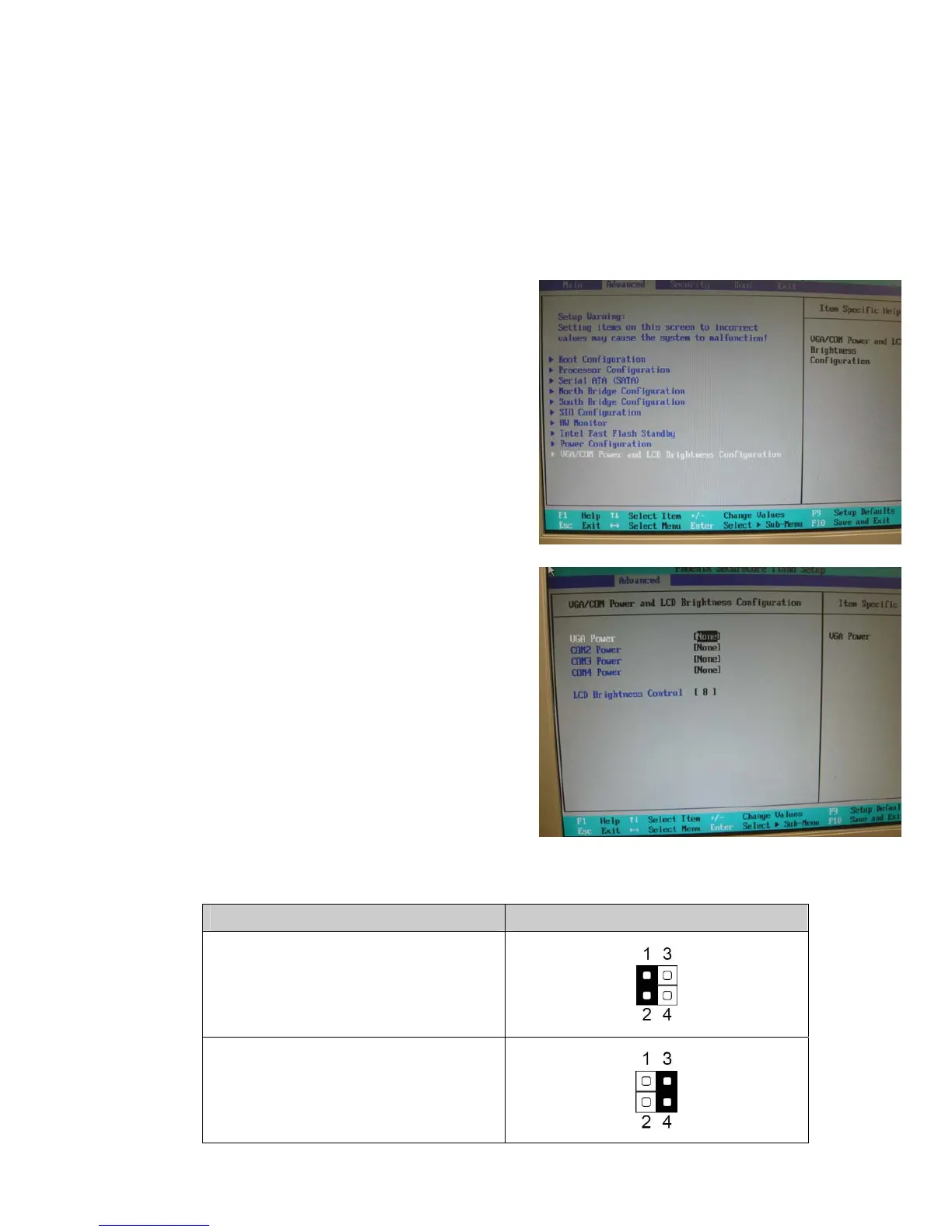
Enable COM2/ COM3/COM4 power in
BIOS
1. Power on the system, and press
the <DEL> key when the system is
booting up to enter the BIOS Setup
utility.
2. Select the Advanced tab.
3. Select VGA/COM Power and LCD
Brightness Configuration Ports
and press <Enter> to go to display
the available options.
4. To enable the power, select
COM2 , COM3 or COM4 Power
setting and press <Enter>. Select
Power and press <Enter>. Save
the change by pressing F10.
COM2 Power Setting
Function JP5 (1-2) (3-4)
▲COM2 +5V
COM2 +12V



 To Next Page