Section II – Configuring a SLIP Connection
AB06064 · Issue/Rev. 0.0 (5/06) Page 7
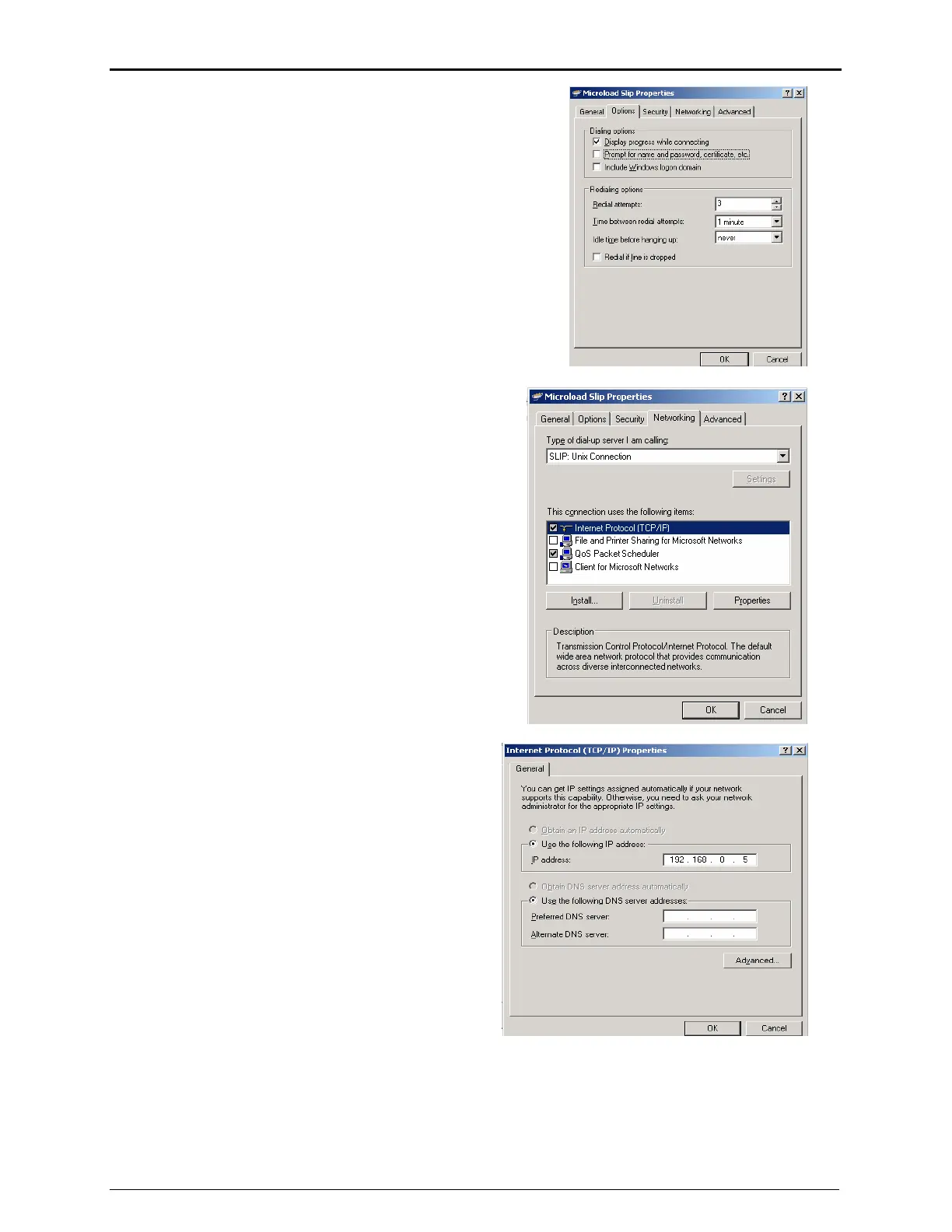
Click on the Options tab. Un-check the “Prompt for name
and password, etc.” box. The other options can be left the
same.
Click on the Networking tab.
o From the drop down menu for the type of dial
up server I am calling, select “SLIP: UNIX
Connection”
o Clear all checkboxes except for Internet
Protocol (TCP/IP) and QoS Packet
Scheduler.
o Select “Internet Protocol (TCP/IP) ” in the list
box and click <Properties>
A new window will appear that is labeled “Internet
Protocol (TCP/IP) Properties”
o Select “Use the following IP address”
o Specify an address that is DIFFERENT
from but on the same subnet as the
microLoad you are using
For example, if the microLoad is configured
for 192.168.0.1, set the PC to 192.168.0.5, or
192.168.0.10, etc.
Click <OK> to exit the dialog then click <OK> at the bottom of the microLoad SLIP Connection Properties
window. If all is configured correctly, the dialog should report ‘connected’ and the link will be established
successfully.



 To Next Page