2.Buttons & Functions Introduction
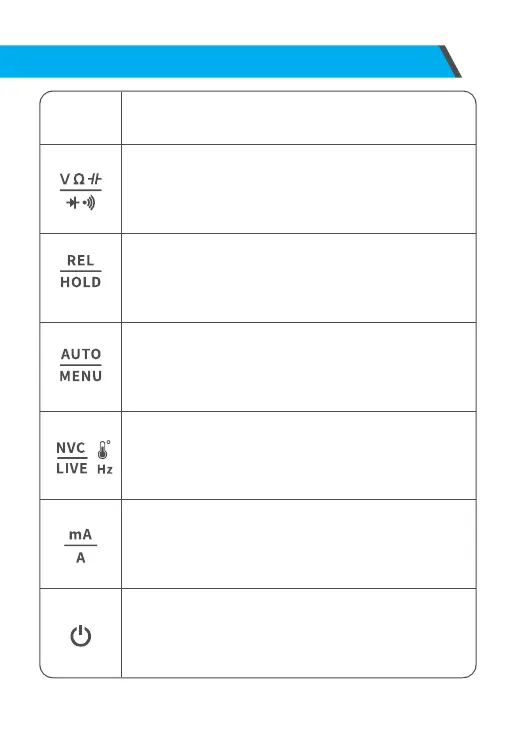
Button Function
Voltage gear, resistance gear, diode/buzzer gear, capacitance
gear, selection key;Enter the menu is the right selection key.
HOLD/REL(date hold/ relative value)key:
Short press this key to hold the date, and short press again to
cancel;Long press this key for 2 seconds to enter the relative
value measurement mode, long press again to cancel;Enter
the menu is the up selection key.
Auto/Menu key:
Short press this key to switch to automatic gear;
Long press and this key for 2 seconds to enter the menu, and
long press again to exit the menu;Enter the menu is the
confirm key.
Frequency, temperature, NCV, LIVE selection key;
Enter the menu is the down selection key.
Low current and high current selection key;
Enter the menu is the left selection key.
On/Off key: Long press and hold for 2 seconds to turn on ,
and long press again to turn off when it is turned on.
12



 To Next Page