LIVE measurement
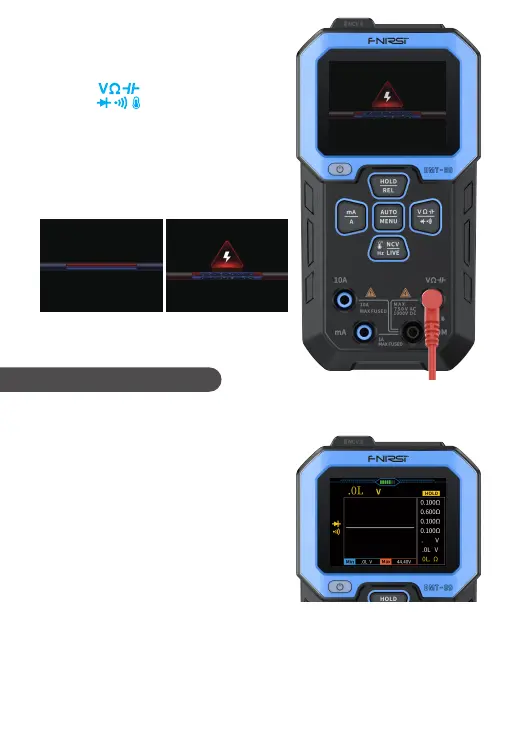
① Press the down to switch to the LIVE
gear, connect the red teat pen to the input
terminal , and remove the black
test pen.
② Contact the red test pen with the mains
power plug, if the buzzer ring as either a
live line or a neutral line or ground line ,
and screen display will change synchro-
nously, as shown in the following figure:
①The measurement methods for
recording mode is the same as that for
normal mode. Please read the measure-
ment methods for normal mode.
②The recording mode adds real-time
measurement curves, records the
minimum and maximum values during
measurement, and saves measurement
data on top of the regular mode.
③When measuring, press the middle button briefly. The record box on the right
side of the screen will record the measured values at this time and save them to
the historical record. The record box can display up to 8 sets of measured values,
when it’s over 8 sets, the first set of data is overwritten and the cycle follows. The
data on the yellow down line represents the latest recorded measurement value.
Detected zero
or ground wire
Detected a live wire
In recording mode, it supports voltage, resistance, diode/buzzer,
capacitor, high current, low current, frequency, and temperature gears.
2. Recording Mode
17



 To Next Page