TView Pro AV User's Manual Rev 2.01
23
4.3.1 Configuring the TView Pro AV for RS-232 or RS-422
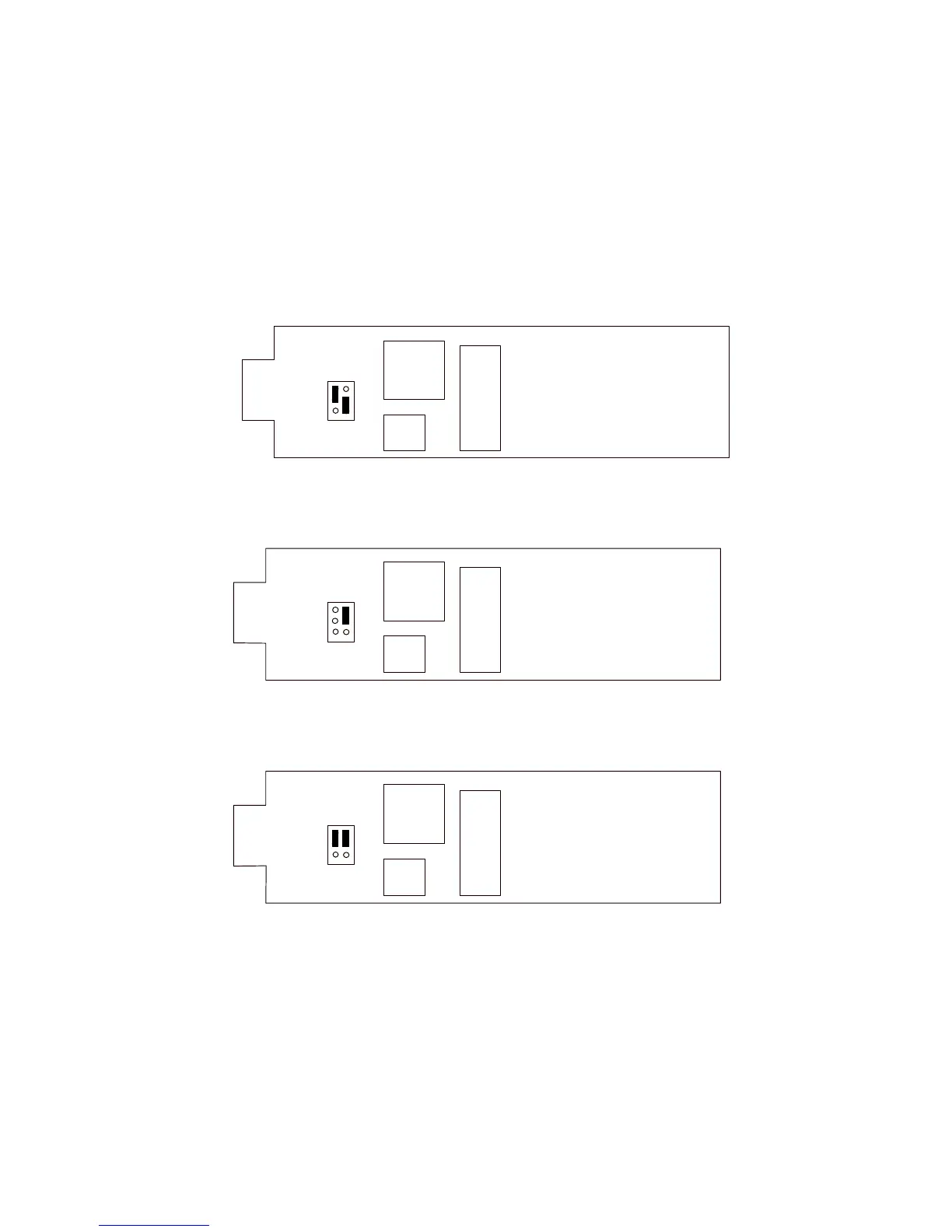
Jumper JP3 on the TView Pro AV's Control Interface board selects RS-232 or RS-422. Depending on the configuration of
this jumper, the DB-9 communications connector located on the rear panel of the TView Pro AV will accept either RS-
232 or RS-422.
Figure 5 indicates the positioning of Jumper JP3. In the case of RS-422, the user has the additional choice of selecting a
120 Ohm termination.
Figure 5: Position of Jumper JP3 for RS232 or RS422 Control
RS-232
RS-422 (Unterminated)
RS-422 (120 Ohm Termination)
P1
FAB 0082-1100-101
U3
JP3
Y1
P1
FAB 0082-1100-101
U3
JP3
Y1
P1
FAB 0082-1100-101
U3
JP3
Y1



 To Next Page