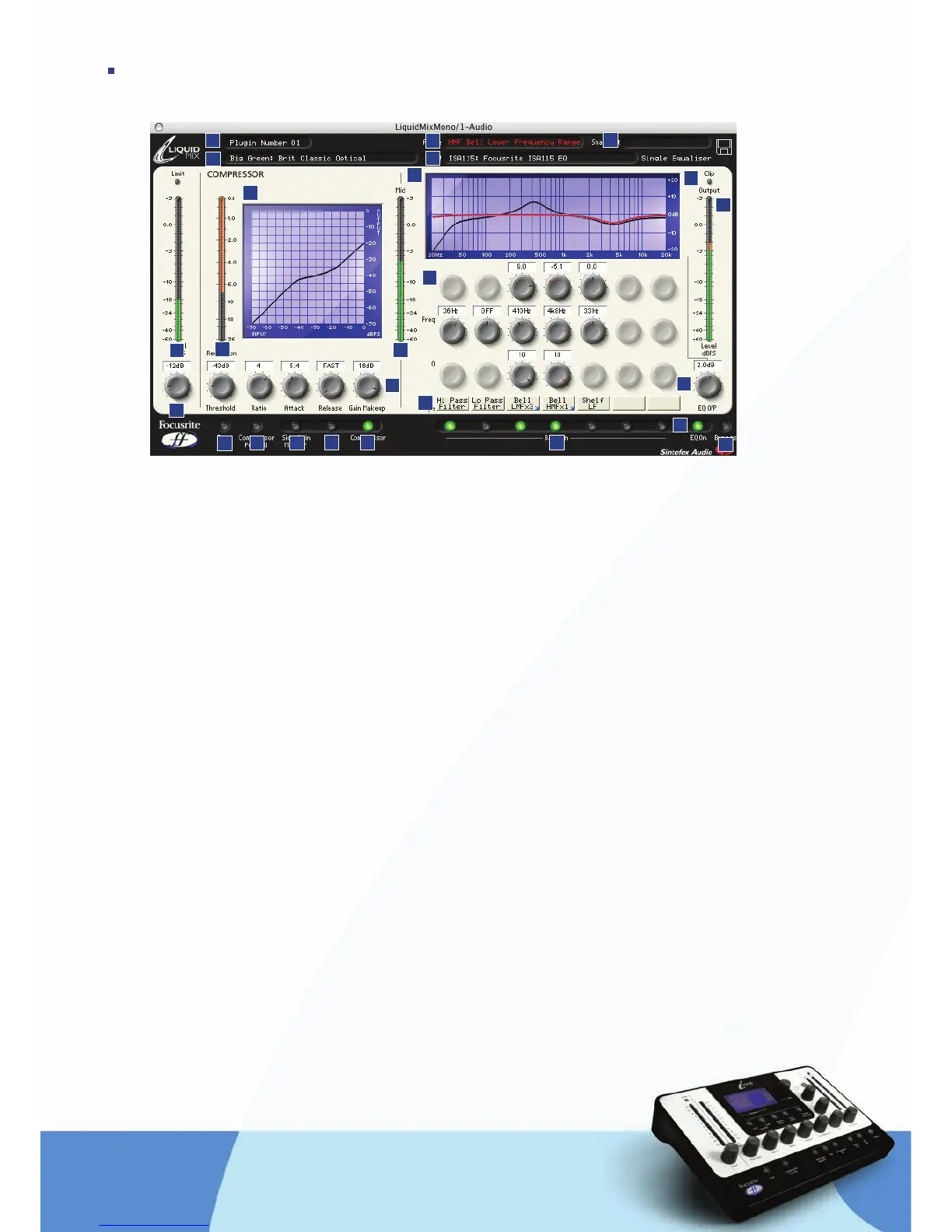
SOFTWARE GUI CONTROLS
1. Track name – the name written here will appear in the Track select List on the Liquid Mix hardware
2. Compressor – displays the currently active compressor emulation, click to choose a different one
3. Active – defines the currently selected EQ band
4. EQ – displays the currently active EQ emulation, click to choose a different one
5. Snapshot – shows the name of the current snapshot if one has been saved, click the disk symbol
to load, save or rename a snapshot
6. Clip – lights if compression and/or EQ are causing the output signal to overload
7. EQ Graph – displays the overall EQ in black and current band shape in red
8. Output meter – displays the level of the signal after compression and EQ
9. EQ Output – sets the level of the signal after EQ
10. Bypass – bypasses this instance of Liquid Mix
11. EQ On – activates/deactivates the EQ section (all bands)
12. Band On – switches activate/deactivate each of the seven EQ bands
13. EQ controls – Gain, Frequency and Q dials for each of the seven bands
14. Shape Names – display the shape of each band, click to select additional options when a blue
arrow is displayed
15. Mid Meter – shows the level of the signal between Compression and EQ stages (after compression
without Compressor Post EQ switch active or after EQ with switch active)
16. Compressor Graph – displays the compressor shape (threshold and ratio)
17. Compressor controls – Threshold, Ratio, Attack, Release, Gain Makeup
18. Compressor On – activates the compressor
19. Link – links the sidechains with stereo instances of Liquid Mix (active as default)
20. Sidechain Monitor – enables listening to the compressor sidechain
21. Compressor Post EQ – reverses the order of the processor sections (places the EQ before compression)
22. Free – enables unrestricted compressor controls (all dials across full ranges)
23. Input – sets the level of the signal before compression and EQ
24. Gain Reduction Meter – shows the amount of compression taking place
25. Input Meter – displays the level of the signal before Liquid Mix processing occurs
2
3
4
5
6
7
8
9
10
11
12
13
14
15
16
17
18
19
20
21
22
23
24
25
1


 To Next Page
 Loading...