FoMaKo Focus Your Streaming www.fomako.net
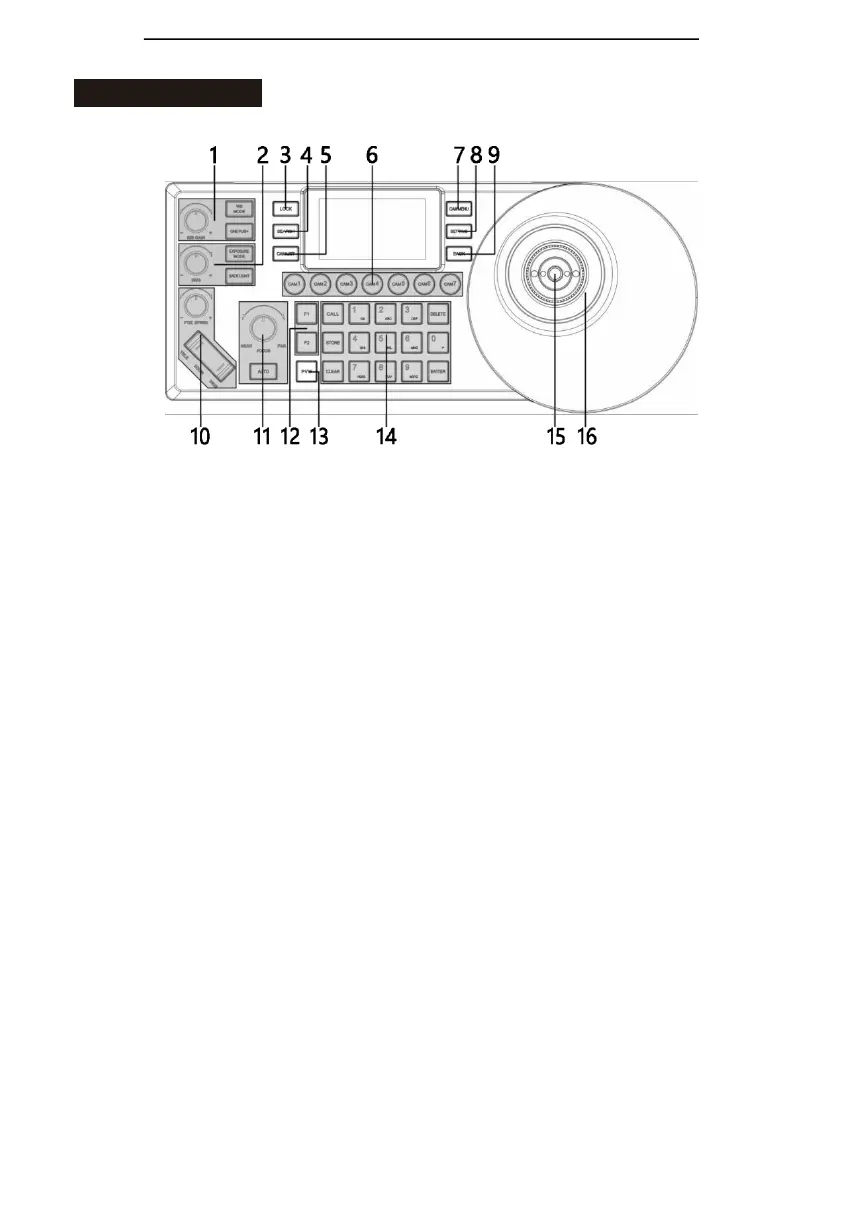
The Frontboard:
Button Function:
1. White balance adjustment
“WB MODE” white balance mode selection
“ONE PUSH” trigger, white balance is triggered when the controller is in “ONE PUSH” mode. “R/B
GAIN”white balance adjustment
2. Exposure adjustment
“EXPOSURE MODE” exposure mode selection
“BACKLIGHT” turn on/off backlight
“I/S/G”exposure adjustment
3. “LOCK”, lock keyboard
4. “SEARCH”for searching IP device; support VISCA OVER IP / ONVIF protocol search
5. “CAM LIST”, IP devicelist
6. “CAM1~CAM7”, shortcut buttons to select cameras
7. “CAM MENU” , camera menu, turn on/off
8. “SETTING”, control keyboard settings
9. “BACK”, back button
10. Optical zoom adjustment
“PT/Z SPEED”, knob to adjust the zoom speed level (1~7)
“ZOOM” TELE WIDE, control camera’s optical zoom
11. Focus adjustment
“NEAR”, manual focus mode, near focus
“FAR”, manual focus mode, far focus “AUTO”, auto focus mode
12. “F1~F2”, customizable buttons
13. “PVW”, preview current-controlled device, IP video streaming
14. Preset operation area: characters, number keyboard
15. HOME: confirmation button (VISCA)
16. PTZ joystick
The left and right direction of the joystick is panning, and the up and down
is tilting. When you release the joystick, the camera will stop moving.
Turn the knob on the joystick clockwise, ZOOM TELE; Turn the knob on
the joystick anticlockwise, ZOOM WIDE.



 To Next Page