EasyManua.ls Logo

FoMaKo KC608N - User Manual

Default Icon
22 pages
Print Icon
To Next Page IconTo Next Page
Loading...
FoMaKo
E-mail: ivan@fomako.net
Website: www.fomako.net
Phone: 0086-18565635753
Address: 10F NiuLanQian Building,Minzhi,
longhua, shenzhen, China, 518000
Please feel free to contact us if you have any questions.
FoMaKo
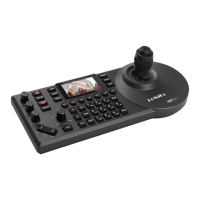
PTZ Camera Controller
(KC608 Pro & KC608N)
Please Note: Both controller and camera have NDI function, then, they can use NDI control protocol.
User Manual V1.0
Question and Answer IconNeed help?

Do you have a question about the FoMaKo KC608N and is the answer not in the manual?

Summary

Quick Start Guide

Network Setup for Controller and Cameras

Connect controller and cameras to your network for operation and IP address assignment.

IP Address Requirements for Connectivity

Explains IP address requirements for successful network connectivity between devices.

Methods for Adding Cameras to the Controller

Details on adding cameras via search function or manual IP entry.

Core Controller Functions

Managing Preset Camera Positions

How to save, recall, and manage camera positions using preset functions.

Enabling Camera Video Preview

Steps to configure and use the camera video preview (PVW) feature.

Controller Hardware and Controls

PTZ and Zoom Operation

How to use the joystick and knobs for PTZ and zoom operations.

Controller Interfaces and Pin Definitions

Power and Network Connections

Serial Camera Connectivity Wiring

Navigating the OSD Menu System

Menu Configuration: Hot Keys and Device Management

Menu Configuration: Protocols, Network, and Keys

Menu Configuration: Display, Beep, and Joystick

Menu Configuration: Language, Device Info, and Reset

Adding Cameras to the Controller

Network Search for IP Cameras

Steps to search and add IP cameras to the controller.

Managing Camera Assignments

Manual Addition of Specific Camera Protocols

Instructions for manual addition of VISCA_IP and VISCA_TCP cameras.

Camera Control and Interaction

Camera OSD Menu Navigation

Accessing and navigating the camera's On-Screen Display (OSD) menu.

Manual Camera Movement Operations

Using the joystick for physical pan, tilt, and zoom adjustments.

Managing Camera Presets

Saving Camera Preset Positions

Saving the current camera position as a preset.

Recalling Saved Camera Presets

Loading a previously saved camera position.

Removing Camera Presets

Removing saved camera positions from the controller.

Camera Image Adjustment and NDI Control

Adjusting Camera Image Settings

Modifying settings like exposure, white balance, and focus.

NDI Protocol Camera Connectivity

Connecting and controlling cameras that use the NDI protocol.

FoMaKo KC608N Specifications

General IconGeneral
BrandFoMaKo
ModelKC608N
CategoryController
LanguageEnglish

Related product manuals