5
4
3
2
7
8
9
6
1
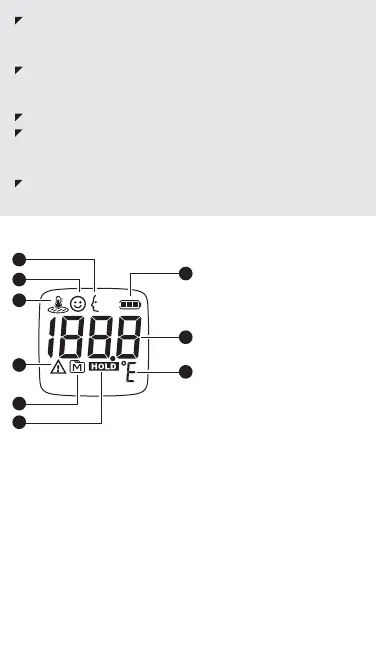
1. Adult body temperature
indicator
2. Child body temperature
indicator
3. Object surface temperature
indicator
4. Error message
5. Memory mode
6. Hold Symbol
7. Battery indicator
8. Temperature display
9. Temperature unit
LCD SCREEN
Always operate the thermometer in an operating temperature
range 50°F to 104°F (10°C to 40°C), and relative humidity less
than 85%.
Always store the thermometer in a cool and dry place:
temperatures between -4°F to 140°F (-20°C to 60°C); relative
humidity less than 85%. Avoid direct sunlight.
Avoid dropping the thermometer.
Basic safety precautions should always be observed,
especially when the thermometer is used on or near children
and disabled persons.
This thermometer is not intended to be a substitution for a
consultation with your physician.
1. Remove battery cover by pressing down at the arrow mark
and slide in the direction of the arrow as shown in the figures
below.
2. Install (2) AAA alkaline batteries and close the battery cover.
3. If thermometer will be stored without use, remove batteries.
When the thermometer is off, press MODE key for 2 seconds to
enter selection mode. Press MODE key again to switch between
°F and °C. Press POWER key.
USING THE DEVICE
Install Battery
Selecting the measuring unit


 To Next Page