EasyManua.ls Logo

Force SCOOT COSMO - User Manual

Force SCOOT COSMO
13 pages
Print Icon
To Next Page IconTo Next Page
Loading...
Question and Answer IconNeed help?

Do you have a question about the Force SCOOT COSMO and is the answer not in the manual?

Summary

Scoot Cosmo Operation Manual

Safety Instructions

Important safety guidelines for operating the Scoot Cosmo drone, covering assembly, operation, and hazards.

Product Specifications

Details on what is included, flight time, charge time, dimensions, and weight of the drone.

Important Statement

Safety Precautions

Precautions regarding small parts, humid environments, rotating parts, heat, and general awareness during operation.

Drone Charging Instructions

Instructions on how to connect the drone to a USB port for charging using various power sources.

Flight Directions

How Scoot Flies

Explains how the drone takes off, hovers, and responds to basic commands.

Scoots Current Actions

Describes how the drone senses its environment and changes direction to avoid obstacles.

Flight Preparations

Calibration Instructions

Steps to calibrate the drone, involving turning it on, shaking it, and placing it on a flat surface.

Flight Direction Controls

How Scoot is Controlled

Details how to control the drone's direction using hand gestures.

How to Make Scoot Go Higher

Explains how to use hand gestures to make the drone ascend.

How to Stop Scoot

Instructions on how to safely stop the drone by catching and turning it upside down.

Additional Scoot Information

How Scoot Flips

Instructions on how to perform a flip maneuver using hand gestures.

Lithium Battery Charging Instructions

Battery Safety Warnings

Warnings and precautions for charging and handling the lithium battery to prevent hazards.

FCC Information

FCC Warning

Information regarding radio frequency energy, potential interference, and user compliance.

Troubleshooting Guide

How Scoot Turns On

Guidance on activating the drone's power switch.

Why Scoot Doesnt Charge

Explanation for issues related to the drone's charging indicator and USB plug.

Why Scoot Crashes

Reasons for the drone crashing, often due to tight spaces or rapid direction changes.

Scoot Going Too Fast

Advice on ensuring adequate airspace to manage the drone's speed and movement.

Scoot Durability

Information on the drone's toughness and gentle handling recommendations.

Where Scoot Can Fly

Recommendations for suitable flying environments, emphasizing indoor spaces.

Improving Scoots Performance

Guidance on adjusting flight control through the calibration section.

Warranty

Exceptions to Limited Warranty

Details the conditions and damages that are not covered by the product's warranty.

Warranty Claim Procedure

Steps for making a warranty claim, including required information and contact details.

Limited Remedy

Outlines the sole liability and exclusive remedies available for warranty breaches.

Disclaimer

States that warranties are exclusive and disclaims other implied warranties and liability for damages.

Free Replacement Parts

Information on obtaining free spare parts for a limited period after purchase.

Overview

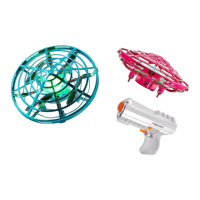
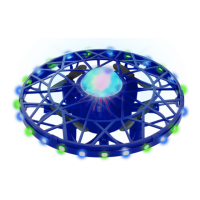
The Scoot Cosmo Drone is a hand-operated drone designed for users aged 8 and above, offering an intuitive and interactive flying experience. It's primarily intended for indoor use, emphasizing safety and ease of operation through its motion sensor technology and simple controls.

Function Description:

The Scoot Cosmo is a mini drone that flies based on hand gestures and proximity sensing. It's designed to be launched by gently tossing it into the air or placing it on a palm. Once airborne, its motion sensors detect nearby objects, including hands, and guide its flight in the opposite direction, preventing crashes. The drone can be controlled to go higher by placing a hand underneath it. It also features an automatic rotation function to sense the room and avoid obstacles. A unique "flip" trick can be performed by sensing hands on both sides and then brushing a hand underneath when the light flickers green. To stop the drone, it should be gently caught "hamburger-style" and turned upside down to disengage the motor. The drone's center light serves as an indicator for various statuses: solid green for readiness, flashing for takeoff, blinking slowly for low battery, and red for low battery.
Important Technical Specifications:

  • Includes: 1 x Scoot Cosmo hand-operated drone, 1 x Built-in 3.7V 380 mAh Li-Po rechargeable battery, 1 x USB charging cable, 1 x Instructions Manual.
  • Flight Time: Approximately 5 minutes.
  • Charge Time: Approximately 60 minutes.
  • Drone Dimensions: 4.5" Diameter x 2" Height.
  • Drone Weight: 1.6 ounces.
  • Battery Type: Built-in 3.7V 380 mAh Li-Po rechargeable battery.
  • Charging Input: USB port with a 5V output and a charging current of 1-2A.
  • Age Recommendation: Suitable for age 8+.
  • FCC Compliance: The device complies with part 15 of the FCC Rules, designed to provide residential protection against harmful interference.

Usage Features:

  • Hand-Operated Control: The drone responds to hand gestures and proximity, making it easy to direct its flight without a traditional remote control.
  • Motion Sensor Detectors: Sensors around the drone detect hands and other obstacles, allowing it to fly in the opposite direction to avoid collisions.
  • Automatic Obstacle Avoidance: The drone automatically rotates to sense the room and prevent crashes.
  • Easy Launch: Can be launched by gently tossing it into the air or from the palm of a hand.
  • Altitude Control: Placing a hand underneath the drone makes it ascend.
  • Flip Trick: A special maneuver where the drone performs a flip, activated by specific hand gestures.
  • Simple Stop Mechanism: Catching the drone "hamburger-style" and turning it upside down stops the motor.
  • LED Indicators: The center light provides visual cues for battery status (solid green for ready, blinking red for low battery) and operational modes (flashing red to green during calibration).
  • Indoor Use: Designed specifically for indoor environments, avoiding strong winds or narrow spaces.
  • Calibration Mode: A calibration process ensures optimal flight control, initiated by turning the drone off and on, shaking it, and placing it on a flat surface.

Maintenance Features:

  • Charging: The drone is charged via an included USB cable, which can be connected to various power sources like a phone charger, power bank, computer, or car charger. The charging light indicator blinks while charging and turns off when fully charged.
  • Battery Safety: Users are advised not to charge the battery unattended, keep it away from flammable materials, and stop charging if any deformation or discoloration occurs. Contact with battery leaks should be avoided, and the battery should not be exposed to fire or extreme conditions.
  • Cleaning: The drone can be cleaned with a clean, damp cloth after disconnecting the charger. Solvents or industrial alcohol should not be used.
  • Storage: Keep packaging materials away from children.
  • Troubleshooting Guide: The manual includes a troubleshooting section for common issues like turning on, charging, crashing, speed, durability, flight location, and performance improvement, often referencing the calibration section for flight control adjustments.
  • Replacement Parts: Force1rc.com offers free limited replacement parts for 90 days for registered drones, with exceptions for batteries, motors, circuit boards, cameras, and transmitters, and shipping charges may apply.
  • Warranty: A 90-day limited warranty covers defects in material and workmanship, requiring product registration online to obtain a warranty code for claims. The warranty does not cover damage from normal wear and tear, accidents, misuse, unauthorized modifications, incorrect use, or operation in poor weather or electromagnetic interference.

Force SCOOT COSMO Specifications

General IconGeneral
BrandForce
ModelSCOOT COSMO
CategoryDrones
LanguageEnglish

Related product manuals