Appliance Deployment Overview
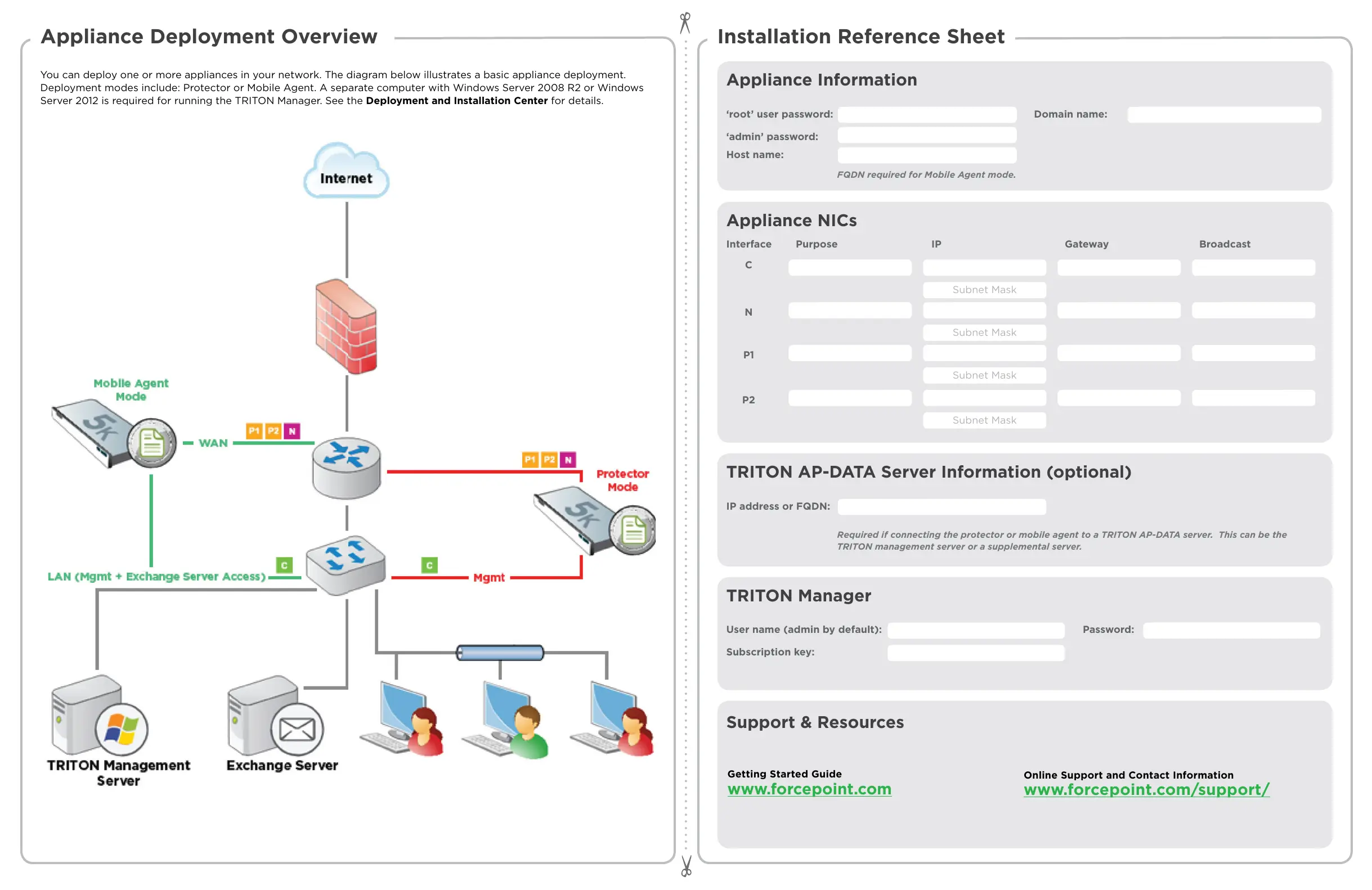
You can deploy one or more appliances in your network. The diagram below illustrates a basic appliance deployment.
Deployment modes include: Protector or Mobile Agent. A separate computer with Windows Server 2008 R2 or Windows
Server 2012 is required for running the TRITON Manager. See the Deployment and Installation Center for details.
Installation Reference Sheet
Appliance Information
Appliance NICs
‘root’ user password:
Interface
Domain name:
Host name:
‘admin’ password:
C
FQDN required for Mobile Agent mode.
N
P1
P2
Purpose IP Gateway Broadcast
Subnet Mask
Subnet Mask
Subnet Mask
TRITON AP-DATA Server Information (optional)
IP address or FQDN:
Required if connecting the protector or mobile agent to a TRITON AP-DATA server. This can be the
TRITON management server or a supplemental server.
TRITON Manager
User name (admin by default): Password:
Subscription key:
Getting Started Guide
www.forcepoint.com
Online Support and Contact Information
www.forcepoint.com/support/
Support & Resources
Subnet Mask


 To Previous Page