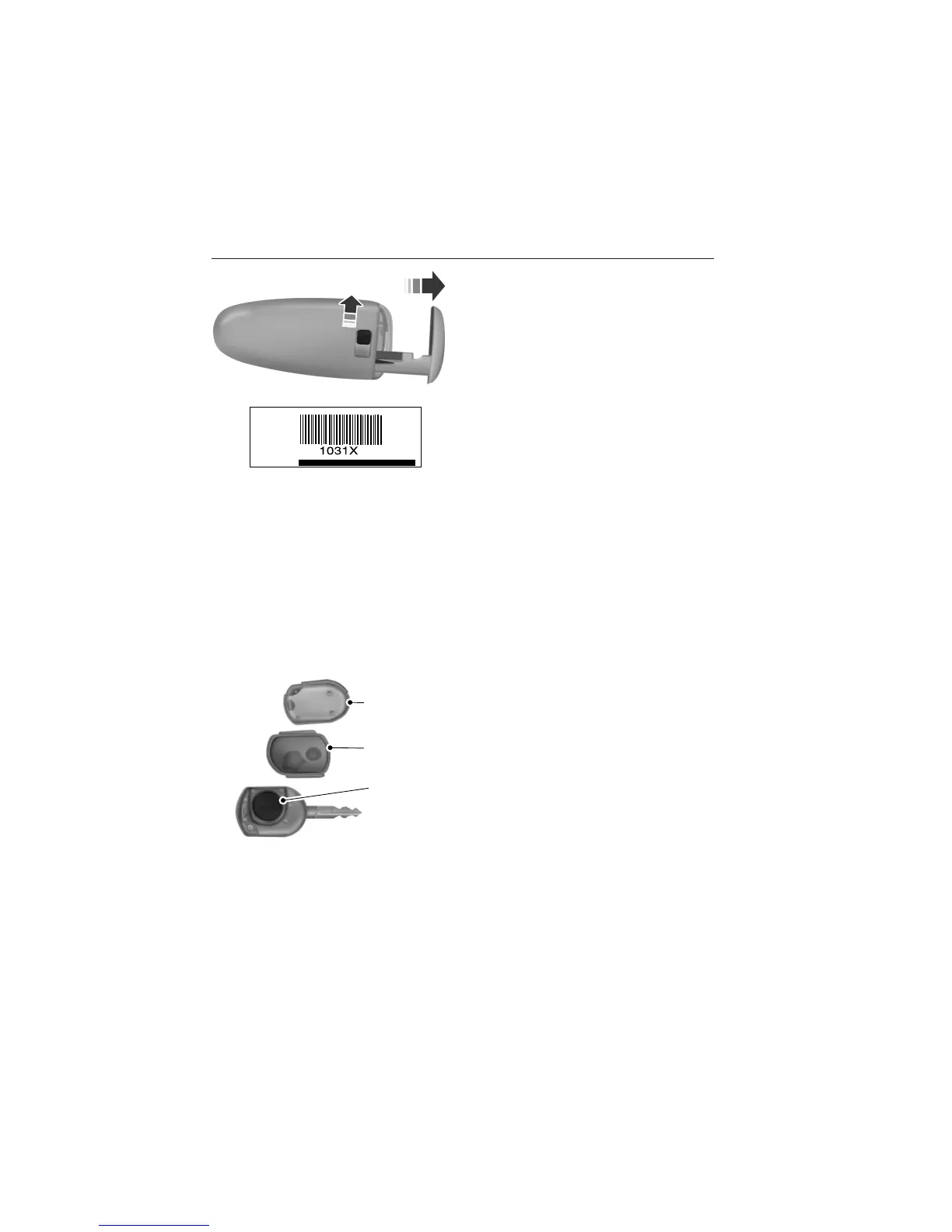
The intelligent access key also
contains a removable mechanical key
blade that can be used to unlock the
driver door. Slide the release on the
back of the transmitter to release the
key blade, then pull the blade out.
Note: Your vehicle’s back-up keys
were issued with a security tag that
provides important vehicle key cut
information. Keep the tag in a safe
place for future reference.
Replacing the Battery
Note: Refer to local regulations when disposing of transmitter batteries.
Note: Do not wipe off any grease on the battery terminals or on the
back surface of the circuit board.
Note: Replacing the battery will not delete the transmitter from the
vehicle. The transmitter should operate normally.
The remote control uses one coin-type three-volt lithium battery CR2032
or equivalent.
Integrated Keyhead Transmitter
1. Twist a thin coin in the slot near the key
ring to remove the battery cover (1).
2. Carefully peel up the rubber gasket (2)
from the transmitter if it does not come off
with battery cover.
3. Remove the old battery (3).
4. Insert the new battery. Refer to the instructions inside the integrated
keyhead transmitter for the correct orientation of the battery. Press the
battery down to ensure that the battery is fully seated in the battery
housing cavity.
5. Reinstall the rubber gasket.
6. Snap the battery cover back onto the key.
3
2
1
Keys and Remote Control 63
2013 Explorer (exp)
Owners Guide gf, 2nd Printing
USA (fus)















 To Next Page