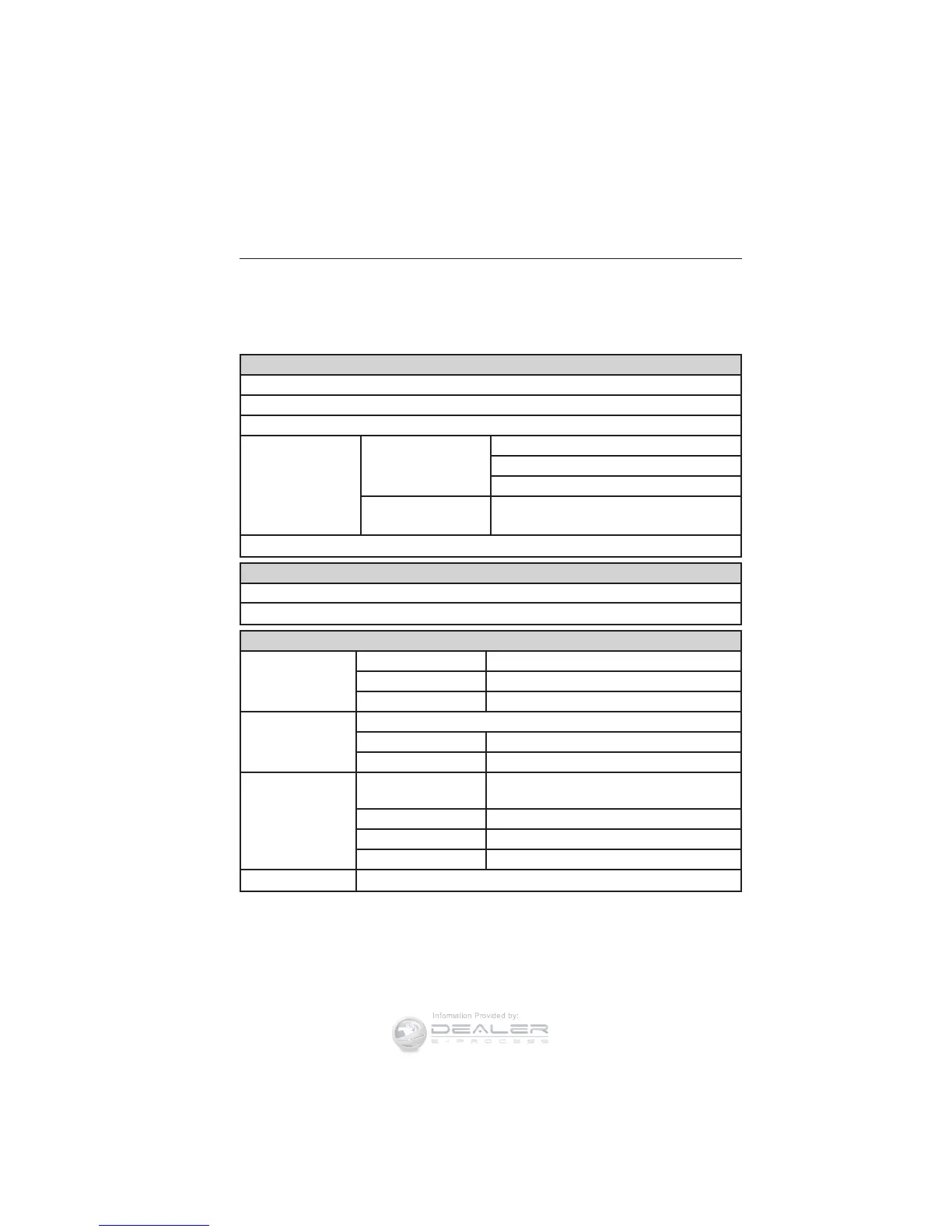
Menu structure - information display (All vehicles)
You can access the menu using the information display control.
Note: Some options may appear slightly different or not at all if the
items are optional.
†Trip1/2
ToE / Distance to E
Trip Odometer
Trip Timer
AVG / Average
Fuel
Ford EcoMode Gear Shifting
Anticipation
Speed
OK = More Info Provides additional EcoMode
information
†See Trip computer later in this section for more information.
Information
MyKey (Distance driven if MyKey is programmed)
MyKey Info (Number of MyKeys and Admin Keys programmed)
Settings
Driver Assist Traction Ctrl On or Off
Hill Start On or Off
Rear Park Aid On or Off
Lighting Rain Light
Dimming Auto or Manual
Hdlamp Delay Manual or xx Seconds
Display Navigation info Always off, On guidance or
Always on
Language Choose your applicable setting
Distance Choose your applicable setting
Temperature Choose your applicable setting
Chimes Park Slot (park aid)
110 Information Displays
2014 Focus (foc)
Owners Guide gf, 1st Printing, October 2012
USA (fus)









 To Next Page