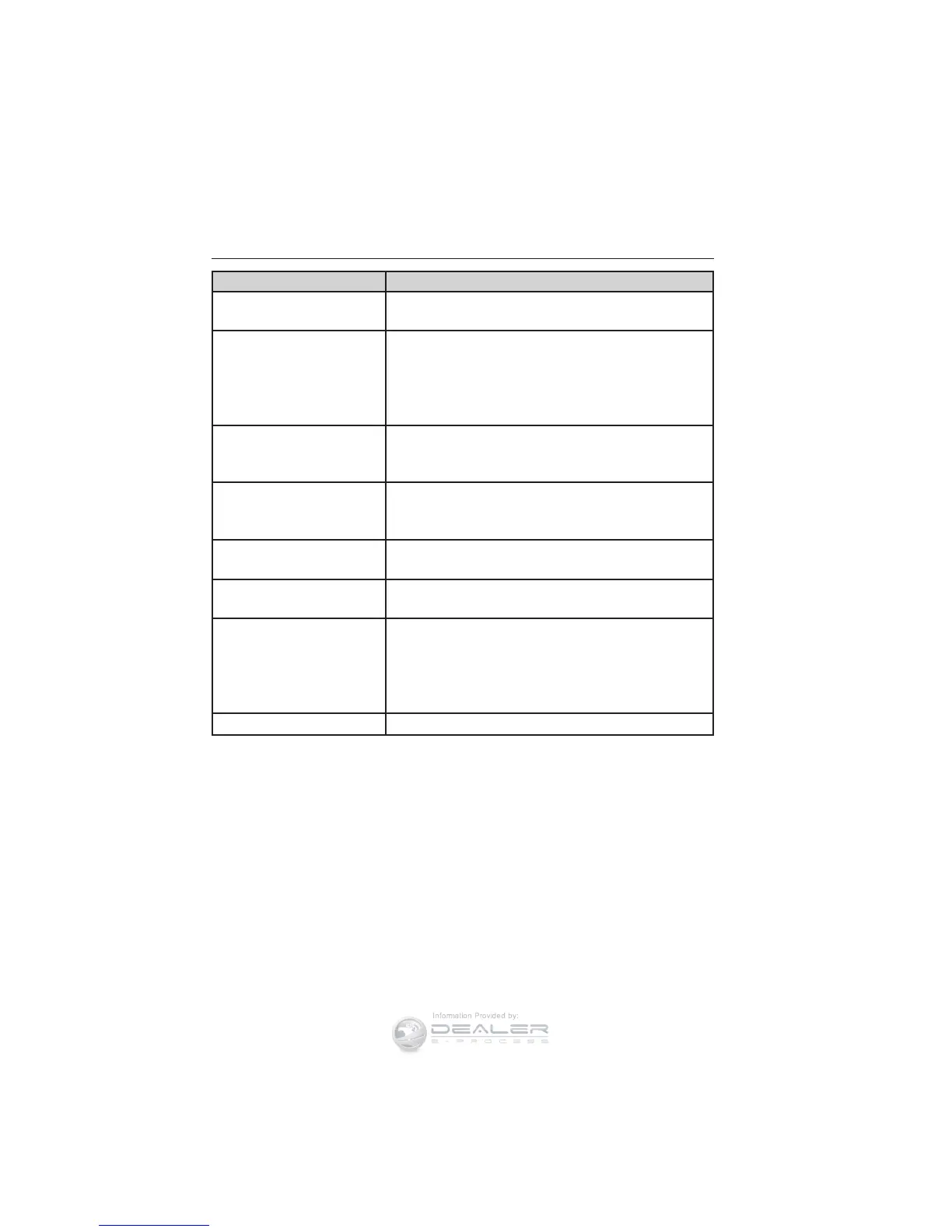
When you select: You can:
Text Message
1
Enables you to send, download and delete
text messages.
Phone Settings
1
Allows you to view your phone’s status, set
ring tones, select your message notification,
change phone book entries and automatically
download your cellular phone among other
features.
SYNC Services
3
Access the SYNC services portal where you
can request various types of information,
traffic reports and directions.
911 Assist
4
Place an emergency call to a 911 operator for
you after an accident (if the feature is used
properly).
Vehicle Health
Report
3
Create and receive a diagnostic report card on
your vehicle.
Mobile Apps
3
Interact with SYNC-capable mobile
applications on your smartphone.
System Settings
Access Bluetooth Devices menu listings
(add, connect, set as primary, on/off, delete)
as well as Advanced menu listings (prompts,
languages, defaults, master reset, install
application and system information).
Exit Phone Menu
Exit the phone menu by pressing OK.
1
This is a phone-dependent feature.
2
This is a phone-dependent and speed-dependent feature.
3
If equipped, United States only.
4
If equipped, United States and Canada only.
SYNC® 335
2014 Focus (foc)
Owners Guide gf, 1st Printing, October 2012
USA (fus)














 To Next Page