THE APP
14. WHY DO I NEED TO DOWNLOAD THE FOREO APP BEFORE USING MY UFO™ 2 DEVICE?
All app-enabled FOREO products need to be activated and unlocked via the FOREO For You app the first time they are turned on. This
helps protect against fake/copied FOREO products, and makes it easier to register the warranty and protect your investment.
15. HOW DO I PAIR MY UFO™ 2 DEVICE WITH THE FOREO APP?
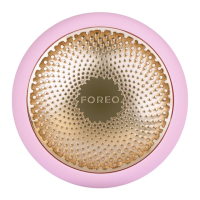
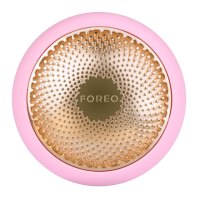
Download the FOREO For You app to your smartphone or tablet and turn on Bluetooth. Press the universal button on your device once to
turn on. A blinking white light indicates your device is in pairing mode. Follow the instructions in the app to register and pair your UFO™ 2
device.
16. DOES MY UFO™ 2 DEVICE WORK WITHOUT THE APP?
Yes, you can manually access 8 routines you have saved on your device. Press the universal power button to turn on and activate the Make
My Day treatment routine. Press again to activate the Call It a Night treatment, and so on with each mask. Your power mask treatment is
ready to begin!
17. CAN I CUSTOMIZE MY POWER MASK TREATMENT ROUTINE?
Yes. While each UFO™ Power Activated Mask comes with a recommended pre-programmed treatment routine, you can personalize your
power mask experience by creating your own treatment routine via the FOREO For You app. On the app, you are able to choose your
preferred LED light and T-Sonic™ pulsation level, and select whether you wish your personalized routine to include Thermo-Therapy or not.
TROUBLESHOOTING & MAINTENANCE
18. WHAT DOES IT MEAN WHEN MY UFO™ 2 DEVICE IS CONTINUOUSLY BLINKING?
A blinking light around device indicates that your UFO™ 2 device is in Bluetooth pairing mode or that the device needs to be charged.
Follow the instructions in the app to sync your device.
19. HOW DO I CHARGE MY UFO™ 2 DEVICE?
UFO™ 2 devices are USB-rechargeable, with a two and half hour charge delivering up to
40
uses.
2
0
. HOW DO I CLEAN MY UFO™ 2 DEVICE?
Wash the device and plastic ring with soap and then rinse with warm water. Pat dry with a lint-free cloth or towel. After use, we recommend
spraying the device with FOREO
’
s Silicone Cleaning Spray and rinsing with warm water for optimal results, then placing the device on the
stand to dry. Never use cleaning products containing alcohol, petrol or acetone, as they may irritate the skin and damage the silicone.
FOREO MASKS
21. CAN I REUSE FOREO MASKS?
Each UFO™ Power Activated Mask and FOREO Sheet Mask is intended for single-use only.
H
owever, if one UFO™ 2 treatment wasn
’
t
enough, press the universal button again within
30
seconds after the end of the routine to start the same treatment over again!
22. DO I NEED TO WASH THE MASK ESSENCE OFF AFTER USING MY UFO™ 2 DEVICE?
No,
H
yper-Infusion Technology is specifically engineered to help mask essence absorb deeper into the skin, faster. After the treatment,
simply massage any remaining essence into your skin, or remove excess with a cotton pad.
*
NOTE
:
H
eat and cold affect different skincare products in different ways, and can compromise the ingredients in the formulas.
(
For optimal
safety, we strongly recommend researching the effects of temperature on any non-FOREO mask before enhancing it with UFO™ 2.
)
©
2
0
22 FOREO AB. ALL RI
GH
TS RESER
V
ED
EU DISTR.
:
FOREO AB,
K
ARLA
VÄG
EN
41
,
114
31
STOC
KH
OLM, SWEDEN
US DISTR.
:
FOREO INC.,
15
2
5
E PAMA LANE, LAS
V
E
G
AS, N
V
8
9119
, USA
AUS DISTR.
:
6
PRO
H
AS
K
Y STREET, PORT MELBOURNE,
V
IC,
3
2
07
AUSTRALIA
DESI
G
NED AND DE
V
ELOPED BY FOREO SWEDEN
MANUFACTURED FOR FOREO AB
www.foreo.com
EN-P2-2
0
2
30116
10


 To Previous Page
 Loading...