M6
M4
M8
STEP 1-1
Select TV Screw Diameter
STEP 1-2
Select TV Screw Length
FLAT BACK ROUND BACK CABLESINSET HOLES
A
B
Too Short
Too Long
Correct
99 lbs.
(45 kg)
Does your TV (including accessories)
weigth more than 99 lbs. ( 45 kg )?
—
Perfect!
Y
—
This mount is NOT compatible.
If your TV has a flat back, AND you want your TV closer
to the wall, use the shorter screws (A).
Use the spacers and longer s crews
(
B)
t
o accommodate:
· Round/irregular back TVs
· TVs with inset mounting holes
· Extra space needed for cables
CAUTION Verify
adequate thread
engagement with the screw/
washer/spacer combination
AND TV bracket .
- Too sho will not hold the TV.
- Too long will damage the TV.
Standard configurations
are shown. For special
applications, or if you
are uncertain about your
hardware selection,
you can see online:
www.forgingmount.com
Hand thread screws into the threaded inserts
on the back of your TV to determine which
screw diameter (
M4, M6, or M8) to use.
WARNING
Exceeding the weight
capacity can result in serious personal
injury or damage to equipment! It is the
installer's responsibility to make sure the
weight of the TV (with accessories) does
not exceed 99 lbs ( 45 kg ).
Drywall with
woo studs?
Perfect!
What is your wall made of?
Please read
through these instructions completely to be sure you’re comfortable with
this easy install process. Also check your TV owner’s manual to see if there are any
special requirements for mounting your TV.
If you do not understand these instructions or have doubts about the safety of the
installation, assembly or use of this product, please contact US via: forgingmount888@163.com
CAUTION:
Avoid potential personal injuries and property damage!
●
This product is designed for use in wood stud/concrete walls
DO NOT
install into
drywall
●
The wall must be capable of supporting
ve times the weight of the TV and mount combined
●
Do not use this product for any purpose not explicitly speci
ed by manufacturer
●
Manufacturer is not responsible for damage or injury caused by incorrect assembly or use
Solid concrete or
conc et
block?
Tools Needed
Hardware Included
WARNING:
This product
contains small items that could
bea choking hazard if swallowed.
Before starting assembly,
verify all parts are included
and undamaged. If any parts
are missing or damaged, do
not return the damaged item to
your dealer; contact Customer
Service.
Never use damaged parts!
NOTE: Not all parts and
hardware included will be used.
Concrete Install
Hammer
Drill Bit
3/8 in.
(10 mm)
Concrete
Wood Stud Install
AwlStud Finder
7/32 in.
( 5 mm)
Wood
Drill Bit
Pencil Screwdriver
Tape
Measure
Electric
Drill
1/2 in.
(13 mm)
Socket
Wrench
Lag Bolts
5/16x2.75”
A x5
concrete anchor
C x5
Lag Bolt
Washers
B x5
TV Screws
M4X15
D x4
M6X15
F x4
M8X15
H x4
M4X30
E x4
M6X30
G x4
M8X45
I x4
Spacers
L5MM
L x8
L10MM
M x8
TV Washers
J x4
Wall plate cover
Arm and Wall Plate TV Bracket
01 x1
HDMI Cable
07 x105 x1
wallplate template Level
04 x1
Cable Cover
06 x5
02 x2
03 x2
fi
fi
No
es
Getting Started
:
d
er
rt
:
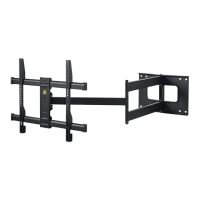
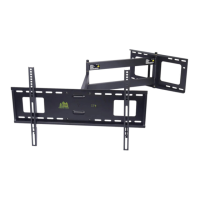
LONG ARM
TV WALL MOUNT
Model HY9389-B
N x1
Wrench
take out the wallplate covers from the wall plate
STEP 1-3 Attach the TV plate to the arm assembly
M
4
/
M
5
M
6
/
M
8
K x4
Specification Sheet
30”-2.36”
11.2”
16.93”
23.6”-5.9”

 Need help?
 General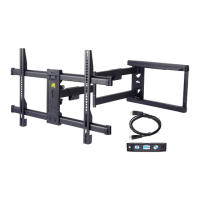

 To Next Page