mounted on specially preset
forks and frames.
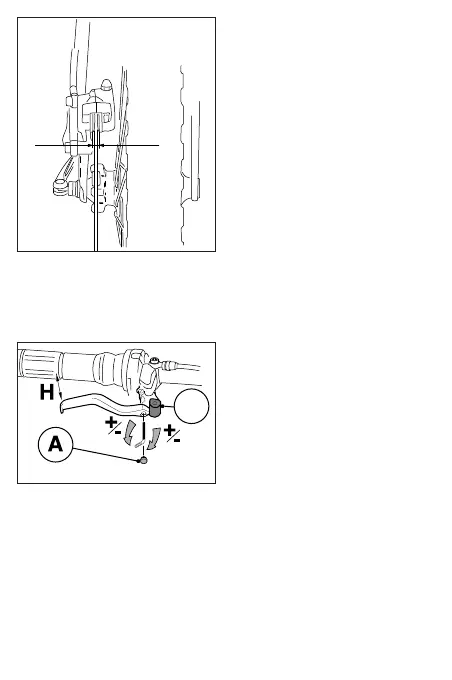
Mount the wheel and lock it in place
with the quick release fix it with the
fasteners, turn it slowly to check that
the rotor is in the center of the brake-
pads and none of the pads rub on the
rotor (fig. 7).
Before riding the bike squeeze the
brake lever 2 or 3 times in order to
bring the pads at the right distance
from the rotor.
WARNING
The brake system needs a break
in period. FORMULA suggests to
brake at least a hundred times
before considering the system
broken in and fully efficient.
2.0 OPERATING INSTRUC-
TIONS
2.1 Lever reach adjust-
ment
To adjust the lever position it is neces-
sary to remove the locking knob A
(Fig.8) and with a TORX® -T15 wren-
ch act on the internal screw of the
lever by regulating the distance H
according to your preferences. Lock
the knob in place again after comple-
ting the adjustments.
WARNING
Lever adjustments should be
made one time only when
mounted on the handlebar for
the first time.
WARNING
If damaged, it is vital to change
the dust cover. Failure to
observe this, results in grave
danger for the user.



 To Next Page