5
w
w
w
w
w
w
w
w
w
w
w
w
w
w
w
w
ww.foscam.co
ww.foscam.co
ww.foscam.co
ww.foscam.co
ww.foscam.co
ww.foscam.co
ww.foscam.co
ww.foscam.co
m
m
m
m
m
m
m
m
Shenzhen
Shenzhen
Shenzhen
Shenzhen
Shenzhen
Shenzhen
Shenzhen
Shenzhen
Foscam
Foscam
Foscam
Foscam
Foscam
Foscam
Foscam
Foscam
Intelligent
Intelligent
Intelligent
Intelligent
Intelligent
Intelligent
Intelligent
Intelligent
Technology
Technology
Technology
Technology
Technology
Technology
Technology
Technology
Co.,
Co.,
Co.,
Co.,
Co.,
Co.,
Co.,
Co.,
Limited
Limited
Limited
Limited
Limited
Limited
Limited
Limited
Tel:
Tel:
Tel:
Tel:
Tel:
Tel:
Tel:
Tel:
86
86
86
86
86
86
86
86
755
755
755
755
755
755
755
755
2674
2674
2674
2674
2674
2674
2674
2674
5668
5668
5668
5668
5668
5668
5668
5668
Fax:
Fax:
Fax:
Fax:
Fax:
Fax:
Fax:
Fax:
86
86
86
86
86
86
86
86
755
755
755
755
755
755
755
755
2674
2674
2674
2674
2674
2674
2674
2674
5168
5168
5168
5168
5168
5168
5168
5168
5
5
5
5
Back
Back
Back
Back View
View
View
View
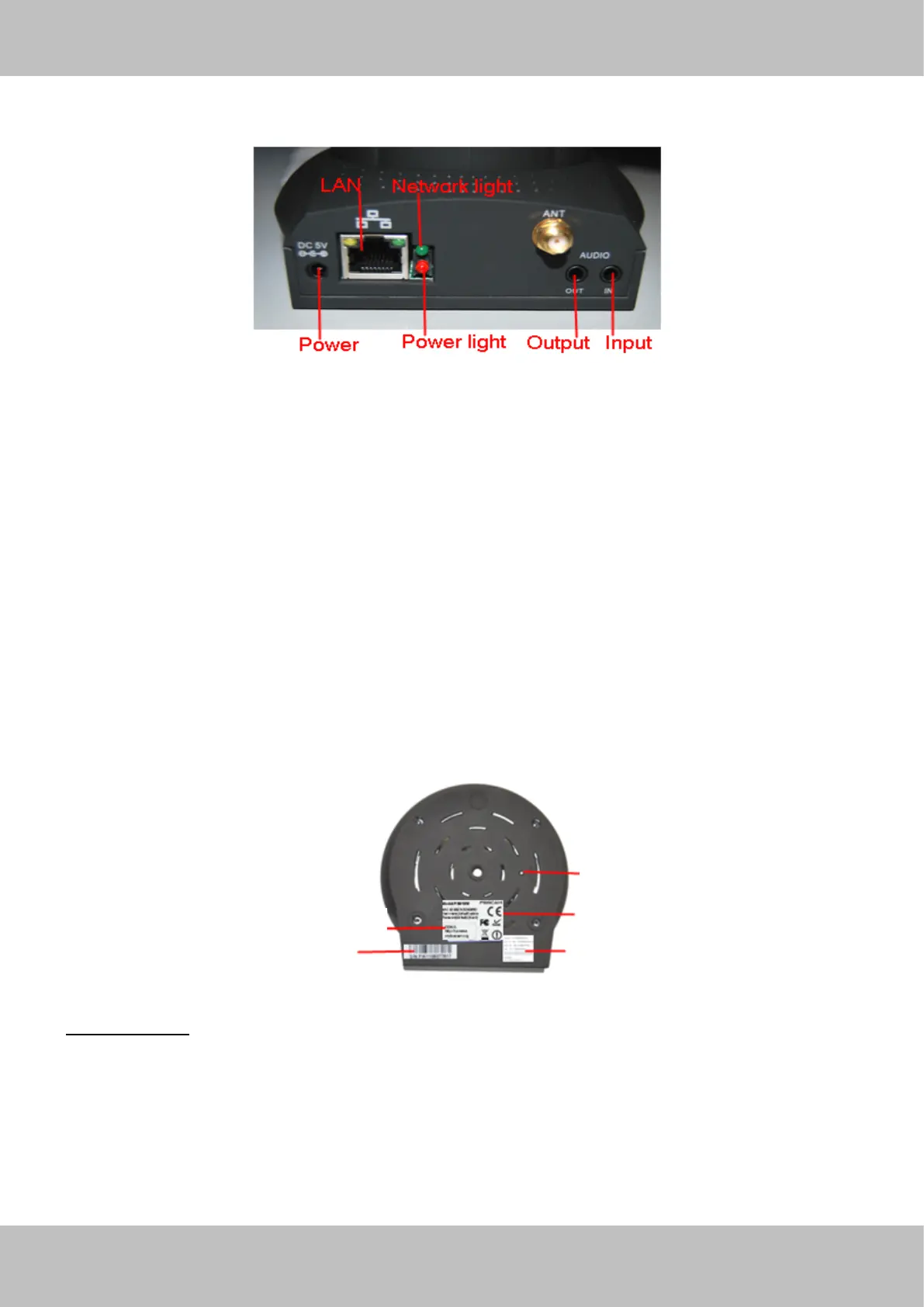
Figure 1. 2
LAN:
LAN:
LAN:
LAN: RJ-45/10-100 Base T
Power:
Power:
Power:
Power: DC 5V/2A Power supply
Network
Network
Network
Network Light:
Light:
Light:
Light: The LED will blink when power and network cable are plugged in
Power
Power
Power
Power Light:
Light:
Light:
Light: If the power adapter works well, the light will turn on
Audio
Audio
Audio
Audio Input:
Input:
Input:
Input: This jack is used to plug an external microphone
Audio
Audio
Audio
Audio Output:
Output:
Output:
Output: Th is jack is used to plug an external speaker
Bottom
Bottom
Bottom
Bottom View
View
View
View
There are up to three labels located on the body of the camera; this is an important feature of
original Foscam cameras. If your camera does not have labels as shown in Figure 1.3 ,it may be
a clone one. Cloned Foscam cameras can not use original firmware and are not eligible for
warranty or technical services.
Figure 1.3
Reset
Reset
Reset
Reset button
button
button
button
1) Press and hold down the RESET BUTTON about 10 seconds. when released the IP camera
will be reset back to factory default settings. You must power on the camera before reset.
2) Press and hold down the RESET BUTTON about 4 seconds, then press the WPS button on
the router, then you can use the WPS function. (F o r more details: please read Wireless Settings
in the User Manual)
Reset
Reset
Reset
Reset button
button
button
button
MAC
MAC
MAC
MAC address
address
address
address of
of
of
of wired
wired
wired
wired connection
connection
connection
connection
MAC
MAC
MAC
MAC address
address
address
address of
of
of
of wireless
wireless
wireless
wireless connection
connection
connection
connectionS/N
S/N
S/N
S/N of
of
of
of FOSCAM
FOSCAM
FOSCAM
FOSCAM
FOSCAM
FOSCAM
FOSCAM
FOSCAM domain
domain
domain
domain name
name
name
name



 To Next Page