EasyManua.ls Logo

Fostex 812 - SECTION 8 MULTITRACK RECORDING; I. BASIC TRACK RECORDING

Fostex 812
22 pages
Print Icon
To Next Page IconTo Next Page
To Previous Page IconTo Previous Page
Loading...
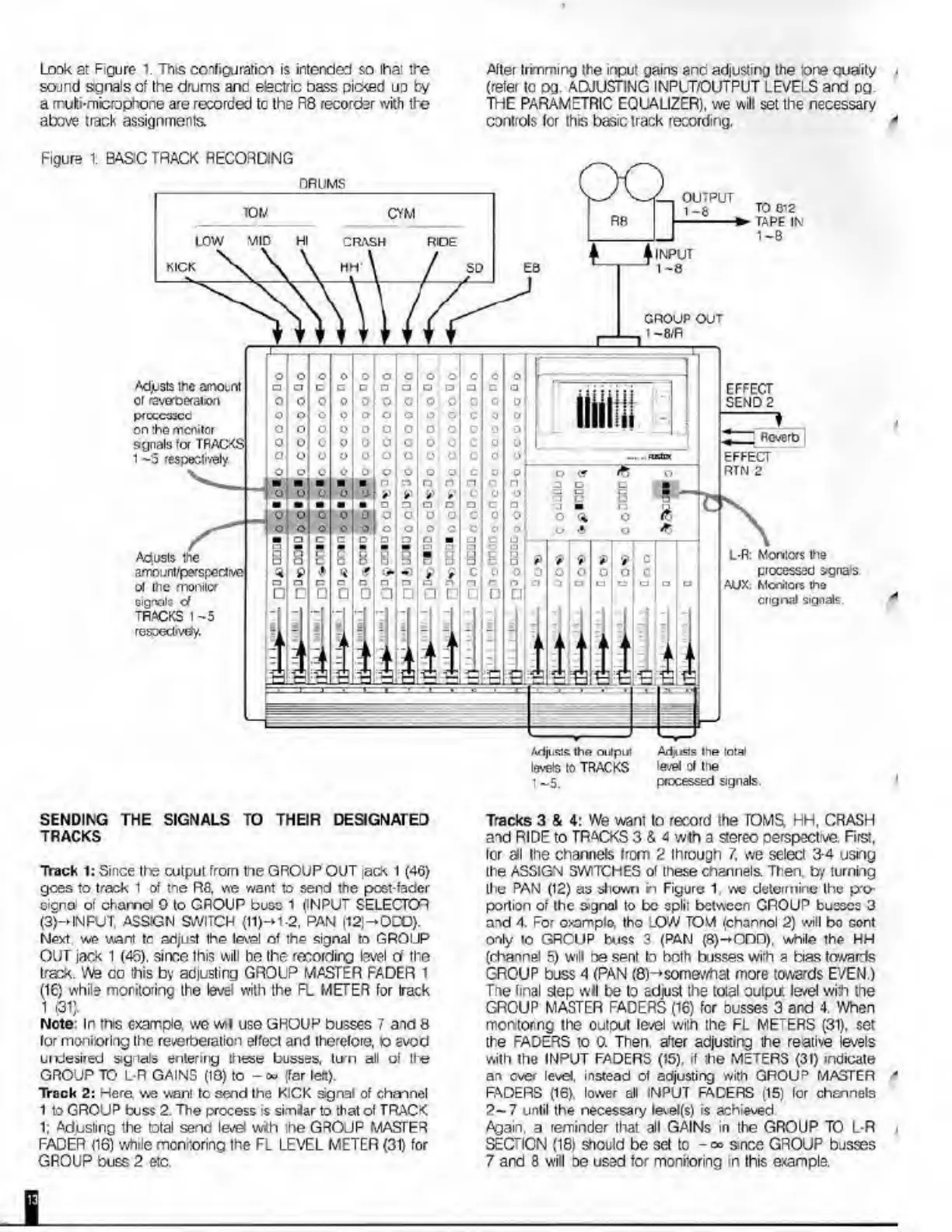
Look
at
Figure
1.
This
configuration
is
intend©:!
so
that
the
sojnd
sgnals
of
the
drums
and
electric
bass
pic<ed
ud
by
a
mutii-mcrophone
are
recorded
tc
the
R8
recorcter
with
the
above
track
assignments
After
trimming
the
input
gains
and
adiusiing
the
‘one
quaity
,
(refer
tc
pg.
ADJUSTING
INPLT/OUTPUT
LB/ELS
and
pg.
THE
PARAMETRIC
EQUALIZER),
we
will
set
the
necessary
controls
fcr
this
basic
track
recording.
'
Figure
DRUMS
CRASH
INPUT
GROUP
OUT
I-8/R
Adjjsts
the
amoLnt
01
raverperaton
P<CCC33CC
on
:he
monitor
sgnals
fa
TRACKS
1
-5
respectively
EFFECT
SEND
2
Rcvert>
Adiisls
the
arriount/p^spectr/o
oi
tne
nvoniux
signals
d
TRACKS
t
-5
respectively.
Adjusls
the
total
level
of
tne
processed
signals
Adjusts
the
ontpiil
levels
to
TRACKS
1:
BASC
TRACK
RECOFONG
JL
'L
OUTPUT
1
1-8
RR
_r^
CYM
TO
612
TAPE
IN
1-8
o
o
o
o
o
.
Cl
c
c
I
ol
O
0
0
0
o
o
o
o
o
°
0
o
0
o
0
0
o
0
c
o
o
o
o
o
o
o
o
o
L-R:
Morvias
the
processed
signais
AUX.
Mentors
tho
cngnal
signals.
SENDING
THE
SIGNALS
TO
THEIR
DESIGNATED
TRACKS
Track
1:
Since
tho
output
from
the
GROUP
OUT
ack
1
(46)
gees
to
track
1
of
tne
R8,
vie
want
to
send
the
post-fader
cicna
of
chamol
0
to
CROUP
buss
1
(INPUT
SELECTOR
(3)->INFUT,
ASSIGN
SWITCH
(11)-»1-2,
PAN
(12J-OCO).
Next
we
want
to
adjust
the
level
of
the
signal
to
GROUP
OUT
jack
1
(46).
sine©
this
will
the
recording
level
d
the
traek.
We
co
this
by
adjusting
GROUP
MASTER
FADER
1
(16)
while
monitoring
the
level
with
the
FL
METER
for
Irack
1
(31).
Note:
In
this
c-xampia
we
wi
use
GHOUP
busses
7
aid
8
lor
moni'oring
the
reverberation
effect
and
therefore,
o
avod
unJesired
signals
entering
these
busses,
tun
all
of
lie
GROUP
TO
L-R
GAINS
(18)
to
{far
left).
Track
2:
Here
we
want
tc
send
the
KICK
signal
of
channel
1
to
GROUP
buss
2.
The
process
is
similar
to
that
of
TRACK
1:
Adusling
the
total
send
level
with
the
GROUP
MASTER
FADER
116)
while
monitoring
the
FL
LEVEL
METER
(31)
for
GROUP
buss
2
etc.
Tracks
3
&
4:
VVe
warn
to
record
Ihe
TOMS.
HH.
CRASH
and
RIDE
to
TRACKS
3
&
4
wth
a
stereo
oerspectve
Firs:,
lor
all
Ihe
channels
Irom
2
through
7.
we
select
3-4
using
the
ASSIGN
SWITCHES
of
these
channels.
Then,
by
lurning
the
PAN
(12)
as
shown
ri
Figure
1
we
determine
the
p
o-
portion
of
the
signal
to
be
split
between
GROUP
busses
3
aid
4.
For
oxamplo,
tho
LOW
TOM
(chonnol
2)
will
bo
cont
only
to
GROUP
buss
3
(PAN
(8)-»Om).
while
the
HH
(channel
5)
will
be
sent
to
both
busses
with
a
bias
towards
GROUP
buss
4
(PAN
(8)-*somewhat
more
towards
EVEN.)
The
final
step
wil
be
to
adjust
the
total
output
le/el
with
the
GROUP
MASTER
FADERS
(16)
for
busses
3
and
4.
When
monitorng
the
output
le/el
with
the
FL
METERS
(31),
set
the
FADERS
to
0.
Then,
after
adjusting
the
reative
levels
with
the
INPUT
FADERS
(15),
if
the
METERS
(31)
indicate
an
ever
levet,
instead
of
adjusting
with
GROUP
MASTER
'
FADERS
(16).
lower
all
INPUT
FADERS
(15)
for
channels
2-7
until
the
necessary
level(s)
is
achieved
Again,
a
reminder
that
all
GAINs
in
Ihe
GROUP
TO
L-R
i
SEC'ION
(18)
should
be
set
to
-<»
smee
GROUP
bosses
7
and
3
will
oe
used
for
monitoring
in
this
example.

Related product manuals